Eligibility inquiry validation guide
How to Validate an EDI 270 File
Check a healthcare eligibility inquiry before transmission while keeping file conformance separate from the eligibility answer that only a 271 response can provide.
To validate an EDI 270 file, confirm the X12 envelope and transaction controls, identify the exact 005010X279A1 implementation, test the information-source, information-receiver, subscriber, and dependent hierarchy, and review required patient and EQ content plus any situational TRN and DTP supplied. Correct source issues in the producing system, then rerun validation. A clean result means no issues were found by the enabled checks; it does not determine current eligibility or guarantee payer acceptance.
Current routing and privacy: Smart Mapping accepts exact ST03=005010X279A1, or blank ST03 plus exact GS08=005010X279A1; near-matches are Raw-only. The unified 227-field schema has no separate Key layout. Smart de-identification protects mapped rows, validation presentation, summary, and downloads. Raw segments preserve original identified values and are not de-identified. NM108=XX identifies NM109 as an NPI; validation checks its 10-digit format and checksum and does not apply NPI terminology to SV or FI values.
What validating an EDI 270 means
An EDI 270 Health Care Eligibility Benefit Inquiry asks an information source—typically a health plan or its intermediary—for eligibility or benefit information about a subscriber or dependent. Providers, billing teams, clearinghouses, and eligibility vendors commonly send it before or around a patient encounter. The corresponding EDI 271 is the response.
The current smart mapper recognizes the X12 005010X279A1 implementation. A 270 can carry payer and provider identifiers, a transaction trace, subscriber or dependent identity, inquiry dates, and one or more requested service types in EQ. The surrounding HL hierarchy establishes who is asking, who the inquiry concerns, and whether the patient is the subscriber or a dependent.
Validation checks whether the inquiry is internally usable under enabled rules. It does not contact the payer, retrieve coverage, or predict the eventual 271. Keep these questions separate: Is the 270 coherent? is a validation question; Is this patient currently eligible? is answered by the information source through its response.
What to check in a 005010X279A1 inquiry
| Validation area | Representative check | Why it matters |
|---|---|---|
| Envelope controls | ISA13/IEA02, GS06/GE02, and ST02/SE02 agree; declared transaction and segment counts are coherent. | Control mismatches can prevent a receiver from establishing interchange, group, or transaction integrity. |
| Implementation identity | ST01 identifies 270; ST03 is exactly 005010X279A1, or ST03 is blank and GS08 is exactly 005010X279A1. | Near-match and unsupported implementations remain Raw-only. |
| Beginning and trace | BHT is present; BHT03 is populated; BHT04 is a real date; BHT05 is a valid X12 time. Patient-level TRN is situational; when present its paired values are complete. | BHT identifies and dates the inquiry. A supplied TRN can help correlate it with the response. |
| HL hierarchy | HL IDs are unique, parent references resolve, and information-source, receiver, subscriber, and dependent levels are nested coherently. | A valid-looking patient or service value can be assigned to the wrong participant if hierarchy is broken. |
| Patient identity | The subscriber or dependent NM1 uses its expected entity code and retains applicable member, name, and relationship context. | A wrong-role NM1 cannot satisfy the required subscriber or dependent identity. |
| Inquiry content | EQ service-type content is present. Member and inquiry DTP are situational; when supplied, D8 dates are real and RD8 ranges do not end before they begin. | EQ defines what information is requested; a supplied DTP can qualify the date or period. |
Scope: These checks do not replace the licensed implementation guide or a payer’s companion guide. A trading partner may impose additional identifiers, situational data, code restrictions, or routing rules.
Controlled invalid 270 and corrected source
This shortened synthetic transaction uses fictional identifiers and no real protected health information (PHI). It deliberately puts 20260229 in BHT04. Because 2026 is not a leap year, the value has the right eight-digit shape but is not a real calendar date.
Invalid source
ST*270*000000001*005010X279A1~
BHT*0022*13*REF000001*20260229*1030~
HL*1**20*1~
NM1*PR*2*SYNTHETIC HEALTH PLAN*****PI*PAYER001~
HL*2*1*21*1~
NM1*1P*2*SYNTHETIC CLINIC*****XX*1234567893~
HL*3*2*22*0~
TRN*1*000000000001*1999999999~
NM1*IL*1*SAMPLE*ALICE****MI*000000000123~
DTP*291*D8*20260228~
EQ*30~
SE*13*000000001~
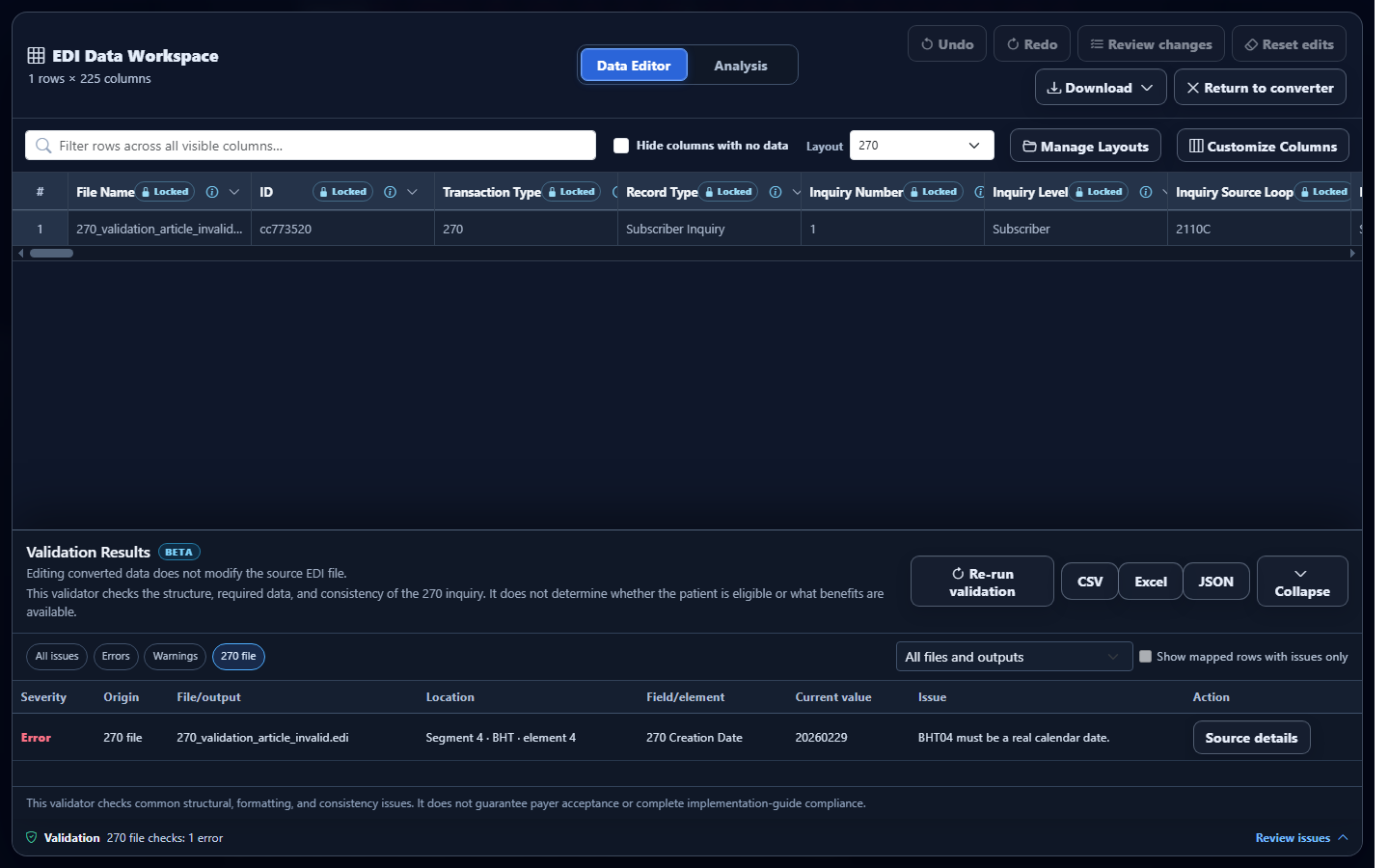
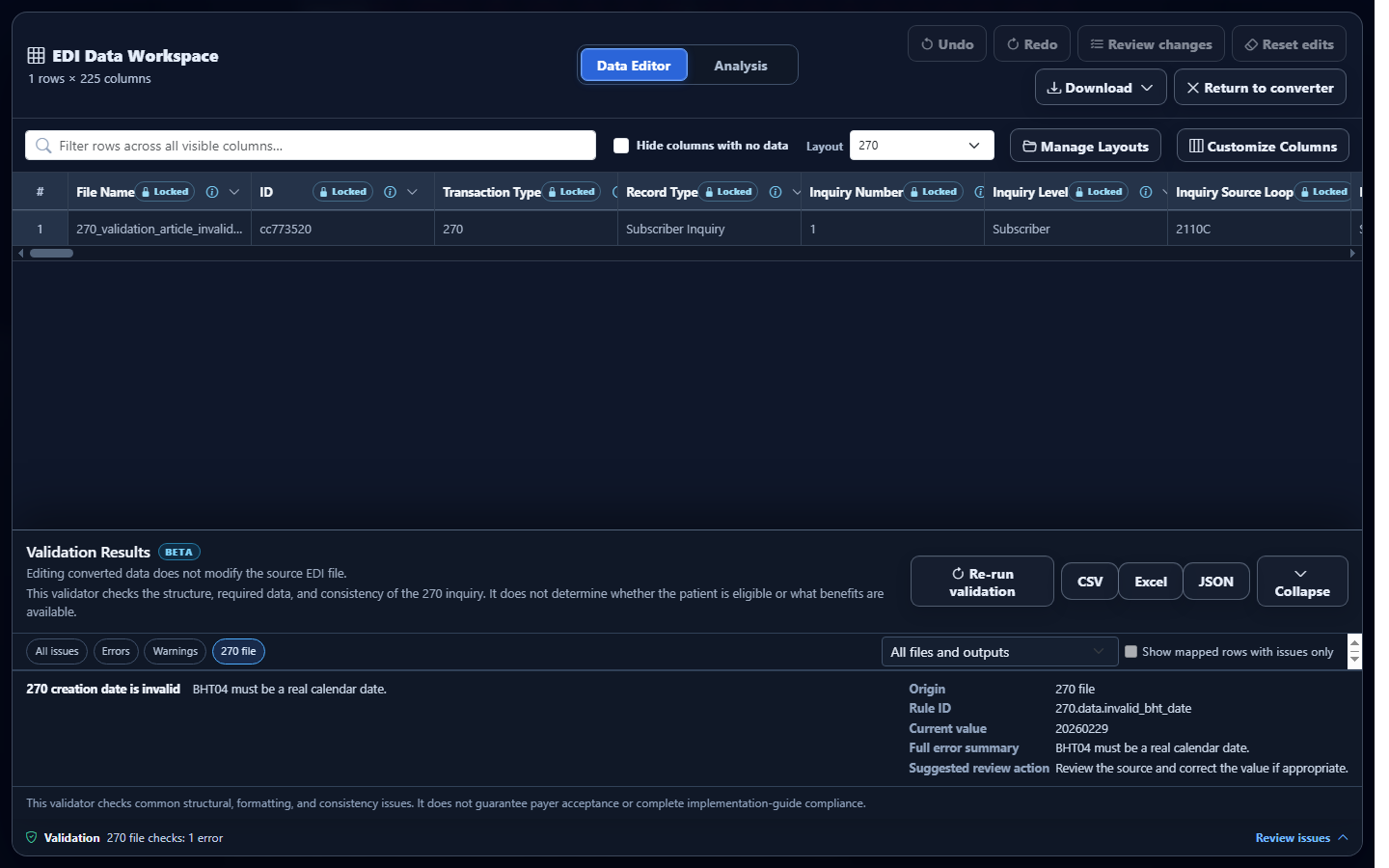
Observed validator result: the actual validator creates an error titled 270 creation date is invalid, locates it at BHT element 4, and retains the current value 20260229. The rule expects BHT04 to be a real calendar date.
Corrected source
ST*270*000000001*005010X279A1~
BHT*0022*13*REF000001*20260228*1030~
HL*1**20*1~
NM1*PR*2*SYNTHETIC HEALTH PLAN*****PI*PAYER001~
HL*2*1*21*1~
NM1*1P*2*SYNTHETIC CLINIC*****XX*1234567893~
HL*3*2*22*0~
TRN*1*000000000001*1999999999~
NM1*IL*1*SAMPLE*ALICE****MI*000000000123~
DTP*291*D8*20260228~
EQ*30~
SE*13*000000001~
After the source system regenerates BHT04 as 20260228, that controlled date error clears. The correction changes the transaction creation date only; it does not supply an eligibility answer.
Validate the 270 in EDIFileConverter.com
- Open the EDI converter and validator. Add the 270 through Browse files or the Drag & drop EDI files area. Files are processed in the browser tab without application-server upload.
- Keep Smart mapping (per file) selected. The application detects the transaction and uses the eligibility-inquiry mapping. Raw segments are useful for delimiter inspection, but they do not assemble participant and inquiry context into mapped rows.
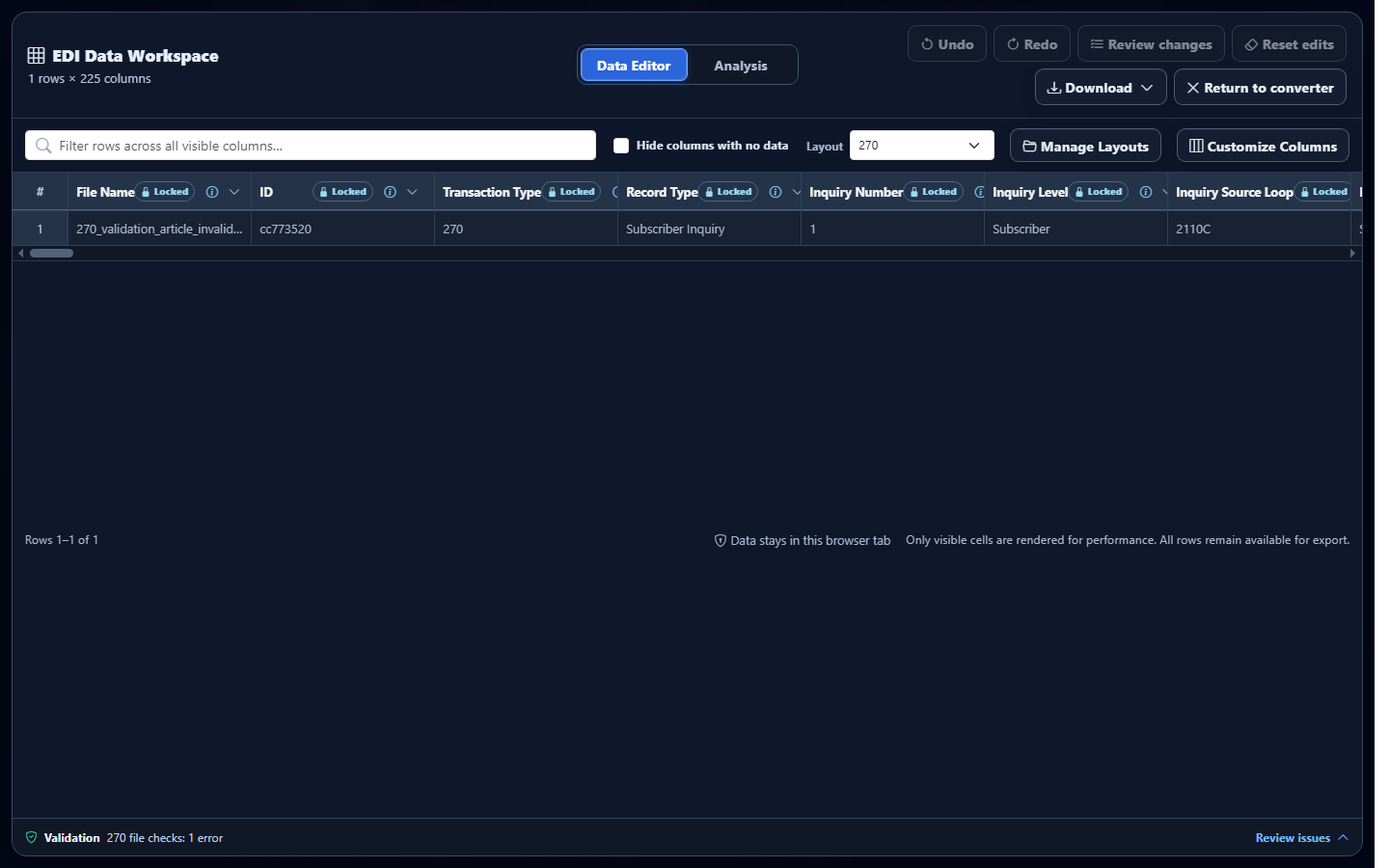
- Select Convert & Preview. Confirm that Converted results identifies the 270 output. Spot-check the payer, provider, patient, trace, service type, and inquiry date before opening the workspace.
- Select Open full editor. The Data Editor workspace includes the collapsed Validation bar. Expand it to open Validation Results.
- Filter the result. Use 270 file to isolate source concerns. EDI structure, Required data, and Data quality organize issue types; Errors and Warnings narrow severity.
- Open Source details. Review the rule, segment and element location, current value, expected value, summary, and suggested corrective action. Use those details to find the producing-system field rather than editing EDI blindly.
- Correct and rerun. Regenerate or replace the corrected source, then choose Re-run validation. Editing converted values does not rewrite the uploaded EDI.
- Document the scoped result. Eligible plans can export the validation report as CSV, Excel, or JSON. Treat “no issues” as the result of enabled checks, not proof of payer acceptance or eligibility.
How to interpret the validation result
Errors identify conditions that the enabled rules treat as more serious, such as a missing BHT, invalid creation date, mismatched ST/SE controls, or broken HL parent. Warnings flag concerns that still need review, such as an unknown service-type code or invalid inquiry date in mapped output. Severity helps prioritize review; it is not a universal payer disposition.
Use the issue location and origin together. A source issue points back to a segment or element in the uploaded EDI. An edited-data issue applies to a converted value changed in Data Editor. Because converted-data edits do not rewrite the source, correct source defects in the producing system and regenerate the inquiry when the business workflow requires a corrected EDI transaction.
A clean result should be stated precisely: No issues were found by the enabled validation checks. It does not certify the file against every companion guide, prove that routing identifiers are recognized by the intended payer, or establish coverage.
Common EDI 270 validation issues and cautious fixes
Invalid BHT04 creation date or BHT05 time
What you see: an error at BHT element 4 or 5. Why it matters: an eight-digit date or four-digit time can be well-shaped but impossible. Review: Source details and the producing system’s timestamp. Correction: regenerate the transaction with the actual date and time; do not substitute a guessed value.
Duplicate HL01 or missing HL02 parent
What you see: a hierarchy error tied to an HL segment. Why it matters: the payer, provider, subscriber, and dependent context depends on valid parent-child relationships. Review: all HL IDs, parent IDs, and level codes in the transaction. Correction: repair hierarchy generation and retest the whole transaction.
Incomplete patient trace or missing role-specific identity
What you see: a paired-value issue for a supplied TRN or a missing IL/03 NM1 error. Why it matters: TRN is optional, but incomplete supplied trace data is ambiguous; the expected NM1 role identifies the inquiry subject. Review: the subscriber or dependent HL, NM1 entity code, and any TRN supplied. Correction: confirm authorized source identifiers rather than copying values from another inquiry.
Unknown or repeated EQ service-type codes
What you see: a data-quality warning for Service Type Codes. Why it matters: EQ says which eligibility or benefit category is being requested. Review: each requested code and the intended payer’s rules. Correction: use supported codes appropriate to the business question; do not assume an unknown value will be interpreted consistently.
Invalid or reversed inquiry date range
What you see: an inquiry-date warning, especially for D8 or RD8. Why it matters: the requested service period can change the meaning of the response. Review: DTP01, DTP02, and DTP03 together. Correction: verify the intended date or range and ensure the end is not before the start.
Control number or SE count mismatch
What you see: an EDI structure error. Why it matters: the receiver may be unable to establish transaction integrity. Review: ISA/IEA, GS/GE, ST/SE, and the actual segment count. Correction: calculate controls and counts from the final serialized file instead of editing one trailer value in isolation.
Frequently asked questions
What does an EDI 270 validator check?
It checks enabled rules for controls, structure, required inquiry data, hierarchy, dates, selected codes, and internal consistency. The exact scope is narrower than every possible partner rule.
Does a valid 270 prove that a patient is eligible?
No. The 270 is the inquiry. The information source returns eligibility and benefit information in a 271 response.
Which 270 implementation is recognized?
The current smart-mapping and validation workflow recognizes the 005010X279A1 Health Care Eligibility Benefit Inquiry.
Can the validator check dependent inquiries?
Yes. It can inspect mapped subscriber and dependent inquiry rows and their source hierarchy. The dependent must remain under the correct subscriber context.
Does editing converted 270 data rewrite the uploaded EDI?
No. Data Editor changes affect the converted representation and download, not the source EDI. Correct the producing system when a source transaction must be regenerated.
Does a clean result guarantee payer acceptance?
No. It means no issues were found by enabled checks. Trading partners may apply additional companion-guide, routing, and situational requirements.