Benefit enrollment and maintenance analysis guide
How to Analyze an EDI 834 File
Review mapped member and coverage maintenance data while preserving the hierarchy and business context supplied by the sender.
To analyze an EDI 834 file, convert the 005010X220A1 enrollment transaction with Smart mapping, open the full workspace, and select Analysis. Review member and coverage counts; compare subscriber and dependent maintenance actions; inspect top coverage-action and hierarchy patterns and affected files; then drill into Data Editor rows when source context is needed. The analysis summarizes values supplied in the enrollment transaction. It does not apply enrollment, create coverage, or change the source transaction.
What EDI 834 analysis shows
An EDI 834 Benefit Enrollment and Maintenance transaction communicates member and coverage additions, changes, terminations, and reinstatements between trading partners. The 005010X220A1 hierarchy identifies the sponsor, payer, subscriber, and—when applicable—a dependent. INS and HD occurrences identify member and coverage maintenance details, while TRN, REF, DTP, NM1, and DMG supply trace, identifier, date, party, and demographic context.
Analysis summarizes the enrollment content already present in the file: member and coverage counts, subscriber-versus-dependent distribution, coverage-action patterns, effective and termination dates, identifier coverage, and hierarchy quality. Its grains are distinct: files means physical input files; transactions means ST/SE 834 transactions; members means INS occurrences; coverage details means HD occurrences; and member or coverage actions are distributions at their respective INS or HD scope. It does not contact a payer, apply enrollment, or create coverage.
Repeated HD occurrences create multiple mapped rows for one INS member, while a member with no HD produces one member-only row. Interpret row counts with Member Number, Coverage Number, Member Type, maintenance action, member identifier, and coverage-action context rather than treating rows as people.
Choose the correct enrollment occurrence before analysis
| Converted context | Fields to verify | Analysis risk |
|---|---|---|
| Transaction | Transaction control, BGN reference, purpose code, sponsor, and payer. | Combining files can hide which transaction supplied a member action. |
| Member | Member number, subscriber/dependent indicator, INS maintenance code, relationship, and member identifier. | Repeated rows can represent one member with multiple coverage occurrences. |
| Coverage | Coverage number, HD maintenance code, insurance line, plan description, and coverage level. | A member action and a coverage action can differ and should not be conflated. |
| Dates | Benefit begin, benefit end, employment, and eligibility dates with their qualifiers. | A date without its qualifier can be assigned the wrong business meaning. |
Start with a stable member identifier and keep Member Number and Coverage Number visible while interpreting repeated rows. Preserve leading zeros in identifiers and retain the original file for audit. Locked file and row identifiers protect workspace context; analysis reflects the converted output.
Important: If the source EDI 834 is malformed, correct it in the system that generated the transaction. Analysis can expose patterns and outliers, but it does not repair the source file or execute enrollment.
Synthetic enrollment example and analysis result
The synthetic 834 used for the screenshots contains fictional organizations, patients, identifiers, and dates. It reports member and coverage maintenance for a synthetic subscriber:
ST*834*0001*005010X220A1~
BGN*00*VALIDATION834*20260229*1200~
TRN*1*000000000001*1999999999~
NM1*IL*1*SAMPLE*ALICE****MI*000000000123~
DTP*291*D8*20260726~
INS*Y*18*021**A***FT~
HD*021**HLT*TEST PLAN*EMP~
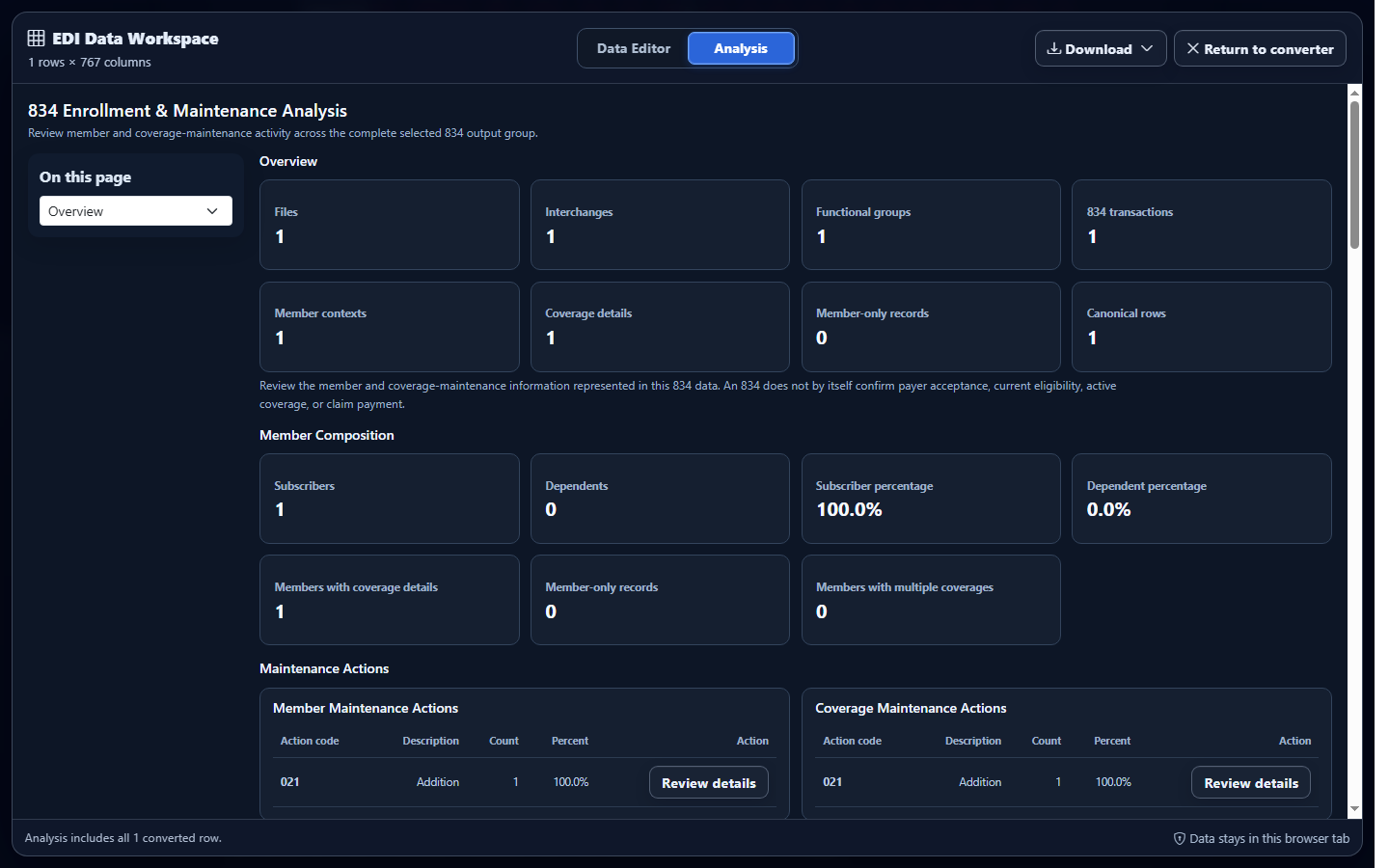
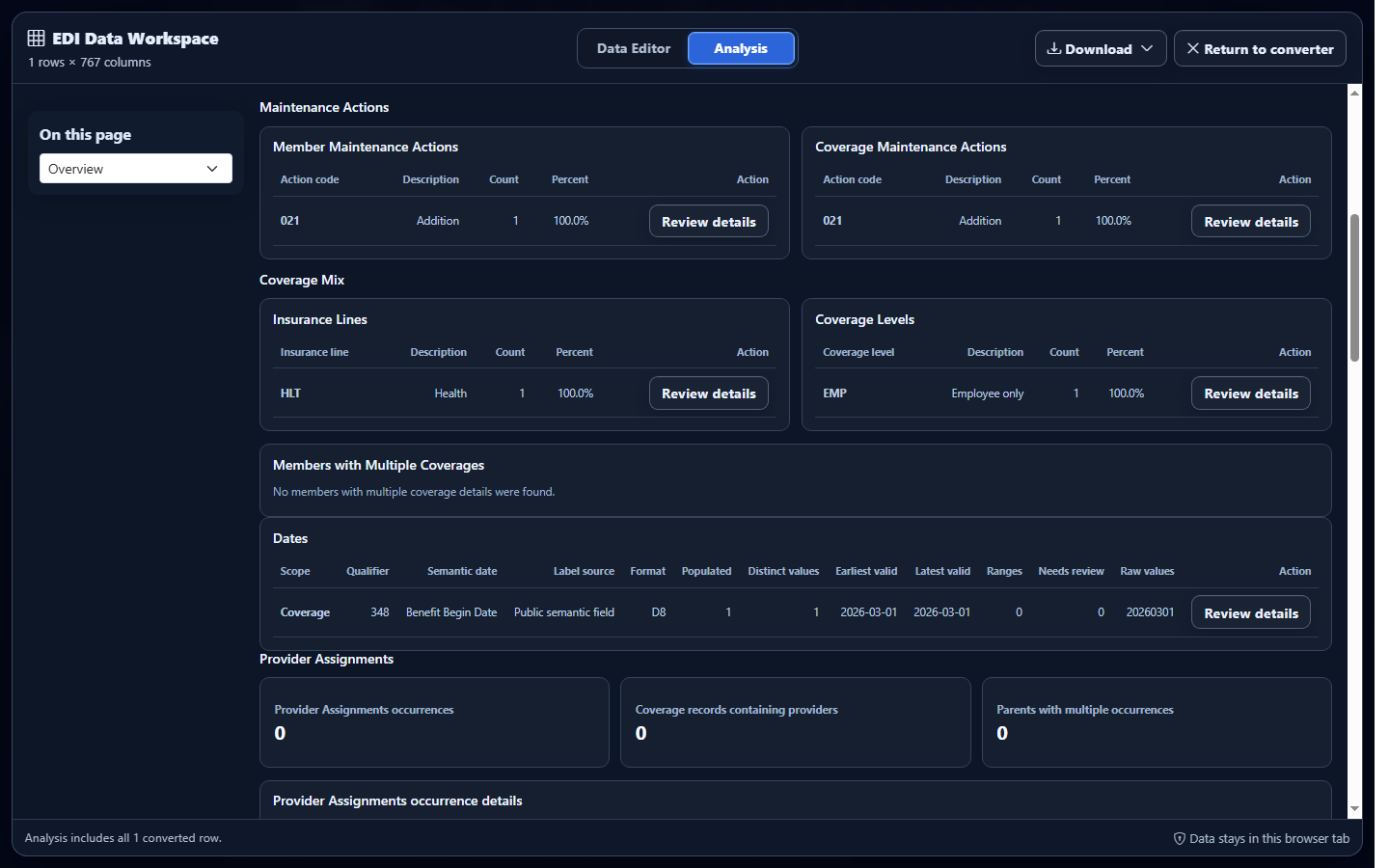
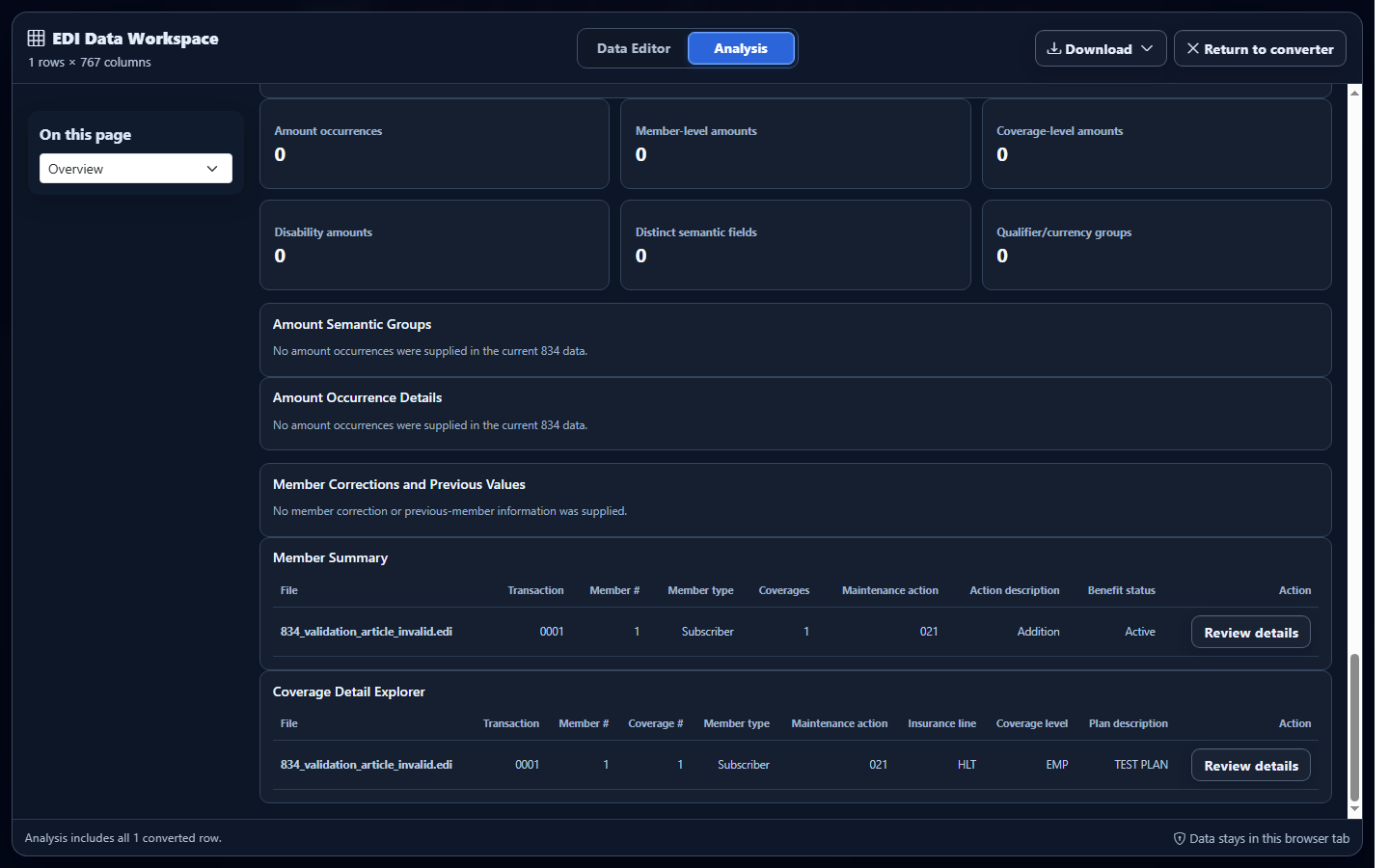
Full Analysis counts the member at subscriber scope and summarizes the member and coverage maintenance details. It reports the supplied maintenance actions; it does not apply or change enrollment at the receiver.
Analyze converted EDI 834 data in EDIFileConverter.com
- Open the EDI converter and Data Editor. Add an authorized EDI 834 using Browse files or Drag & drop EDI files. Processing occurs in the browser tab without application-server upload.
- Keep Smart mapping (per file) selected. Confirm the detected implementation is 005010X220A1 Benefit Enrollment and Maintenance.
- Select Convert & Preview. Verify the transaction type and inspect member, coverage, maintenance-action, identifier, and date fields before opening the workspace.
- Select Open full editor. The EDI Data Workspace opens on the Data Editor tab. The interface shows the row and column count and keeps protected context columns locked.
- Select Analysis. Review member and coverage totals, subscriber/dependent distribution, maintenance-action patterns, dates, identifier coverage, and affected files.
- Drill into the intended occurrence. Use the analysis details and Data Editor filters while keeping Member Number, Coverage Number, maintenance codes, and identifiers visible.
Interpret metrics without double-counting members
Use member counts for people and coverage counts for HD occurrences. One subscriber can have multiple coverage rows, and a dependent can inherit sponsor, payer, and subscriber context. Compare INS and HD maintenance codes separately, then use identifiers and qualified dates to investigate outliers.
Open Download in the Data Editor and select Excel, CSV, JSON, or XML. Choose Excel for a reviewed workbook, CSV for a flat system import, JSON when a downstream application benefits from objects and explicit field names, or XML when an integration benefits from structured elements. Retain member and coverage numbers, maintenance codes, identifiers, and date qualifiers when consumers must reconstruct hierarchy.
Common EDI 834 analysis mistakes
Counting every coverage row as a different member
What you see: more converted rows than people. Why it matters: one member can have multiple HD coverage occurrences. Review: Member Number, Coverage Number, member identifier, and insurance line. Correction: count distinct members separately from coverage occurrences.
Combining member and coverage maintenance actions
What you see: an INS member action summarized as though it were an HD coverage action. Why it matters: the two levels communicate different instructions. Review: both maintenance codes and their mapped descriptions. Correction: report member and coverage action distributions separately.
Dropping hierarchy identifiers during aggregation
What you see: a concise export that cannot be joined back to a member or coverage occurrence. Why it matters: business meaning depends on ownership and occurrence. Review: member identifier, Member Number, Coverage Number, sponsor, payer, and transaction control. Correction: retain the necessary identifiers before download.
Reading a date without its qualifier
What you see: one date interpreted as both an effective and termination date. Why it matters: DTP qualifiers define the business meaning. Review: the qualifier, date format, and hierarchy level. Correction: keep qualified date fields together in analysis and export.
Frequently asked questions
Does analysis rewrite the original EDI 834?
No. It summarizes the converted representation, while the uploaded X12 source remains unchanged.
Does analysis apply enrollment changes?
No. It does not enroll a member or create, change, or terminate coverage.
Which EDI 834 implementation is supported?
Smart mapping recognizes 005010X220A1 Benefit Enrollment and Maintenance.
Can analyzed data be downloaded?
Yes. The Data Editor offers Excel, CSV, JSON, and XML downloads containing committed converted-data edits.
Can I investigate the source rows behind a metric?
Yes. Use the analysis details and Data Editor filters to inspect the member and coverage occurrences contributing to a summary.