Raw boundary: Raw mode preserves identified original segment rows, bypasses the 58-field Smart projection and 999 Smart Summary/validation, and is not de-identified. TA1, broader optional X231 structures, payer/partner companion rules, and lossless hierarchical export remain outside the current result schema.
Current converter contract
Smart routing requires ST01=999. A nonblank ST03 must be exactly 005010X231 or 005010X231A1; only a blank ST03 may fall back to an exact supported GS08. Near matches and unsupported references are Raw-only.
Smart Mapping exposes one unified 58-field schema with no separate Key schema. It is a bounded, non-exhaustive X231/X231A1 projection with hybrid row grain: one row per IK4, an IK3-without-IK4 row, an AK2-without-IK3 row, or a group-summary row when no AK2 exists. Converter-generated ID represents private physical occurrence identity and is not source-supplied.
IK401-3 is the repeating data-element position. CTX output preserves exact source text, case, physical order, and duplicates. Summary counts physical AK2, IK3, IK4, and every populated IK5/AK9 error-code position independently; AK9 counts remain source-reported and are not reconciled to AK2 detail.
De-identification protects Smart rows, Summary, validation presentation, and CSV/JSON/XLSX/XML downloads. Raw mode preserves identified original segment rows and is not de-identified.
Implementation acknowledgment analysis guide
How to Analyze an EDI 999 File
Review implementation-level acceptance results and reported syntax issues without confusing a 999 acknowledgment with claim adjudication or payment.
To analyze an EDI 999 file, convert an exactly routed X231 or X231A1 acknowledgment with Smart Mapping, open the full workspace, and select Analysis. Compare detailed physical AK2 transactions with source-reported AK9 counts; review every IK5 and AK9 error-code position; inspect physical IK3, IK4, IK401-3, and exact CTX context; then drill into affected rows. The analysis does not prove claim acceptance, adjudication, or payment, and it does not change the source acknowledgment.
What EDI 999 analysis shows
An EDI 999 Implementation Acknowledgment communicates whether an interchange receiver accepted, accepted with errors, or rejected the implementation syntax of one or more transaction sets. AK1 identifies the acknowledged functional group, AK2 identifies a transaction set, IK5 reports its result, and AK9 summarizes the functional group. When errors are reported, IK3 identifies a segment problem, IK4 identifies an element problem, and CTX can add situational context.
Analysis groups those occurrences into file, group, transaction, and issue metrics. It can expose acceptance-result distributions, affected files, reported issue codes, and transaction details while retaining the hierarchy needed to trace an issue back to its acknowledgment.
A successful 999 is not a claim-payment response. It addresses implementation acknowledgment status, not eligibility, claim adjudication, enrollment, or remittance.
Preserve acknowledgment scope during analysis
| Acknowledgment level | Fields to verify | Analysis risk |
|---|---|---|
| Functional group | AK1 functional identifier and control number; AK9 result and transaction counts. | A group result can differ from an individual transaction result. |
| Transaction set | AK2 transaction identifier and control number; IK5 acknowledgment code. | Aggregating IK5 values without AK2 context can hide the affected transaction. |
| Segment | IK3 segment ID, position, loop identifier, and syntax error code. | The same segment can recur in different loops and positions. |
| Element/context | IK4 position, component position, reference, syntax code, bad value, and CTX context. | An element code without its segment and context can point to the wrong occurrence. |
Retain the file name, acknowledged group control, transaction control, acknowledgment level, and issue number while aggregating results. Preserve leading zeros because control numbers are identifiers, not quantities.
Important: Analysis reports acknowledgment content. Source validation is a separate check, and trading partners may apply additional companion-guide requirements.
Synthetic acknowledgment example and analysis result
This short fictional example acknowledges one 837 transaction as accepted:
ST*999*0001*005010X231A1~
AK1*HC*000000001~
AK2*837*0001*005010X222A1~
IK5*A~
AK9*A*1*1*1~
SE*6*0001~
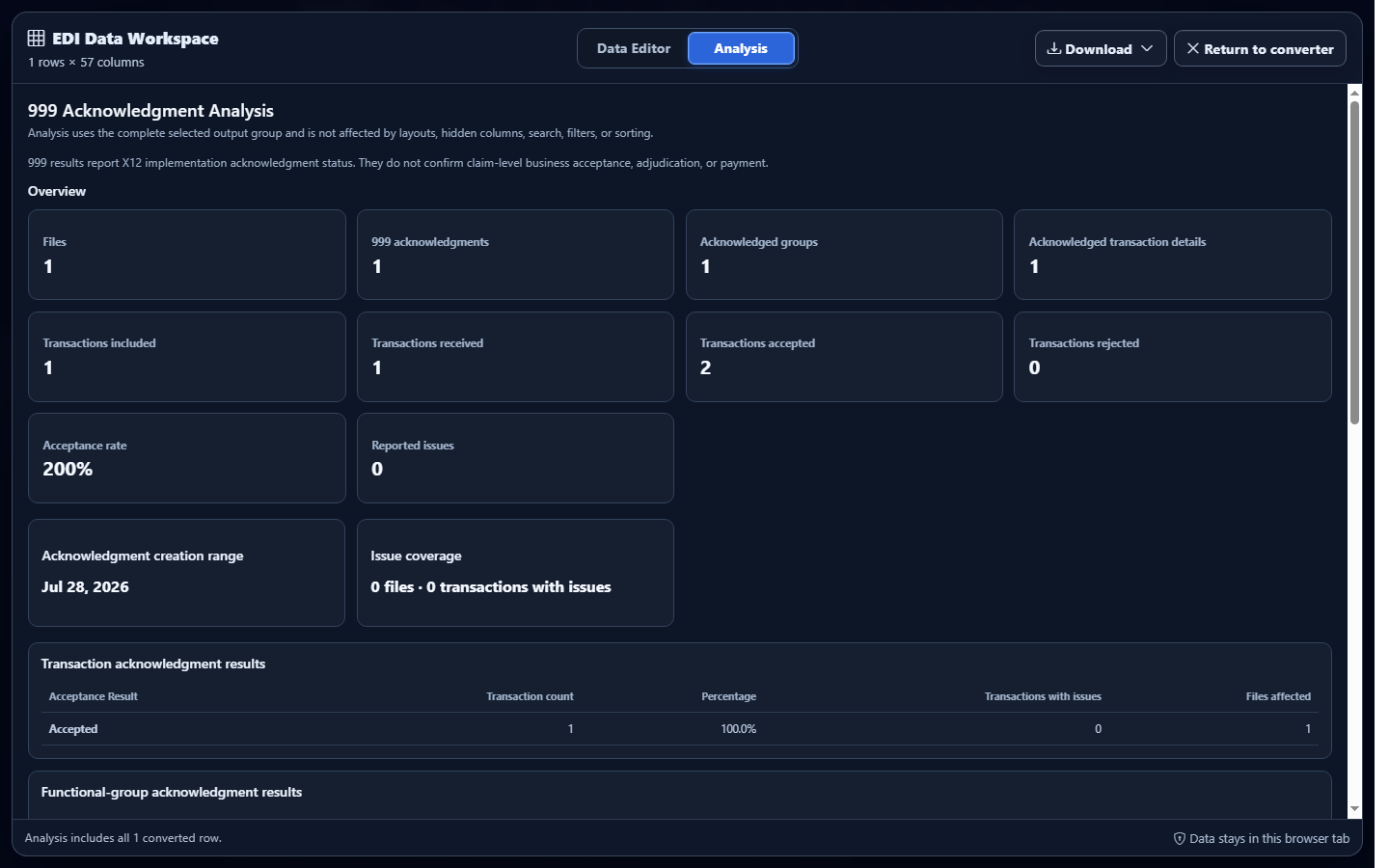
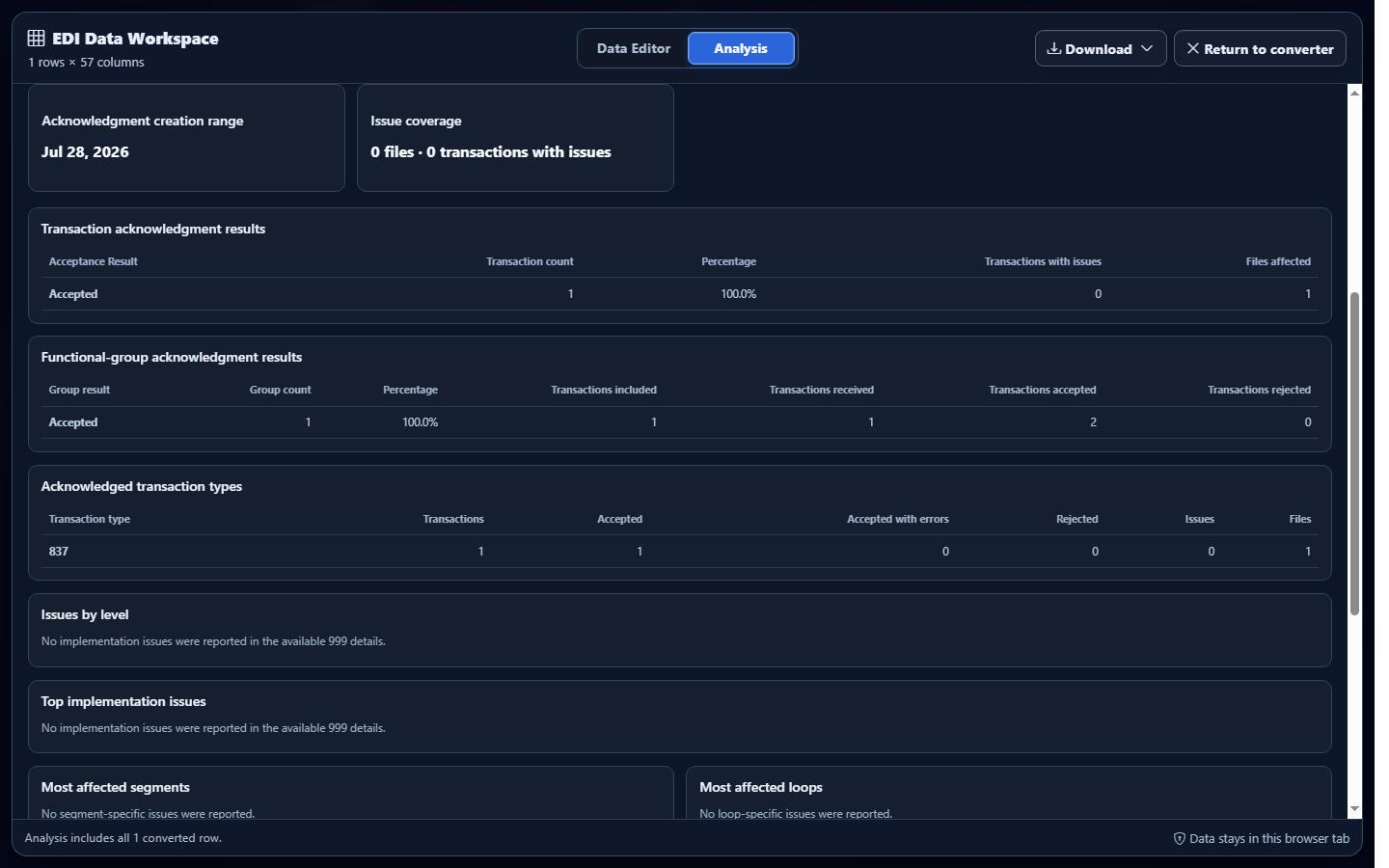
IK5 code A reports the transaction-set result as accepted, and AK9 code A reports the functional group as accepted. Full Analysis counts the acknowledgment, acknowledged group, included transaction, accepted transaction, and reported issues. These results do not establish whether a claim was later adjudicated or paid.
Analyze converted EDI 999 data in EDIFileConverter.com
- Open the EDI converter and Data Editor. Add an authorized EDI 999 using Browse files or Drag & drop EDI files. Processing occurs in the browser tab without application-server upload.
- Keep Smart mapping (per file) selected. Confirm the detected implementation is 005010X231A1 Implementation Acknowledgment.
- Select Convert & Preview. Verify transaction, acknowledgment level, acceptance result, control numbers, and issue fields.
- Select Open full editor. The EDI Data Workspace opens on the Data Editor tab. The interface shows the row and column count and keeps protected context columns locked.
- Select Analysis. Review files, acknowledgments, groups, transactions received, accepted and rejected counts, acceptance rate, and reported issues.
- Drill into the intended occurrence. Use result and issue tables plus Data Editor filters while retaining AK1, AK2, IK3, IK4, IK5, AK9, and CTX context.
Interpret acceptance and occurrence metrics carefully
AK902 Included, AK903 Received, and AK904 Accepted are source-reported; derived Rejected is Received minus Accepted. Keep those values independent from the detailed physical AK2 count. Segment Error Occurrences count physical IK3 segments, Data Element Error Occurrences count physical IK4 segments, and IK5/AK9 error frequencies count each populated source position, including identical repeats.
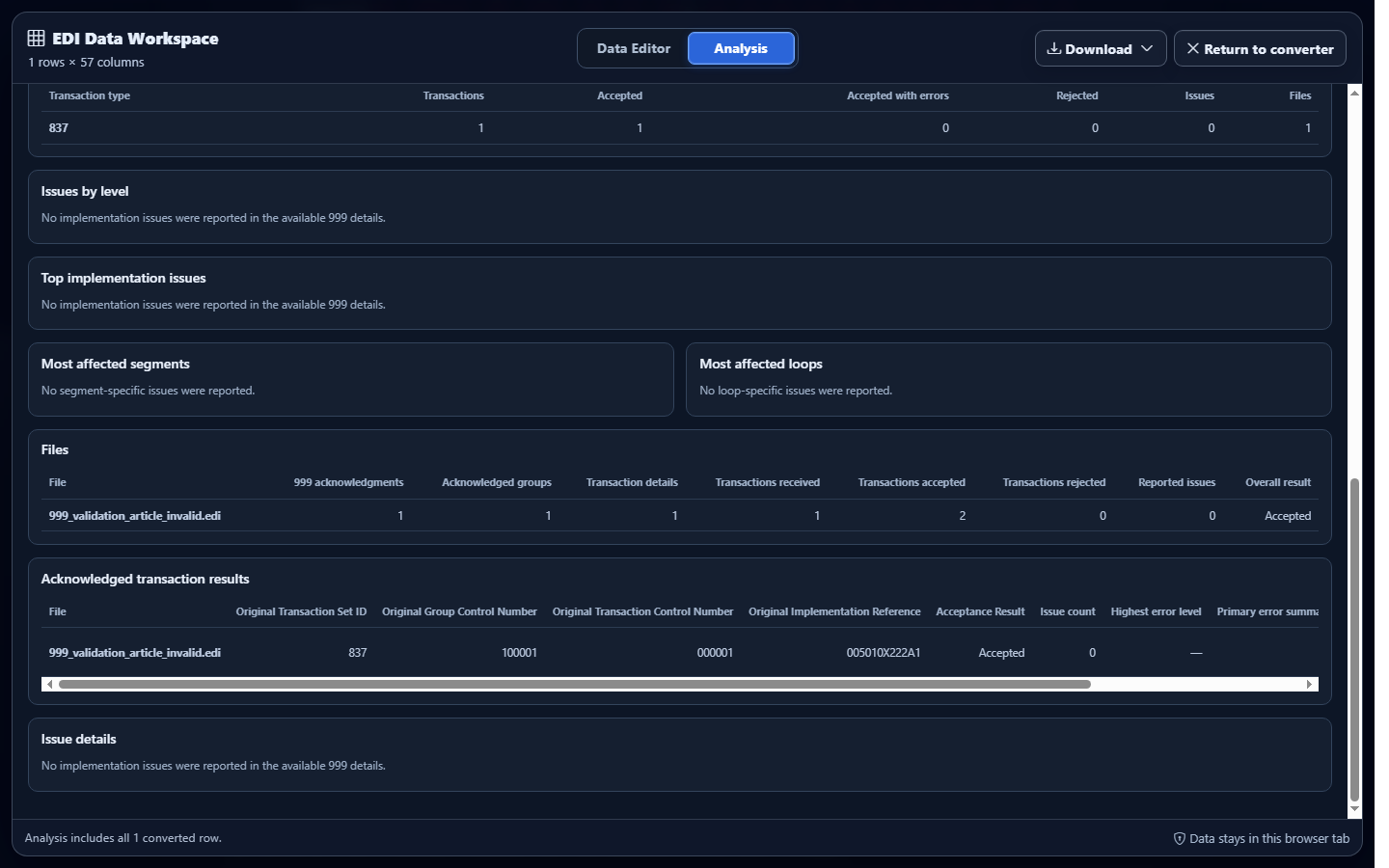
Open Download and select Excel, CSV, JSON, or XML. Retain acknowledgment level, result codes, control numbers, issue number, segment position, element position, and context fields when downstream consumers must reconstruct hierarchy.
Common EDI 999 analysis mistakes
Treating an accepted 999 as claim acceptance
What you see: IK5 or AK9 reports accepted. Why it matters: implementation acknowledgment is not adjudication. Review: acknowledgment level and result code. Correction: use the appropriate downstream claim-status or remittance transaction for business outcomes.
Combining group and transaction results
What you see: one acceptance rate with no hierarchy. Why it matters: AK9 and IK5 summarize different levels. Review: AK1/AK9 and AK2/IK5 separately. Correction: report group and transaction distributions independently.
Dropping control numbers during aggregation
What you see: an issue cannot be joined to its acknowledged transaction. Why it matters: repeated segment IDs and codes need owner context. Review: functional-group and transaction-set controls. Correction: retain control numbers and acknowledgment level.
Interpreting an issue code without position or CTX
What you see: a generic segment or element error. Why it matters: the same structure may repeat. Review: IK3, IK4, loop identifier, and CTX fields. Correction: investigate the complete occurrence and the trading partner’s guidance.
Frequently asked questions
Does analysis rewrite the original EDI 999?
No. It summarizes the converted representation, while the uploaded X12 source remains unchanged.
Does an accepted 999 prove claim acceptance or payment?
No. It reports implementation acknowledgment status, not adjudication, payment, or business acceptance.
Which EDI 999 implementations are supported?
Smart Mapping recognizes exact 005010X231 and 005010X231A1 references under the documented ST03/GS08 fallback rule.
Can analyzed data be downloaded?
Yes. The Data Editor offers Excel, CSV, JSON, and XML downloads containing committed converted-data edits.
Can I investigate the rows behind a metric?
Yes. Use analysis details and Data Editor filters to inspect contributing group, transaction, segment, element, and context occurrences.