Eligibility response validation guide
How to Validate an EDI 271 File
Check the response itself without confusing a valid AAA request rejection with malformed EDI or treating a clean file as an independent guarantee of coverage.
To validate an EDI 271 file, confirm the X12 controls and 005010X279A1 identity, test the information-source, receiver, subscriber, and dependent hierarchy, then review each EB benefit detail or AAA request rejection in its proper response context. Check dates, amounts, percentages, quantities, code dependencies, and related entities. Correct defects in the source system and rerun validation. A clean result means no issues were found by enabled checks; it does not independently prove current eligibility, coverage, benefits, payment, or payer acceptance.
What validating an EDI 271 means
An EDI 271 Health Care Eligibility Benefit Response answers a 270 inquiry. Health plans, clearinghouses, and eligibility services return it to providers or other information receivers. It can identify the information source and receiver, the subscriber or dependent, plan dates, coverage status, service types, benefit amounts or percentages, limitations, related entities, messages, and request-validation outcomes.
Smart Mapping supports exact 005010X279A1 in ST03. If ST03 is blank, GS08 must be exactly 005010X279A1; near-match and unsupported versions are Raw-only. Validation asks whether the supplied response is coherent under enabled structural, required-data, format, code, and consistency rules. It does not contact the health plan or verify that the responder’s information is current.
Validation Results distinguishes source-file findings from findings caused by edited converted output. Heuristic findings are labeled Warnings rather than presented as definitive source errors. Read each origin and severity before deciding where to correct the data.
What to check in a 005010X279A1 response
| Area | Representative check | Why it matters |
|---|---|---|
| Controls | ISA/IEA, GS/GE, and ST/SE controls and declared counts agree. | Broken controls can prevent reliable interchange, group, or transaction processing. |
| Identity and beginning | GS01 is HB; ST01 is 271; exact ST03 005010X279A1 is supported, or blank ST03 uses exact GS08 005010X279A1; BHT reference, date, and time are usable. | These values identify and timestamp the response implementation. |
| Hierarchy | HL IDs are unique, parents resolve, and source, receiver, subscriber, and dependent levels nest coherently. | EB and AAA meaning depends on the response level and patient context. |
| Benefit detail | EB01 is populated; codes are recognized; amount, percentage, quantity, procedure, authorization, and network dependencies are complete. | An isolated value can be misleading without its qualifier or companion element. |
| Dates | DTP qualifier, format, and value travel together; D8 dates are real; RD8 ends are not before starts. | Coverage and benefit meaning is often date-specific. |
| Member response | Each member hierarchy returns at least one EB benefit or AAA rejection occurrence. | The rule is conditional: either response form satisfies it; an AAA is not required when EB exists. |
| AAA detail | Valid-request indicator, reject reason, and follow-up action are present and interpreted at the correct level. | AAA explains why an inquiry or part of it could not be processed; it is not the same as patient ineligibility. |
Scope: Enabled checks do not replace the licensed implementation guide or a trading partner’s companion guide. Partner-specific routing, identifiers, and situational rules may add requirements.
Distinguish EB benefit details from AAA request rejections
EB carries eligibility or benefit information. Its meaning can depend on EB01, coverage level, service types, insurance type, time period, monetary amount, percentage, quantity, authorization, network status, and related DTP or MSG content. Preserve those qualifiers and the surrounding patient hierarchy when reviewing a row.
AAA reports that a request, or part of a request, could not be processed. A structurally complete AAA occurrence is valid response content and is summarized in Analysis. It does not independently mean that the patient is ineligible. The validator should flag malformed AAA data—such as a missing reject reason or follow-up action—but not treat the mere presence of a complete rejection as a file defect.
Controlled invalid response and corrected source
This synthetic response contains fictional names and identifiers and no real protected health information (PHI). It deliberately uses 20261340 in BHT04, which is eight digits but not a real date.
Invalid source
GS*HB*SENDER*RECEIVER*20260726*1200*1*X*005010X279A1~
ST*271*0271*005010X279A1~
BHT*0022*11*VALIDATION271*20261340*1200~
HL*1**20*1~
NM1*PR*2*SYNTHETIC PAYER*****PI*PAYER271~
HL*2*1*21*1~
NM1*1P*2*TEST RECEIVER*****XX*1234567893~
HL*3*2*22*0~
TRN*1*TRACE000271*PAYER271~
NM1*IL*1*MEMBER*TEST****MI*MEMBER0001~
EB*1*IND*30~
DTP*291*D8*20260726~
SE*12*0271~
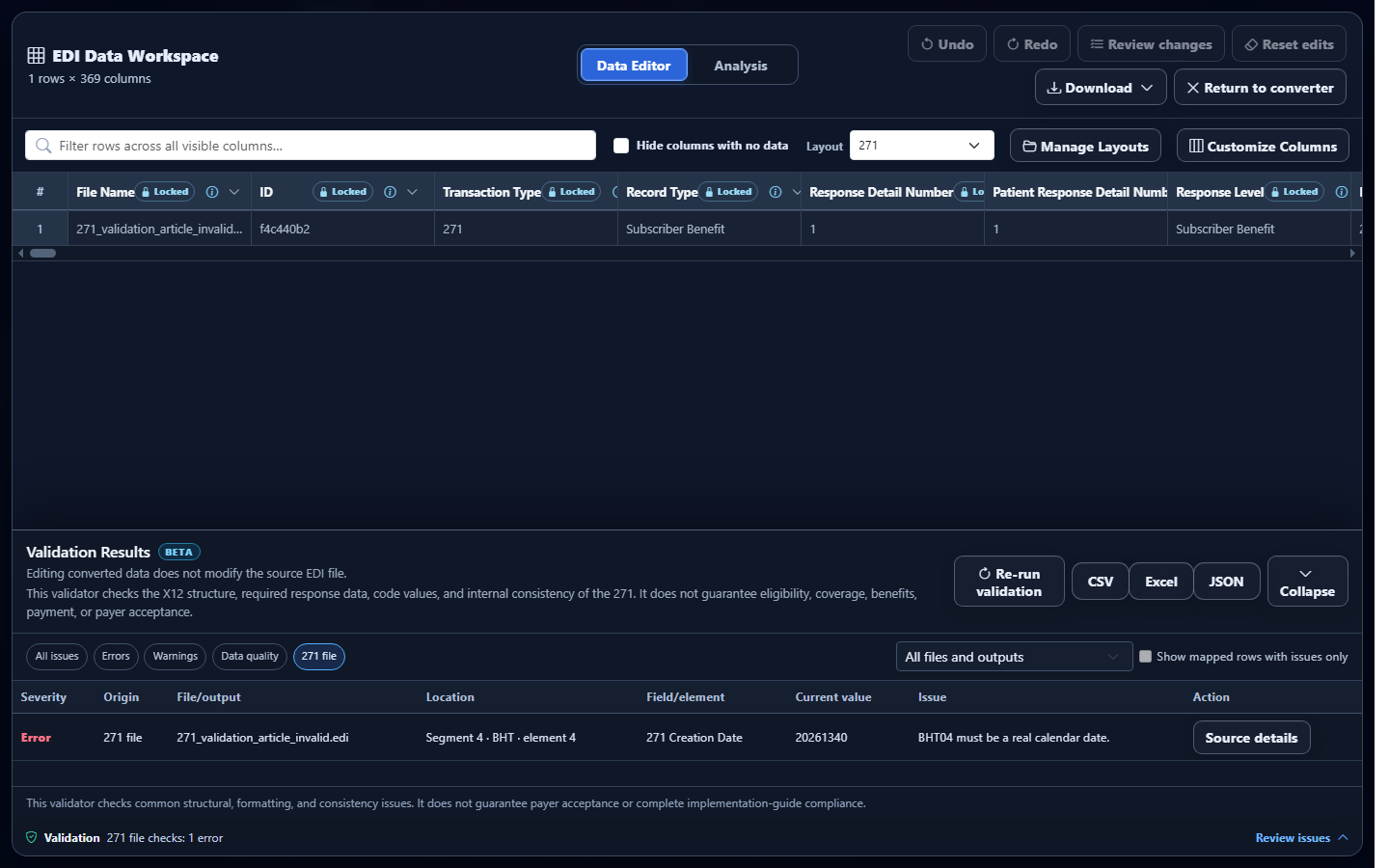
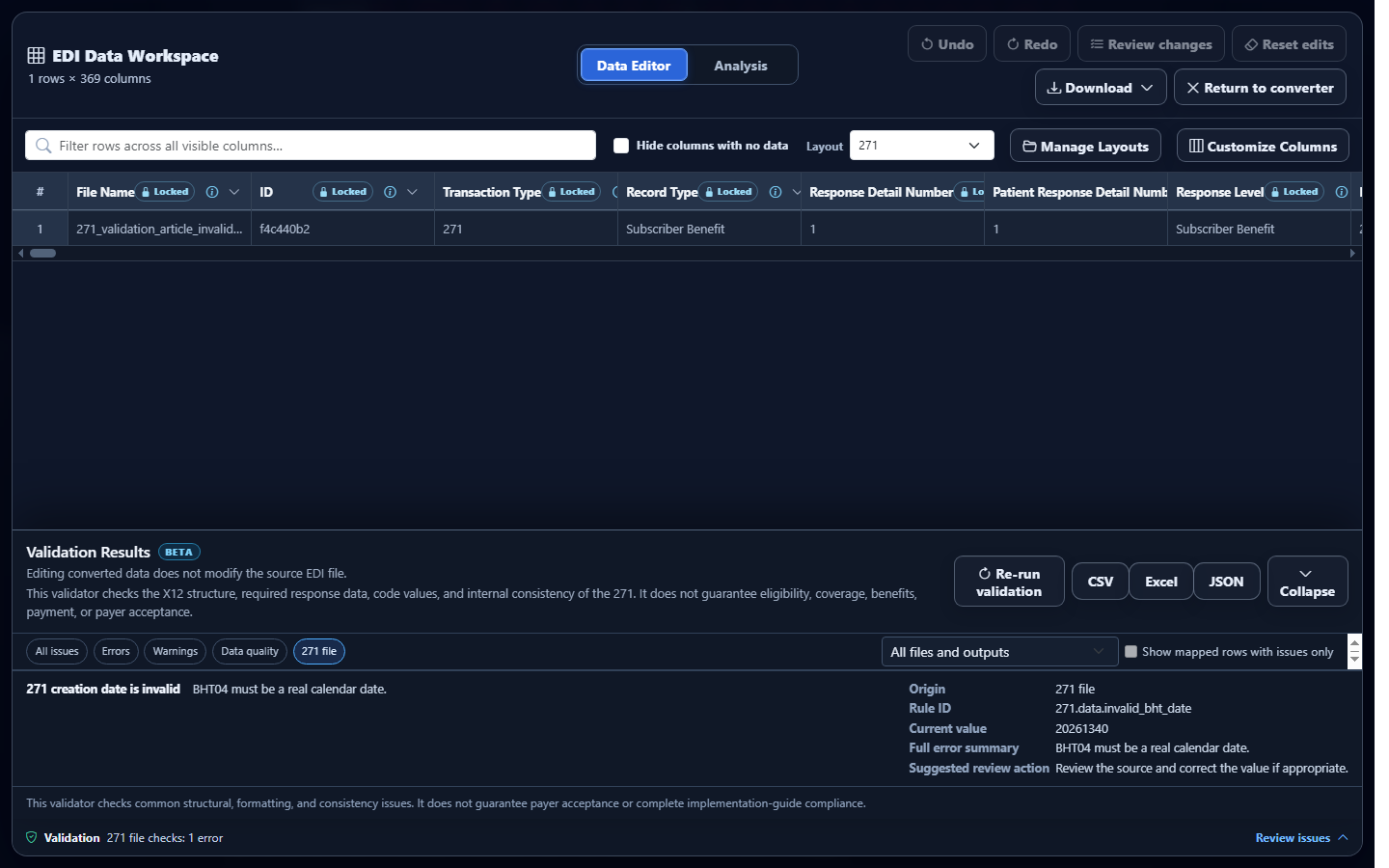
Observed validator result: the actual validator reports 271 creation date is invalid, locates BHT element 4, and retains 20261340 for review.
Corrected source
GS*HB*SENDER*RECEIVER*20260726*1200*1*X*005010X279A1~
ST*271*0271*005010X279A1~
BHT*0022*11*VALIDATION271*20260726*1200~
HL*1**20*1~
NM1*PR*2*SYNTHETIC PAYER*****PI*PAYER271~
HL*2*1*21*1~
NM1*1P*2*TEST RECEIVER*****XX*1234567893~
HL*3*2*22*0~
TRN*1*TRACE000271*PAYER271~
NM1*IL*1*MEMBER*TEST****MI*MEMBER0001~
EB*1*IND*30~
DTP*291*D8*20260726~
SE*12*0271~
Regenerating BHT04 as the actual date 20260726 clears this controlled source error. It does not change or verify the benefit detail in EB.
Validate the 271 in EDIFileConverter.com
- Open the EDI converter and validator. Add the authorized 271 through Browse files or Drag & drop EDI files. Processing occurs in the browser tab without application-server upload.
- Keep Smart mapping (per file) selected. It recognizes the response and maps benefit and request-rejection occurrences with patient and response context.
- Select Convert & Preview. Confirm Converted results identifies 271 and spot-check patient, EB or AAA record type, service type, dates, and response identifiers.
- Select Open full editor. Expand the Validation bar in Data Editor to open Validation Results.
- Use the filters. Choose 271 file to isolate source findings, then narrow by EDI structure, Required data, Data quality, Errors, or Warnings.
- Open Source details. Review the rule, location, current value, expected value, error summary, and suggested action.
- Review valid AAA content separately. Use Review request rejections to open Analysis. Interpret rejection level, reason, and follow-up action without labeling the patient ineligible.
- Correct and rerun. Repair source defects in the producing system, replace the file, and choose Re-run validation. Converted-data edits do not rewrite the uploaded source.
- Export cautiously. Eligible plans can export the validation report as CSV, Excel, or JSON. Reports can contain field values derived from the response.
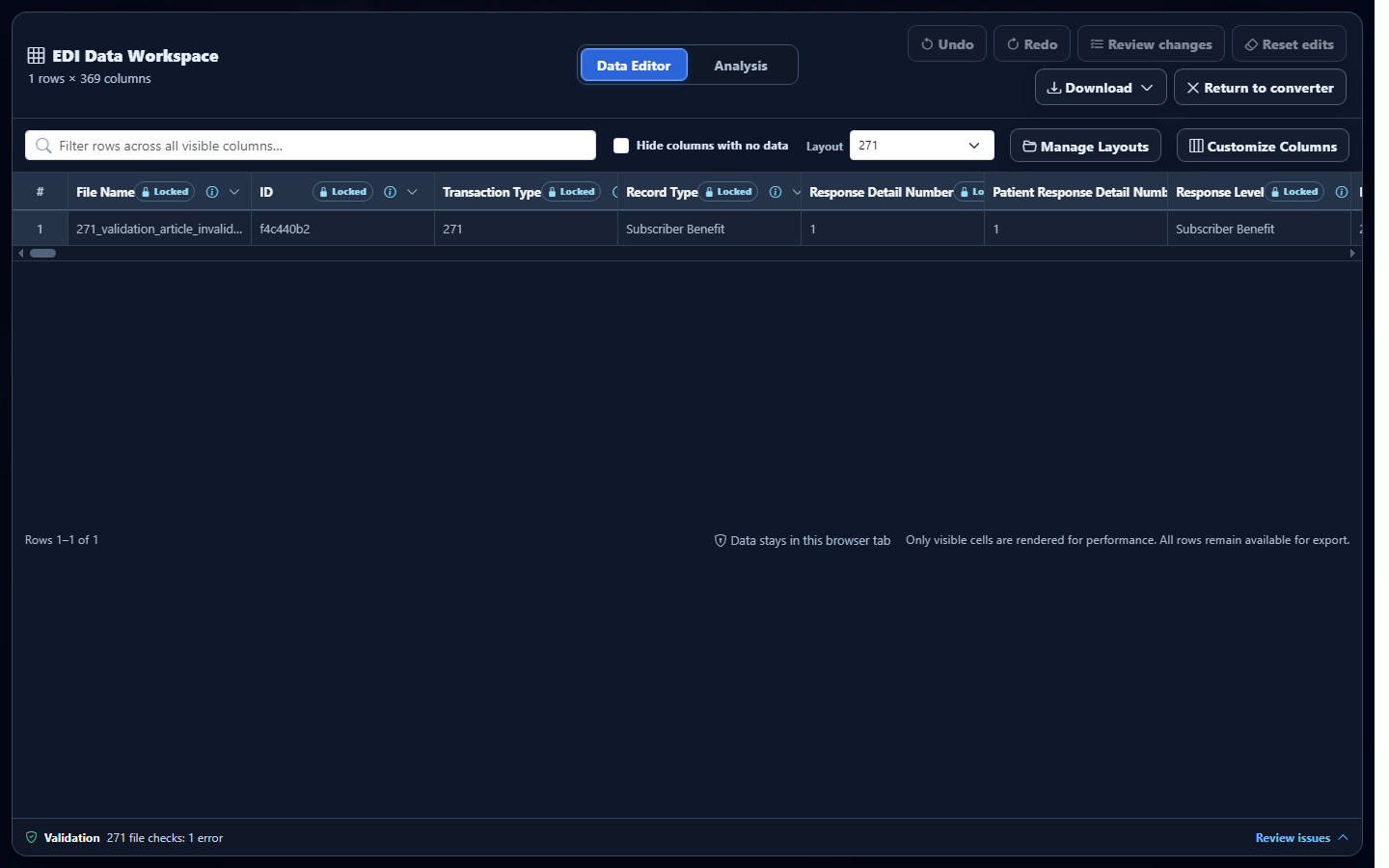
Common EDI 271 validation issues and cautious fixes
Invalid BHT or benefit date
What you see: a creation-date or benefit-date issue. Why it matters: valid shape does not prove a real date, and reversed RD8 ranges change the service period. Review: BHT04 or DTP01–DTP03 together. Correction: verify the responder’s actual date and regenerate the response.
EB amount, percentage, or quantity dependency
What you see: invalid decimal, unusual percentage, or incomplete quantity pair. Why it matters: a value without its qualifier or expected scale is ambiguous. Review: the complete EB and HSD context. Correction: correct the source mapping rather than guessing a unit or percentage.
AAA missing a reason or follow-up action
What you see: required-data findings on a request-rejection row. Why it matters: the receiver cannot reliably understand why processing failed or what to do next. Review: AAA01 through AAA04 and response level. Correction: regenerate complete AAA content under the applicable guide.
EB, DTP, HSD, MSG, or related entity outside context
What you see: a segment-without-context error. Why it matters: benefit meaning depends on its patient and 2110 response-detail scope. Review: the preceding HL, NM1, EB, and related segments. Correction: repair loop serialization and retest the full transaction.
Conflicting or duplicate response details
What you see: duplicate details or active and inactive coverage in the same response scope. Why it matters: repeated rows can inflate counts, while apparently conflicting coverage may require date and plan context. Review: patient, service, plan, dates, network, and source occurrence. Correction: remove accidental duplicates; investigate legitimate differences before changing data.
Frequently asked questions
What does an EDI 271 validator check?
It checks enabled controls, hierarchy, required response data, EB and AAA dependencies, dates, amounts, percentages, quantities, codes, and consistency.
Is an AAA rejection automatically a validation error?
No. A complete AAA can validly report that a request could not be processed. Malformed AAA data can still produce a validation issue.
Does a valid 271 guarantee current coverage?
No. Validation checks the supplied file. It does not independently verify the responder’s data or guarantee coverage, benefits, payment, or acceptance.
Which implementation is recognized?
Exact 005010X279A1 in ST03 is supported. If ST03 is blank, exact GS08 005010X279A1 is the fallback; near-match and unsupported versions are Raw-only.
Does editing converted data change the source?
No. Data Editor changes affect converted output and downloads, not the uploaded EDI.