Eligibility inquiry reading guide
How to Read an EDI 270 File
Trace an eligibility inquiry from its transaction controls through the organization and patient hierarchy to the exact date and service information being requested.
To read an EDI 270 file, first confirm transaction 270 and implementation 005010X279A1, reconcile its envelope controls, and then follow each HL parent-child relationship from the information source to the receiver, subscriber, and any dependent. At the patient level, read TRN trace values, NM1 and REF identifiers, demographic context, DTP date qualifiers and formats, and each EQ service request together. The 270 asks a question; it does not contain the eligibility result returned in a 271.
Current mapping boundary: Smart Mapping requires exact ST03=005010X279A1, or blank ST03 with exact GS08=005010X279A1. Near-match and unsupported versions are Raw-only. The unified 227-field schema has no separate Key layout and emits one row per EQ; EQ01 repetitions remain on that row and count as service occurrences. A member without EQ emits no Smart inquiry row.
HL02 establishes ownership and unresolved parents fail closed. NM1 primary roles are PR source, 1P receiver, IL subscriber, and 03 dependent. Patient TRN and DTP are situational. First 291/102 dates, first 1L/SY references, and the first PRV supply convenience values; later occurrences retain source order in Other Dates, Other References, and Other Provider Data. PRV03 means taxonomy only with PRV02=PXC, and NM109 is an NPI only with NM108=XX.
Read a 270 in this sequence
- Confirm the implementation. ST01 should identify transaction 270 and ST03 should identify 005010X279A1 for the implementation covered here. Preserve ST02 and match it to SE02.
- Reconcile the envelopes. Retain ISA/IEA and GS/GE controls, counts, sender and receiver identifiers, and delimiters. These values identify the interchange; they are not member or inquiry numbers.
- Read the BHT. BHT identifies the transaction purpose, reference, creation date, and time. BHT03 is especially useful when matching an inquiry to operational logs or its response.
- Follow the HL tree. Start at information source level 20, move to information receiver level 21, and then read subscriber level 22 or dependent level 23. Use HL02 rather than physical proximity alone to find a record’s parent.
- Identify each party. Read NM1 entity and identifier qualifiers before interpreting the name or identifier. The same segment name can describe a payer, provider, subscriber, or dependent.
- Read the patient lookup context. Keep TRN, REF, NM1, DMG, INS, and subscriber context together. Preserve leading zeros in identifiers.
- Interpret dates and requests. Read DTP01, DTP02, and DTP03 as a unit. Read EQ service types or procedure composites with their qualifiers and occurrence.
- Match the response. Use trace, transaction, patient, and trading-partner controls to connect the 270 with the corresponding 271; do not treat the inquiry as an answer.
Useful reading rule: identify the active HL owner before interpreting any patient, date, or EQ segment. A correct field value attached to the wrong subscriber or dependent produces an incorrect business conclusion.
Reconstruct the source, receiver, and patient hierarchy
The 270 uses hierarchical levels so one transaction can carry one or more patient inquiries beneath organizational context. Read four HL elements together:
| Element | Meaning | How to use it |
|---|---|---|
| HL01 | Current hierarchy identifier | Give each level a unique key inside the transaction. |
| HL02 | Parent hierarchy identifier | Link the current level back to its source, receiver, or subscriber parent. |
| HL03 | Level code | Distinguish information source (20), receiver (21), subscriber (22), and dependent (23). |
| HL04 | Child indicator | Determine whether subordinate levels are expected to follow. |
A subscriber can own an inquiry directly, or a dependent can appear beneath the subscriber and own a different inquiry. When exporting to a flat table, keep Patient Type, subscriber identifiers, patient identifiers, HL values, and Inquiry Number on each row. Otherwise, two EQ occurrences can look identical even though they belong to different patients.
NM1 identifies the party at the current hierarchy level. Read NM101 first: for example, its entity code distinguishes an information source from an information receiver or insured person. Then read the entity type, name components, identifier qualifier, and identifier. Never infer that every NM1 identifier is a member ID.
Read identifiers, dates, and EQ requests as qualified values
| Segment | Read together | Question answered |
|---|---|---|
| TRN | Trace type, trace number, originating company, secondary reference | Which inquiry occurrence should be reconciled? |
| REF | Reference qualifier, identifier, and description | What kind of member, group, authorization, or other reference is this? |
| DMG | Date format, birth date, gender, and other demographic context | Which fictional or authorized patient lookup attributes were supplied? |
| INS | Subscriber indicator, relationship, and other insurance context | Is the patient the subscriber or related dependent? |
| DTP | Date qualifier, format, and value or range | What date concept and period apply to the inquiry? |
| EQ | Service types, procedure qualifier/code, coverage and insurance context | Which eligibility or benefit information is being requested? |
DTP03 alone is ambiguous. DTP01 states what the date means, and DTP02 tells whether the value is a single date or a range. Likewise, an EQ composite can contain several service-type values separated by the component delimiter, or it can carry a procedure composite whose meaning depends on its qualifier. Preserve delimiter structure and repeated occurrences until mapping is verified.
Read this synthetic EDI 270 example
This fictional excerpt comes from a parsed repository fixture and contains no real protected health information:
ST*270*000000001*005010X279A1~
BHT*0022*13*REF000001*20260726*1030~
HL*1**20*1~
NM1*PR*2*SYNTHETIC HEALTH PLAN*****PI*PAYER001~
HL*2*1*21*1~
NM1*1P*2*SYNTHETIC CLINIC*****XX*1234567893~
HL*3*2*22*0~
TRN*1*000000000001*1999999999*REF001~
NM1*IL*1*SAMPLE*ALICE****MI*000000000123~
DMG*D8*19800102*F~
DTP*291*D8*20260726~
EQ*30^47^98~
SE*13*000000001~
Lines 1–2: ST identifies a 270 under 005010X279A1; BHT supplies reference REF000001 and creation time. Lines 3–4: hierarchy 1 is the information source and NM1 identifies the synthetic plan. Lines 5–6: hierarchy 2 is its information-receiver child and NM1 identifies the synthetic clinic. Lines 7–10: hierarchy 3 belongs to that receiver and identifies the subscriber, trace, member identifier, and fictional demographics. Lines 11–12: DTP requests the applicable date and EQ contains service-type requests. Line 13: SE reports 13 segments from ST through SE and repeats transaction control 000000001.
Read a 270 in EDIFileConverter.com
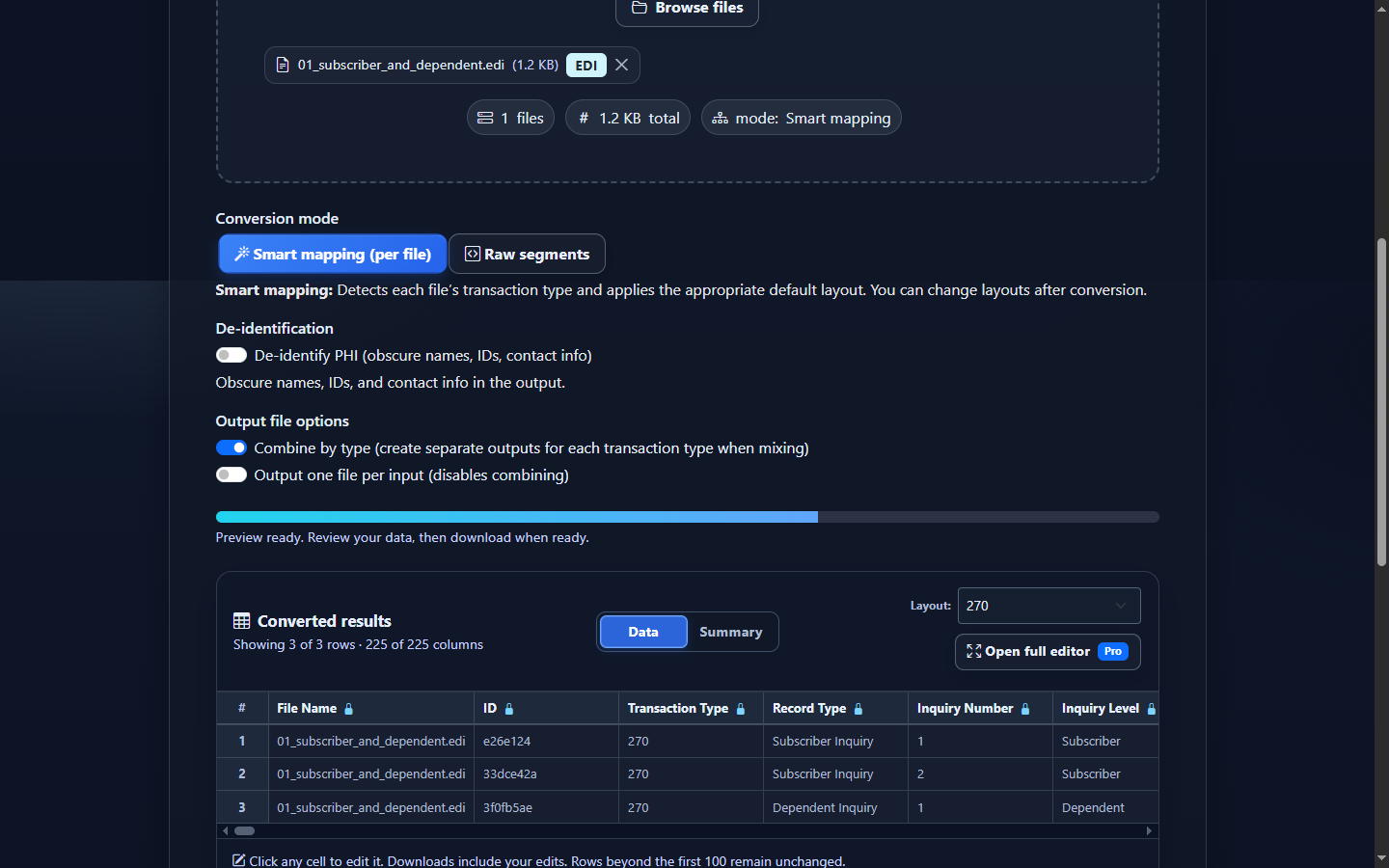
- Open the EDI workspace and add an authorized 270 with Browse files or drag and drop.
- Keep Smart mapping (per file) selected and confirm the detected implementation is 005010X279A1.
- Select Convert & Preview. Begin with File, Record Type, Patient Type, Inquiry Number, trace, subscriber, and patient identifiers.
- Read the mapped date qualifier, format, and value columns together. Then review Service Type Codes, descriptions, procedure qualifier and code, and occurrence-specific context.
- Select Open full editor to filter, sort, control visible columns, or apply a saved layout. Keep hierarchy and identifier columns visible when narrowing rows.
- Open Validation Results to review enabled checks, or select Analysis to summarize inquiries, patient types, service types, dates, identifiers, and detail rows.
- Use Download to export Excel, CSV, JSON, or XML only after confirming the selected fields retain enough context to reconstruct each inquiry.
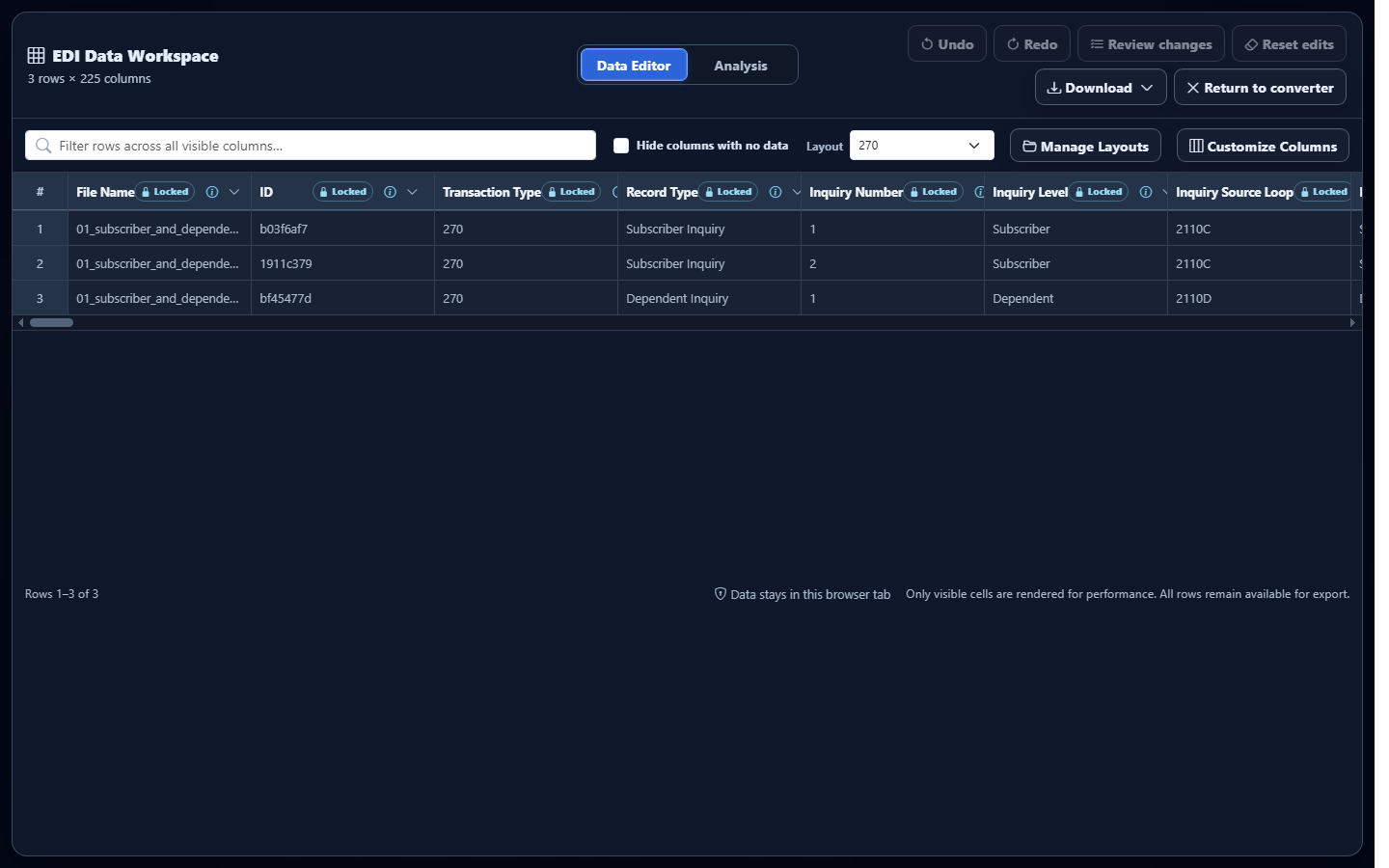
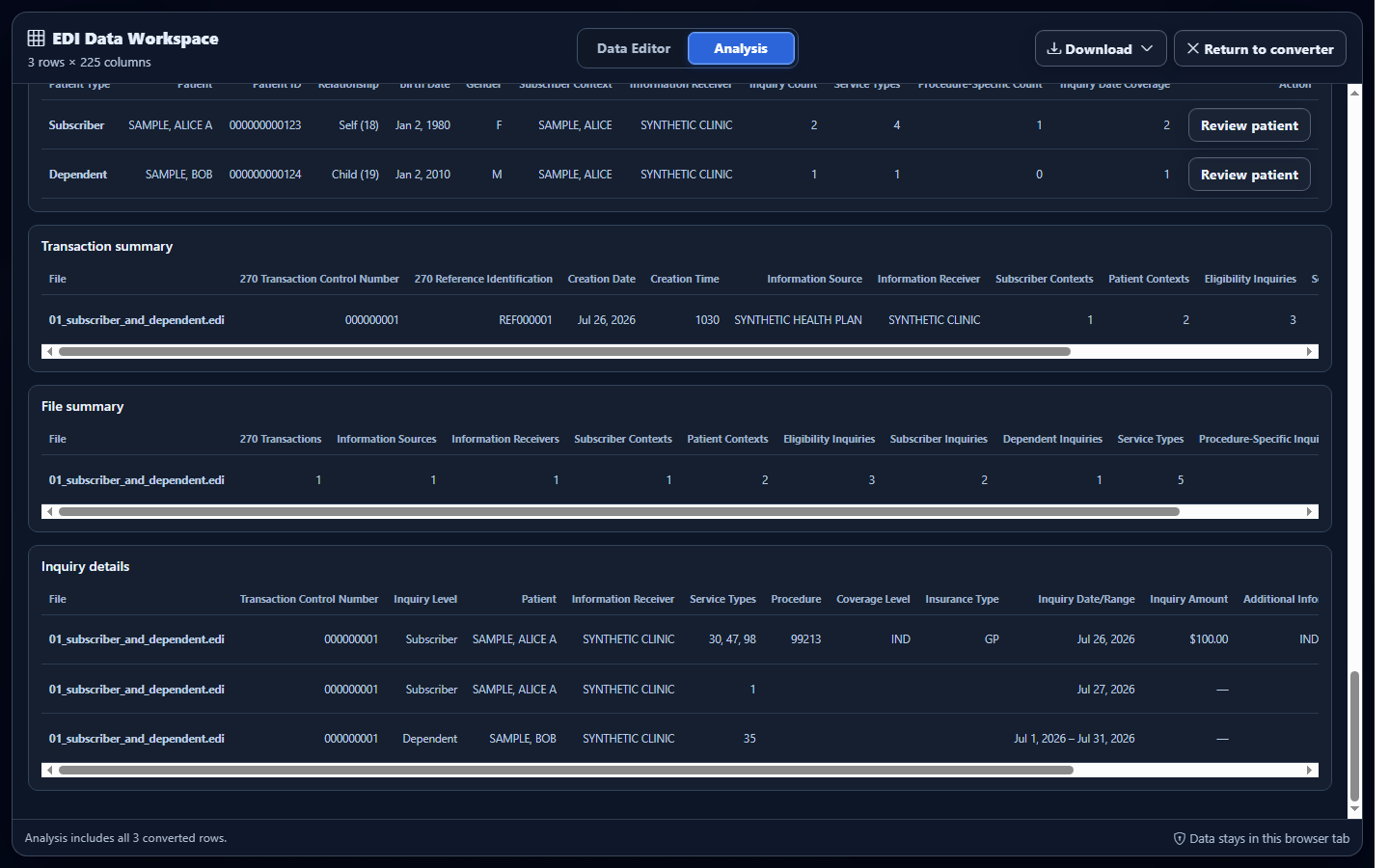
Product limitation: editing converted rows does not rewrite the uploaded source EDI. Validation covers enabled checks and cannot determine whether a patient is eligible, what benefits are available, or whether a trading partner will accept the inquiry.
Common mistakes when reading a 270
Reading EQ as a coverage answer
EQ states what the sender asked about. It does not establish active coverage, benefit amounts, authorization, or payment. Find the corresponding 271 and read its response context.
Ignoring the dependent’s subscriber parent
A level-23 dependent relies on its level-22 subscriber context. Keep both patient and subscriber identifiers during conversion, filtering, and reconciliation.
Dropping qualifiers or component order
A date, identifier, or procedure value can change meaning when detached from its qualifier. Preserve DTP01–DTP03, REF01–REF02, and EQ composite structure until labels have been verified.
Allowing spreadsheets to coerce identifiers
Member, trace, control, and group values may contain leading zeros. Treat them as text; scientific notation or numeric conversion can break a 270-to-271 match.
Assuming adjacent rows share an owner
Physical order alone is not enough. Use HL01 and HL02 to reconstruct ownership, particularly when multiple subscribers or dependents appear in one transaction.
Treating enabled validation as a guarantee
Structural and data checks can identify supported issues, but companion guides can add requirements. “No issues found” means none were found by the enabled checks, not that a receiver will return eligibility information.
Frequently asked questions
What should I read first in an EDI 270?
Confirm 270 and 005010X279A1, reconcile transaction and envelope controls, then follow HL ownership from source to receiver and patient.
How do I identify a subscriber versus a dependent?
Use the patient HL level and parent relationship with the associated NM1 and INS context. Level 22 represents a subscriber and level 23 represents a dependent.
What does EQ mean in a 270?
EQ identifies the service type or procedure context being requested. Interpret its values with component delimiters, qualifiers, occurrence, and patient ownership.
Does the 270 show whether the patient is eligible?
No. It contains the inquiry. The receiver’s 271 contains the eligibility and benefit information supplied in response.
Why must leading zeros be preserved?
Controls, trace numbers, member IDs, and references are identifiers rather than quantities. Removing zeros can prevent accurate matching.
Can converted rows help me read a 270?
Yes. Labeled fields are easier to scan provided hierarchy, patient type, trace, qualifier, date, and occurrence context remain attached.