Claim acknowledgment reading guide
How to Read an EDI 277CA File
Trace a 277CA from its envelope and hierarchy to the exact transaction, provider, claim, or service-line status it reports.
To read an EDI 277CA file, first confirm the 005010X214 transaction and envelope controls, then follow HL hierarchy ownership, identify parties through NM1, connect references through TRN, and interpret each STC status composite at its reported transaction, provider, claim, or service-line scope. Keep occurrence numbers and business controls with every status. An accepted acknowledgment is an intake result, not proof of adjudication or payment.
Read a 277CA in this sequence
- Confirm the transaction. Check ST01 for 277 and ST03 for 005010X214. Match ST02 to SE02 and retain the ISA/IEA and GS/GE controls when the acknowledgment arrived in an envelope.
- Read BHT context. The BHT reference, date, time, and purpose information identify the acknowledgment transaction. They are not the original claim number.
- Follow the HL tree. Read HL01 as the current hierarchy identifier, HL02 as its parent, and HL03 as the level code. Do not assume the next physical row is an unrelated record.
- Identify the owner. Use NM1 entity codes and identifiers to distinguish the information source, submitter, billing provider, and patient-related context.
- Match traces and controls. TRN, REF, and mapped claim or service-line controls connect status occurrences to the original 837 submission.
- Interpret every STC occurrence. Read category, status, and entity components together, then include status date, action, amount, hierarchy level, and occurrence number.
- Reconcile totals. Compare QTY and AMT summaries with detailed occurrences while respecting their qualifiers and scope.
Practical safeguard: keep the original 837 available. A readable label is useful, but the trace and business controls are what let an analyst identify the submission that needs correction or follow-up.
Use hierarchy and controls to find the affected record
The transaction uses hierarchical levels so one acknowledgment can report broad and specific results. Exact content varies, but these scopes provide a reliable reading framework:
| Scope | Fields to retain | Reading question |
|---|---|---|
| Information source | Payer or receiver identity, receipt trace, dates, and totals | Who produced the acknowledgment? |
| Information receiver | Submitter identity and referenced 837 transaction | Which submission channel is being acknowledged? |
| Provider | Billing-provider identity, provider trace, counts, amounts, and STC status | Which provider grouping is affected? |
| Patient or claim | Patient and claim controls, dates, amounts, and claim-level STC occurrences | Which claim has this result? |
| Service line | Line control, procedure context, service date, amount, and line-level STC | Which service occurrence needs review? |
HL establishes ownership; NM1 identifies parties; TRN carries trace references; and STC communicates acknowledgment status. DTP, QTY, AMT, SVC, and REF can add dates, counts, amounts, service, and identifier context. Preserve leading zeros and read qualifiers before values.
Read this synthetic EDI 277CA example
This fictional 005010X214 excerpt reports an accepted result:
ST*277*0001*005010X214~
BHT*0085*08*ACK000001*20260725*1030*TH~
HL*1**20*1~
NM1*PR*2*SYNTHETIC HEALTH PLAN*****PI*SHP001~
TRN*1*RCPT000001~
HL*2*1*21*1~
NM1*41*2*SYNTHETIC SUBMITTER*****46*SUB0001~
TRN*2*837BHT000001~
STC*A1:19:PR*20260725*WQ*125.5~
SE*10*0001~
Line 1: ST identifies a 277 transaction, control 0001, under 005010X214. Line 2: BHT supplies acknowledgment reference ACK000001 and creation date/time. Lines 3–5: HL 1 owns the synthetic health-plan identity and receipt trace. Lines 6–8: HL 2 is a child of HL 1 and identifies the submitter and referenced 837 BHT control. Line 9: STC reports an accepted acknowledgment status at this scope. SE closes the transaction and repeats control 0001.
Interpret STC status without losing context
Start with the enclosing acknowledgment level. Read the status-category component, specific status component, and entity component as a composite—not as three interchangeable codes. Then inspect the status date, action code, amount, and any additional STC occurrences mapped to the same owner.
A claim can have several statuses, and a file can mix accepted and rejected claims or service lines. In a table, keep File, Record Type, Acknowledgment Level, Status Number, transaction and provider traces, claim and line controls, category/status/entity codes and descriptions, status date, action, and amount. Filtering on “rejected” before retaining owner columns can create a list that cannot be reconciled to the 837.
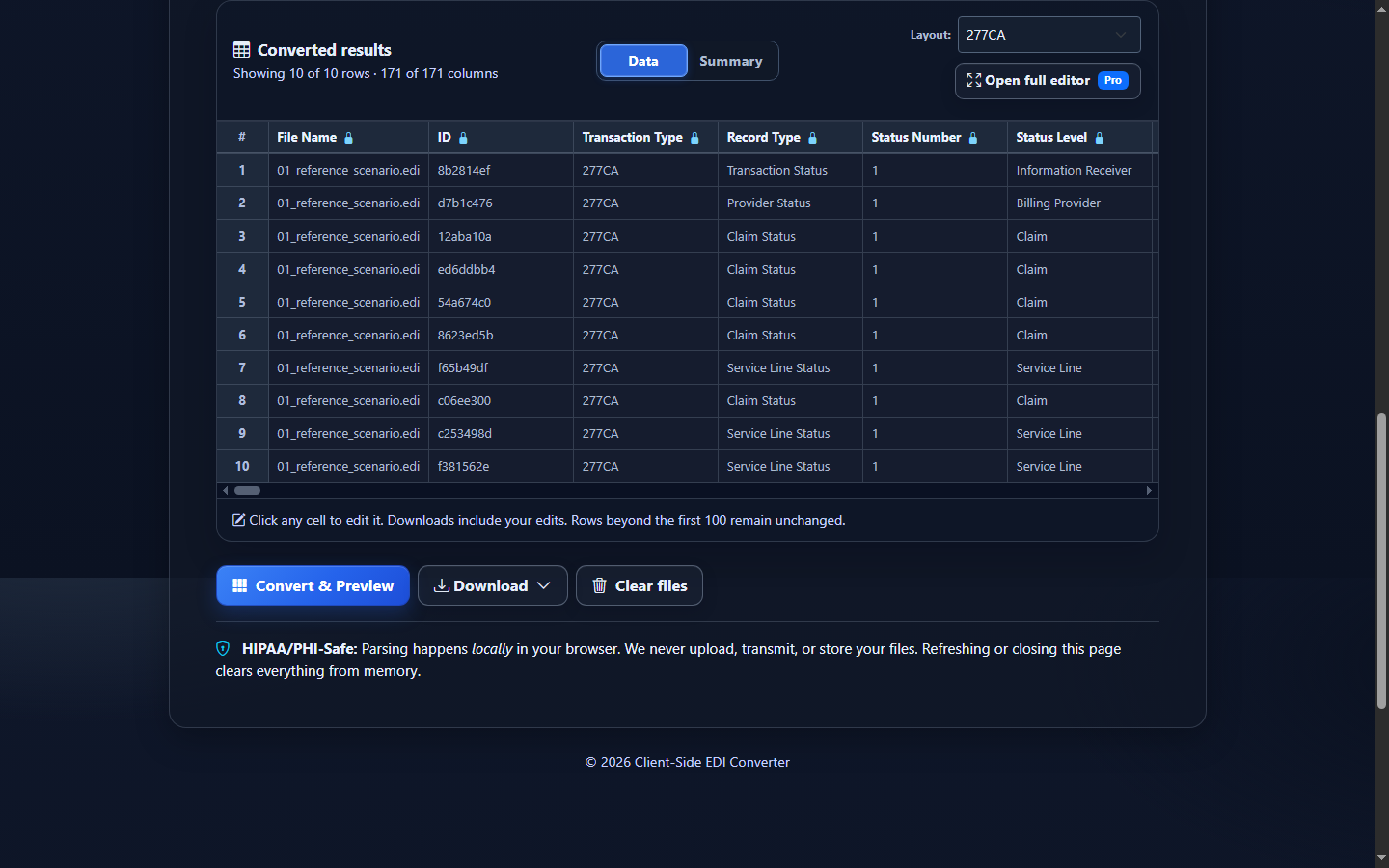
Read a 277CA in EDIFileConverter.com
- Open the EDI workspace and add an authorized 277CA with Browse files or drag and drop.
- Keep Smart mapping (per file) selected and confirm that the detected implementation is 005010X214.
- Select Convert & Preview. Begin with File, Record Type, Acknowledgment Level, trace controls, and Status Number before reading descriptions.
- Select Open full editor for filtering and column review. Keep transaction, provider, claim, and service-line controls visible when narrowing results.
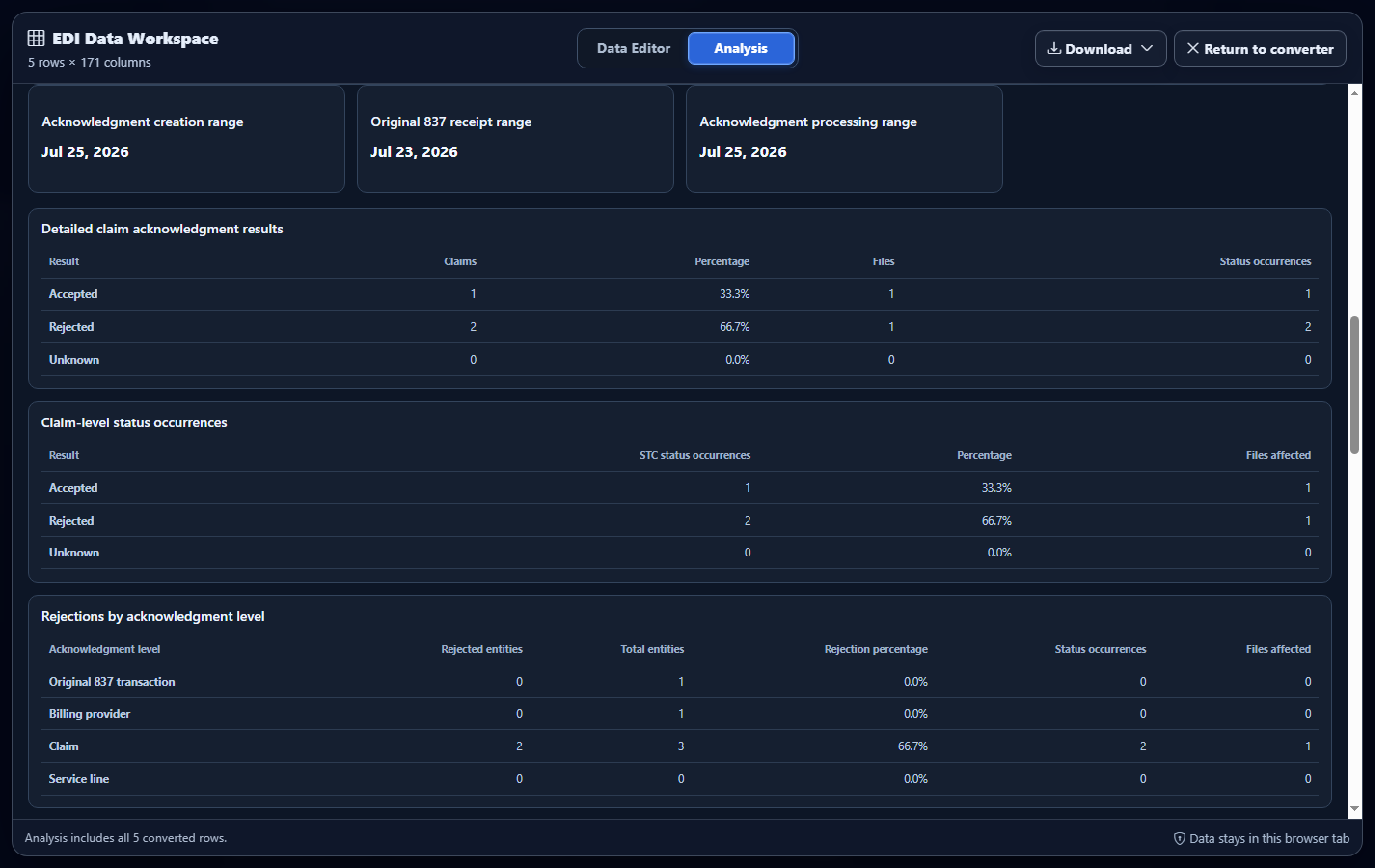
- Select Analysis to compare accepted and rejected outcomes, status categories, entity codes, amounts, dates, and affected hierarchy levels.
- Use Download to export Excel, CSV, JSON, or XML only after confirming that the columns needed to reconstruct hierarchy remain present.
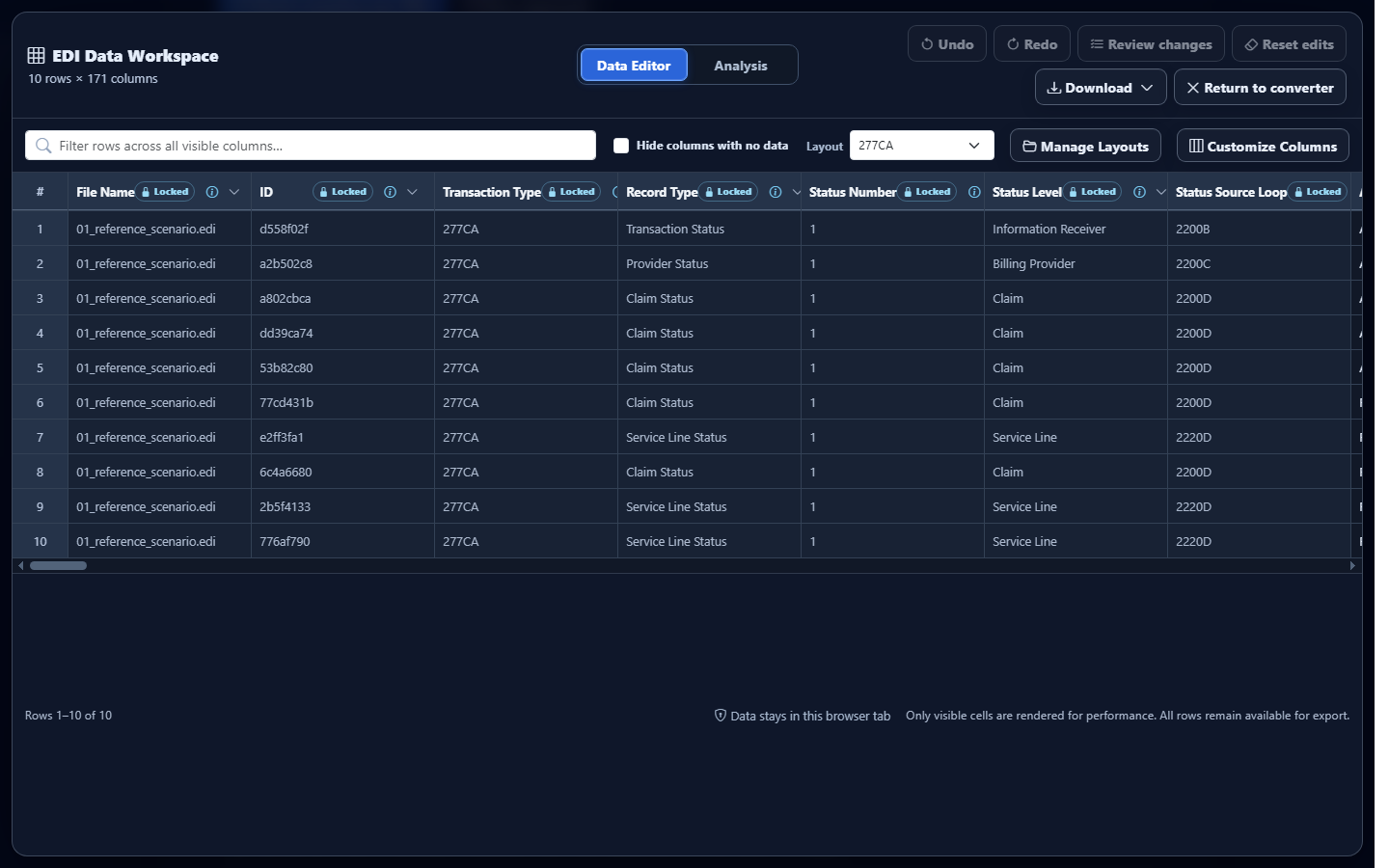
Product limitation: reading or editing converted rows does not rewrite the uploaded source EDI and does not change the acknowledgment sent by the trading partner.
Connect the 277CA to the 837, 999, and 835
| Transaction | Read it for | Do not infer |
|---|---|---|
| 837 claim | Submits professional, institutional, or dental claim information | Receipt, acceptance, adjudication, or payment |
| 999 acknowledgment | Reports implementation-level syntax acknowledgment | Claim-specific business acceptance or payment |
| 277CA acknowledgment | Reports claim-submission acknowledgment results at applicable hierarchy levels | Final adjudication, coverage, or payment |
| 835 remittance | Explains adjudicated payments, denials, and adjustments | The earlier intake sequence by itself |
Common mistakes when reading a 277CA
Assuming accepted means paid
An accepted acknowledgment indicates that submitted information passed the reported intake stage. Review an 835 or the appropriate claim-status workflow for adjudication and payment information.
Reading STC without hierarchy
The same-looking code can apply to a transaction, provider, claim, or service line. Keep acknowledgment level, HL ownership, trace values, and business controls with every status occurrence.
Treating reported rejection content as a malformed 277CA
A structurally valid acknowledgment can legitimately report rejection of the original 837. Separate source-file validation issues from rejection reasons communicated by the sender.
Discarding repeated statuses
Repeated STC occurrences can contribute distinct information. Preserve occurrence order and related category, status, entity, date, action, and amount fields during conversion or aggregation.
Frequently asked questions
What should I read first in a 277CA?
Confirm 005010X214 and its controls, then follow HL ownership, NM1 parties, TRN references, and STC occurrences.
How do I identify the claim affected by STC?
Use the enclosing hierarchy plus provider, patient, claim, and service-line controls. The STC code alone is insufficient.
Can one claim have multiple STC segments?
Yes. Preserve each occurrence with its scope, date, action, amount, and status components.
Does accepted mean the claim was paid?
No. A 277CA reports pre-adjudication intake status, not final adjudication or payment.
Can converted rows help me read a 277CA?
Yes. Labeled fields make hierarchy and status easier to review, provided identifiers and occurrence numbers remain attached.