Eligibility inquiry conversion guide
How to Convert EDI 270 to CSV, Excel, JSON, or XML
Turn a healthcare eligibility inquiry into readable rows while keeping each requested service tied to the correct subscriber, dependent, provider, and inquiry date.
To convert an EDI 270 to CSV, Excel, JSON, or XML, open the EDI converter, add the 005010X279A1 file, keep Smart mapping (per file) selected, and choose Convert & Preview. Review the inquiry rows in Converted results, then open Download and select Excel, CSV, JSON, or XML. The mapped output labels patient, subscriber, information receiver, service-type, procedure, amount, reference, and date fields that are nested in the raw X12 hierarchy.
Current mapping boundary: Smart Mapping requires exact ST03=005010X279A1, or blank ST03 with exact GS08=005010X279A1. Near-matches are Raw-only. The current unified 227-column Smart Mapping schema has no separate Key schema and is not exhaustive X279/X279A1 coverage; EQ05/HI, PER, broader requested-provider loops, and some optional structures remain outside it.
Smart Mapping emits one row per EQ. EQ01 repetitions stay on the same row and Analysis counts them as service occurrences; a member without EQ emits no Smart inquiry row. HL02-resolved ownership and role-aware NM1 codes protect party context. First 291/102 DTP, first 1L/SY REF, and first PRV values are conveniences; later supported occurrences remain in Other Dates, Other References, and Other Provider Data. PRV03 is taxonomy only when PRV02=PXC.
What a converted 270 represents
An EDI 270 is a Health Care Eligibility Benefit Inquiry. Providers, practice-management systems, clearinghouses, and health plans use it to ask for eligibility or benefit information for a subscriber or dependent. The paired EDI 271 carries the response. A 270 is therefore a question, not proof of current coverage or a benefit determination.
The current mapper recognizes implementation 005010X279A1 and builds one canonical output row for each EQ inquiry. Parent information is repeated onto that row: information source, information receiver, subscriber, and—when present—dependent. This is materially different from flattening one row per segment because it preserves the business unit analysts usually need to count or reconcile: the requested eligibility service.
A single patient can have several EQ segments. One may request general health-plan coverage while another asks about a specific service type or procedure. Those inquiries become separate rows rather than being collapsed into a misleading comma-separated record.
From EQ and DTP to a readable inquiry row
This fictional extract is based on the repository’s parser-tested subscriber-and-dependent fixture. Identifiers intentionally contain leading zeroes.
ST*270*000000001*005010X279A1~
BHT*0022*13*REF000001*20260726*1030~
HL*3*2*22*0~
TRN*1*000000000001*1999999999*REF001~
NM1*IL*1*SAMPLE*ALICE****MI*000000000123~
DMG*D8*19800102*F~
EQ*30^47^98*HC:99213:25*IND*GP~
REF*G1*AUTH0001*AUTHORIZATION~
DTP*472*D8*20260726~
The NM1 segment identifies the subscriber and member ID. EQ01 repeats service-type codes—here general coverage, hospital, and professional physician visit. EQ02 adds a procedure composite, while EQ03 and EQ04 supply coverage-level and insurance-type context. The date value in DTP03 is interpreted as the inquiry date because DTP01 is 472; its D8 format is supplied by DTP02.
Member
000000000123Services
30^47^98Procedure
99213Patient Type: Subscriber
Service Type Codes:
30 | 47 | 98Procedure Code:
99213Inquiry Date/Range:
20260726Fields worth checking first
| Output field | Example | Why it matters |
|---|---|---|
| Record Type | Subscriber Inquiry | Separates subscriber from dependent requests. |
| Subscriber Member ID | 000000000123 | Supports matching while demonstrating why IDs must remain text. |
| Service Type Codes | 30 | 47 | 98 | Preserves repeated EQ01 values in source order. |
| Procedure Code | 99213 | Retains a procedure-specific request when supplied. |
| Coverage Level Code | IND | Qualifies the requested coverage level. |
| Inquiry Date/Range | 20260726 | Preserves D8 or RD8 values without inventing a date. |
Convert the 270 in the application
- Open the converter. Visit the Client-Side EDI converter. Selected files are parsed in the browser tab without application-server upload.
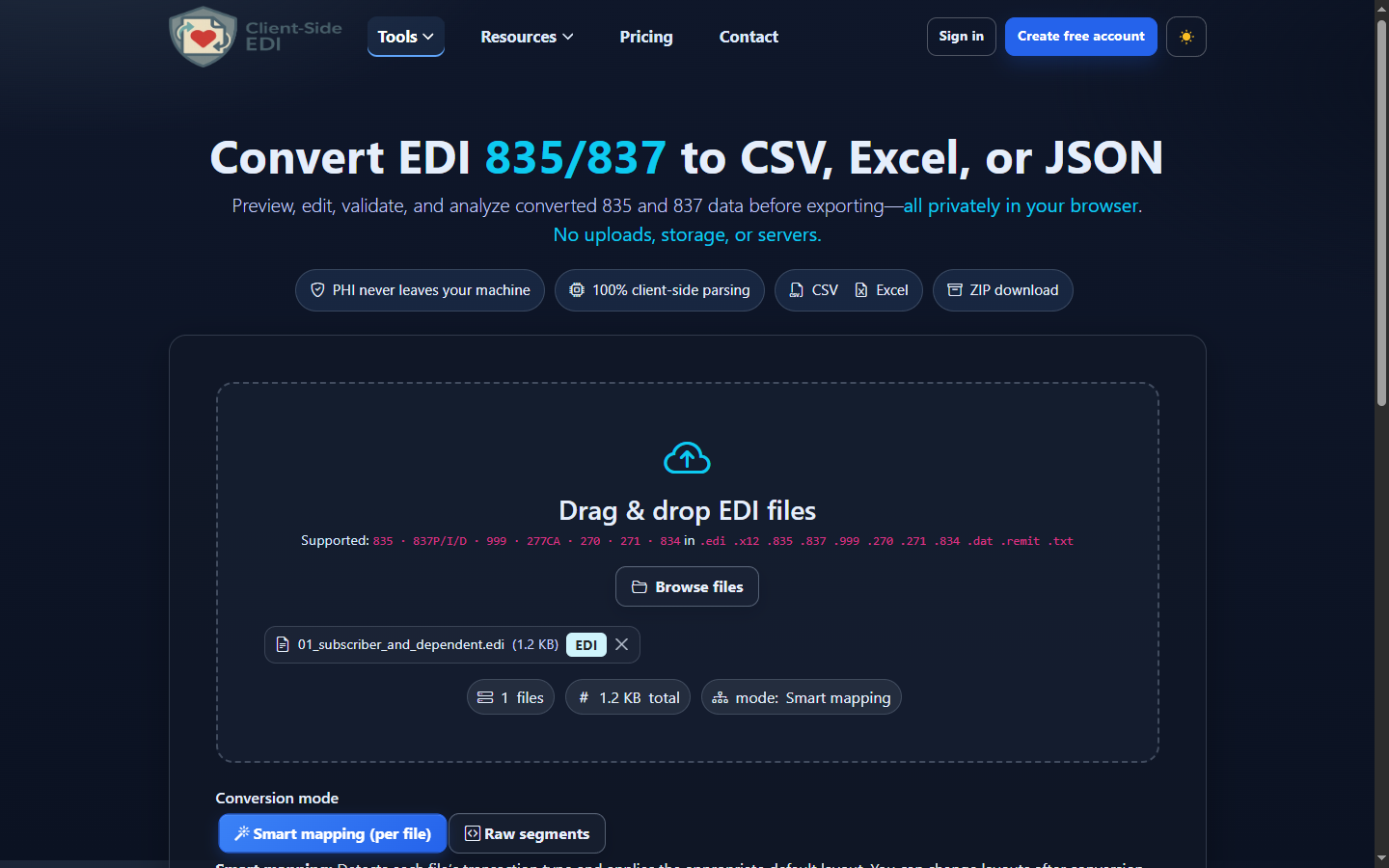
- Add the inquiry. Drag the file into Drag & drop EDI files or choose Browse files. The interface accepts common EDI and text extensions.
- Use Smart mapping. Smart mapping (per file) detects ST01 270 with the 005010X279A1 implementation reference. Raw segments is useful for syntax inspection but does not create inquiry-aware fields.
- Choose privacy options. If appropriate, enable De-identify PHI to obscure names, identifiers, and contact information in converted output. Decide whether your reconciliation workflow still needs a controlled linkage key.
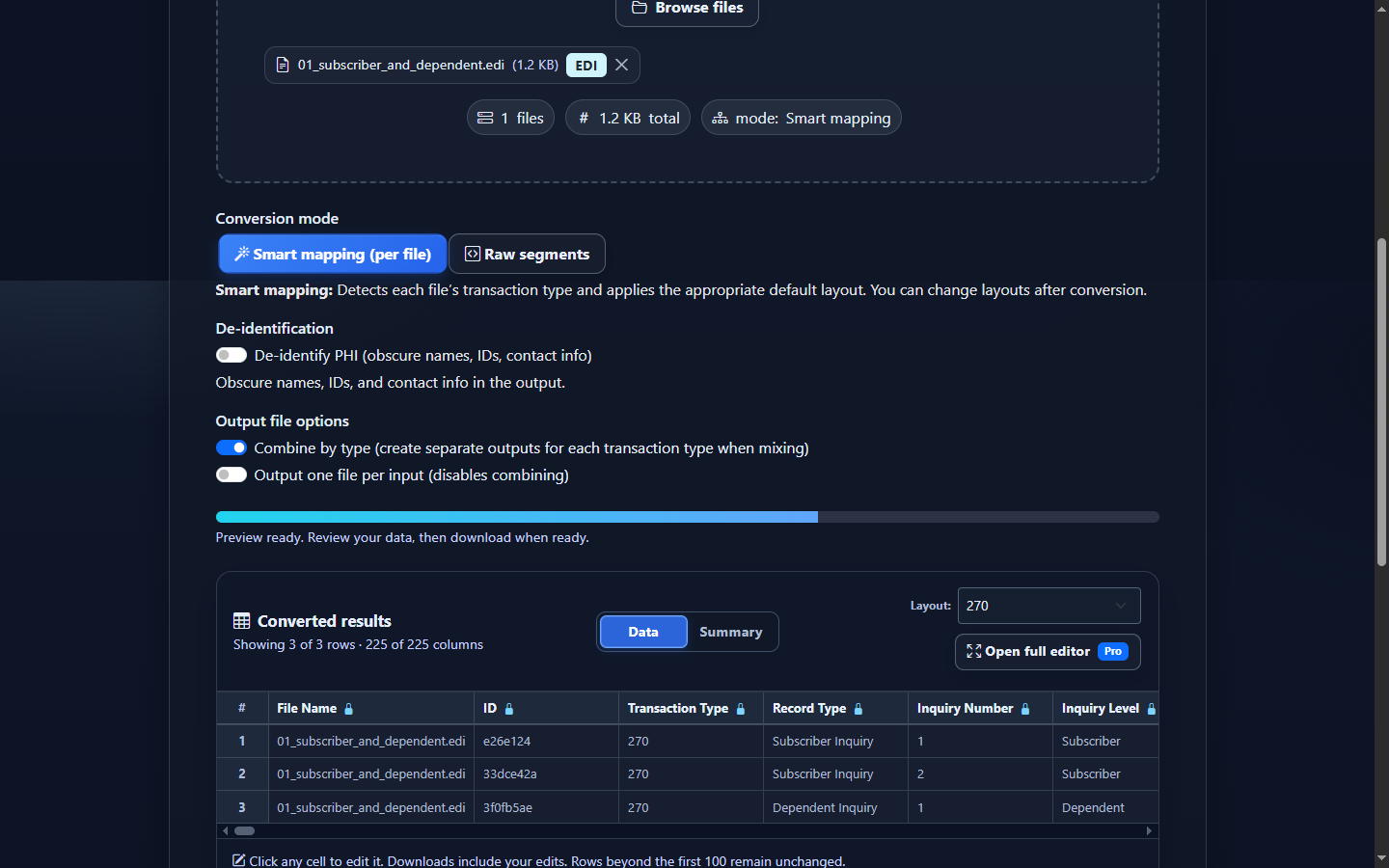
- Select Convert & Preview. Confirm the 270 output and review Data. Compare subscriber/dependent IDs, service types, and inquiry dates with a few source segments.
- Review the mapped rows. Converted results shows one row per EQ occurrence. Use Summary for compact inquiry counts, patient levels, service types, procedures, dates, and request criteria.
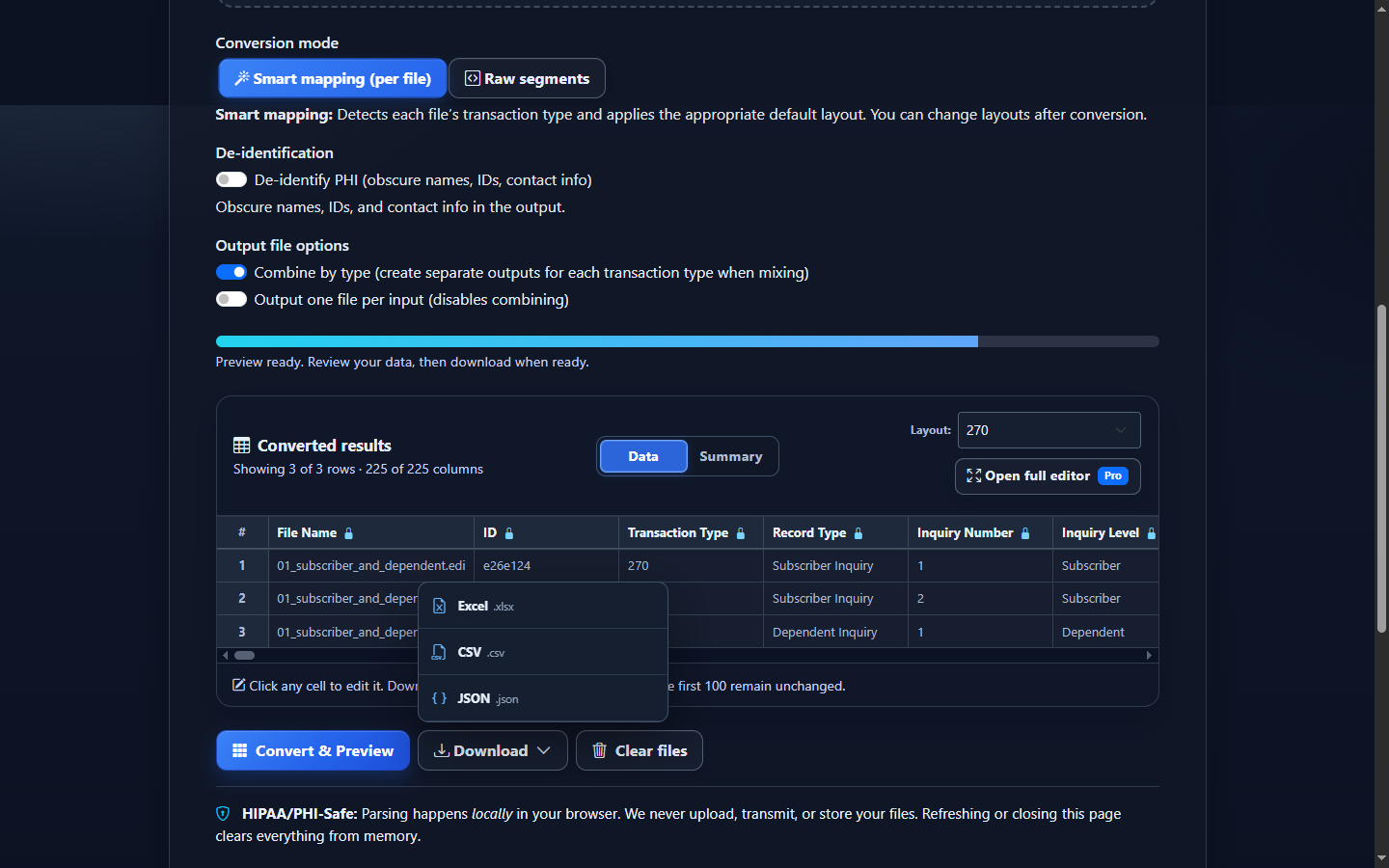
- Download the reviewed data. Open Download and choose Excel (.xlsx), CSV (.csv), JSON (.json), or XML (.xml). Converted-data edits flow into the download but do not rewrite the original 270.
Choose CSV, Excel, JSON, or XML for the next workflow
| Format | Best fit | Watch for |
|---|---|---|
| CSV | Database imports, scripts, reconciliation pipelines, and one-table analysis. | Import IDs as text; CSV has no native typing to protect leading zeroes. |
| Excel | Operations review, filters, handoff, and ad hoc comparisons with 271 responses. | Excel may infer dates or numbers from IDs and eight-digit date values. |
| JSON | Application code and field-name/value integrations. | This is mapped row JSON, not a lossless reconstruction of the source X12 tree. |
| XML | Structured row XML for integrations. It serializes the same reviewed Smart Mapping or Raw rows; it is not a native X12 hierarchy, an implementation-guide XML schema, or a lossless X12 round trip. | |
Interpret the output without inventing a response
The canonical 270 schema contains 227 public columns because a row may need envelope, hierarchy, source, receiver, subscriber, dependent, demographic, provider, EQ, amount, reference, and date context. Most rows are sparse. Blank dependent fields on a subscriber inquiry are expected.
For row counts, use each EQ occurrence as an inquiry detail—not automatically as a unique patient or transaction. Group by file and transaction control number first, then patient trace or identifier, Inquiry Number, service types, and requested dates. A subscriber with two EQ segments produces two rows; a dependent’s EQ produces another.
For a 270-to-271 comparison, identifiers and service-type requests are useful join context, but the response can repeat benefit information in a different hierarchy. Do not assume positional row-for-row correspondence.
Common 270 conversion and review mistakes
Counting EQ rows as unique patients
What you see: more output rows than people. Why: one person can request several services. Review: Patient Type, hierarchical IDs, Inquiry Number, and Service Type Codes. Correction: define a patient key separately from the inquiry-detail key.
Losing leading zeroes
What you see: member ID 000000000123 becomes 123. Why: spreadsheet type inference. Review: member, trace, policy, tax, and control identifiers. Correction: import or format those columns as text.
Reading a date without its qualifier
What you see: an inquiry date or range labeled incorrectly. Why: DTP03 meaning depends on DTP01 and DTP02. Review: Inquiry Date Qualifier, Description, Format, and Date/Range together. Correction: retain all four fields.
Assuming the file proves eligibility
What you see: a complete, valid-looking 270. Why it matters: it contains a request, not a payer’s response. Correction: locate the corresponding 271 and apply the relevant operational rules.
Treating unknown codes as parser failure
What you see: an “Unknown service type” description while the original code is preserved. Why: a code may be outside the local dictionary or trading-partner expectations. Correction: verify the raw value against applicable X12 and companion-guide sources before changing it.
Frequently asked questions
What does one converted EDI 270 row represent?
One EQ inquiry occurrence, with the applicable subscriber or dependent and parent trading-partner context repeated onto the row.
Does a 270 contain eligibility results?
No. It is an inquiry. The corresponding EDI 271 carries eligibility and benefit response information.
Can conversion determine whether a patient is eligible?
No. It summarizes values supplied in the file and does not contact a payer or determine current eligibility.
Which implementation is recognized?
The current mapper recognizes 005010X279A1. A 271 using the same implementation family remains a different transaction type.
Why are many columns blank?
The 227-column schema preserves possible context across several hierarchy levels. A particular EQ row only populates fields present or inherited for that inquiry.
Does editing converted data change the source 270?
No. Edits affect the converted download; the original EDI source is not rewritten.