Raw boundary: Raw mode preserves identified original segment rows, bypasses the 58-field Smart projection and 999 Smart Summary/validation, and is not de-identified. TA1, broader optional X231 structures, payer/partner companion rules, and lossless hierarchical export remain outside the current result schema.
Current converter contract
Smart routing requires ST01=999. A nonblank ST03 must be exactly 005010X231 or 005010X231A1; only a blank ST03 may fall back to an exact supported GS08. Near matches and unsupported references are Raw-only.
Smart Mapping exposes one unified 58-field schema with no separate Key schema. It is a bounded, non-exhaustive X231/X231A1 projection with hybrid row grain: one row per IK4, an IK3-without-IK4 row, an AK2-without-IK3 row, or a group-summary row when no AK2 exists. Converter-generated ID represents private physical occurrence identity and is not source-supplied.
IK401-3 is the repeating data-element position. CTX output preserves exact source text, case, physical order, and duplicates. Summary counts physical AK2, IK3, IK4, and every populated IK5/AK9 error-code position independently; AK9 counts remain source-reported and are not reconciled to AK2 detail.
De-identification protects Smart rows, Summary, validation presentation, and CSV/JSON/XLSX/XML downloads. Raw mode preserves identified original segment rows and is not de-identified.
Implementation acknowledgment validation guide
How to Validate an EDI 999 File
Check acknowledgment structure, transaction scope, error hierarchy, codes, and counts without confusing file conformance with acceptance of the underlying healthcare transaction.
To validate an EDI 999 file, verify the X12 envelope and 005010X231A1 identity, confirm that AK1 and AK9 define the acknowledged group, and review every AK2 transaction occurrence through its IK3, IK4, CTX, and IK5 details. Check that acknowledgment and error codes are recognized, numeric AK9 counts are coherent, and an accepted count never exceeds the received count. Correct defects in the generated 999 and rerun validation. A clean result does not prove that the original claim, eligibility, enrollment, or payment transaction succeeded.
What validating an EDI 999 means
An EDI 999 Implementation Acknowledgment reports whether a receiving system accepted, accepted with errors, or rejected an X12 functional group or transaction set at the syntax and implementation-guide level. The current mapper and validator recognize exact 005010X231 and 005010X231A1 references under the documented ST03/GS08 fallback rule; near matches are Raw-only.
Validation has two distinct jobs. Source validation checks whether the 999 itself is coherent. Reported-issue review interprets errors that the 999 says occurred in the original transaction. A reported IK3 or IK4 error is not necessarily a defect in the acknowledgment file: it is content delivered by that acknowledgment. Keep those two origins separate when triaging results.
What to check in a 005010X231A1 acknowledgment
| Area | Representative check | Why it matters |
|---|---|---|
| Controls | ISA/IEA, GS/GE, and ST/SE controls and counts agree; ST01 identifies 999 and the version identifies 005010X231A1. | Broken controls can prevent dependable interchange or transaction processing. |
| Group result | AK1 identifies the original functional group and AK9 supplies its result and counts. | Without both, the acknowledgment lacks a complete group-level result. |
| Transaction result | Each AK2 occurrence that identifies an original transaction closes with IK5. | AK2 tells you what was acknowledged; IK5 states that transaction’s result. |
| Error hierarchy | IK3 belongs to an AK2 transaction; IK4 belongs beneath an applicable IK3; CTX preserves business or situational context. | Error details are meaningful only when their parent and location remain intact. |
| Codes | IK3, IK4, IK5, and AK9 acknowledgment or error codes are recognized by enabled checks. | An unknown code cannot be interpreted reliably without partner clarification. |
| Counts | AK902, AK903, and AK904 are numeric, and accepted AK904 does not exceed received AK903. | Contradictory counts make the group disposition internally inconsistent. |
Scope: Validation does not replace the licensed implementation guide or a trading partner’s companion guide. Partner rules may add operational requirements, and the 999 does not adjudicate the underlying business transaction.
Read group, transaction, segment, and element scope in order
AK1 identifies the original functional group. Within that group, each AK2 identifies an original transaction set. IK3 points to a segment-level implementation issue, and a related IK4 narrows the location to an element or component. CTX may add situational or business context. IK5 closes the transaction-level result, while AK9 summarizes the group.
One rejected transaction can produce several IK3 and IK4 details, so counting error rows is not the same as counting rejected transactions. Conversely, AK9 can report a rejected group without AK2 detail. In that case, the acknowledgment does not identify which individual transaction failed; consult the sender or companion-guide workflow instead of inventing a transaction-level conclusion.
Controlled invalid AK9 count and corrected source
This shortened synthetic example contains no real protected health information (PHI). AK903 says one transaction set was received, but AK904 says two were accepted. The accepted count cannot exceed the received count.
Invalid source
ST*999*0001*005010X231A1~
AK1*HC*100001*005010X222A1~
AK2*837*000001*005010X222A1~
IK5*A~
AK9*A*1*1*2~
SE*6*0001~
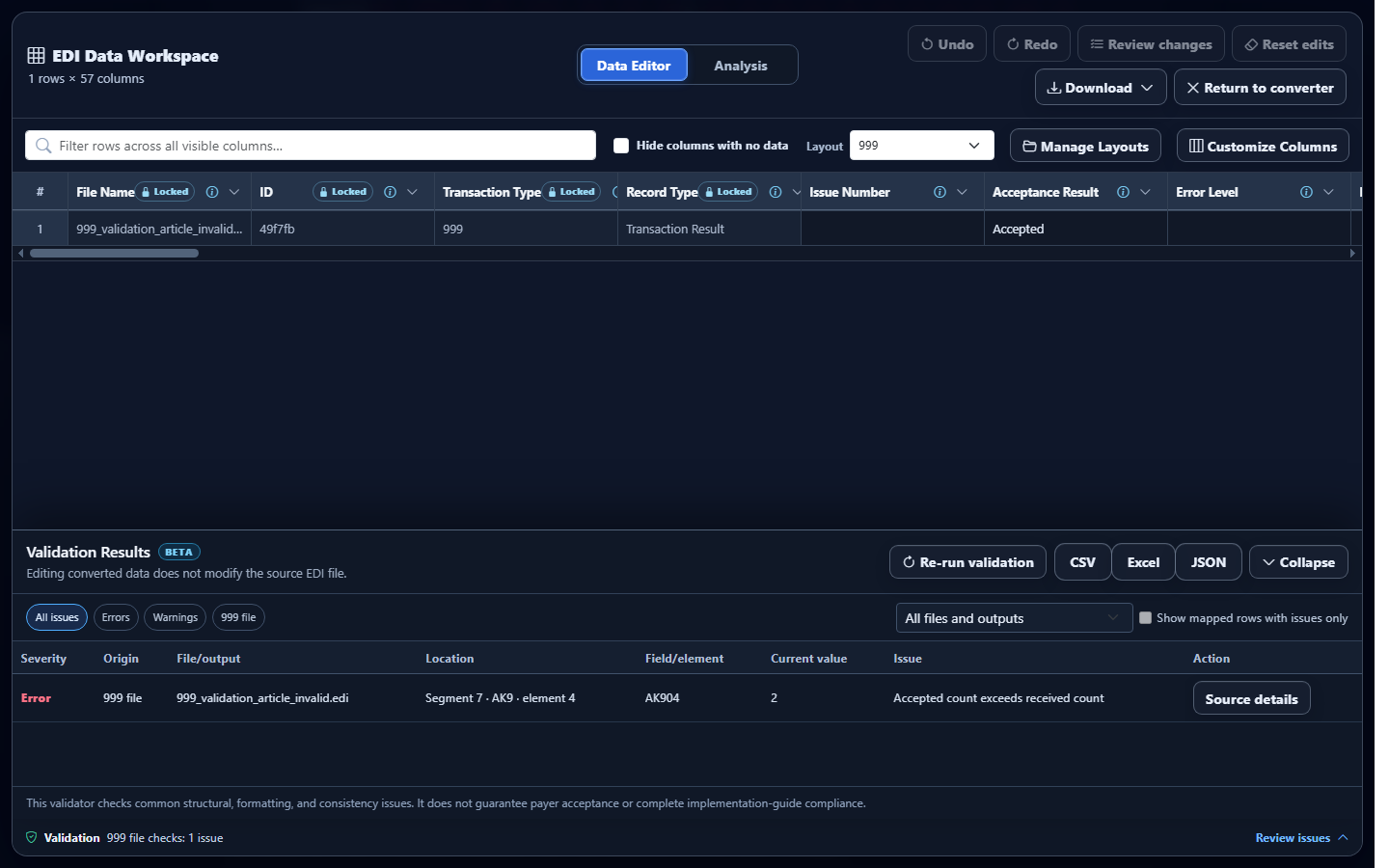
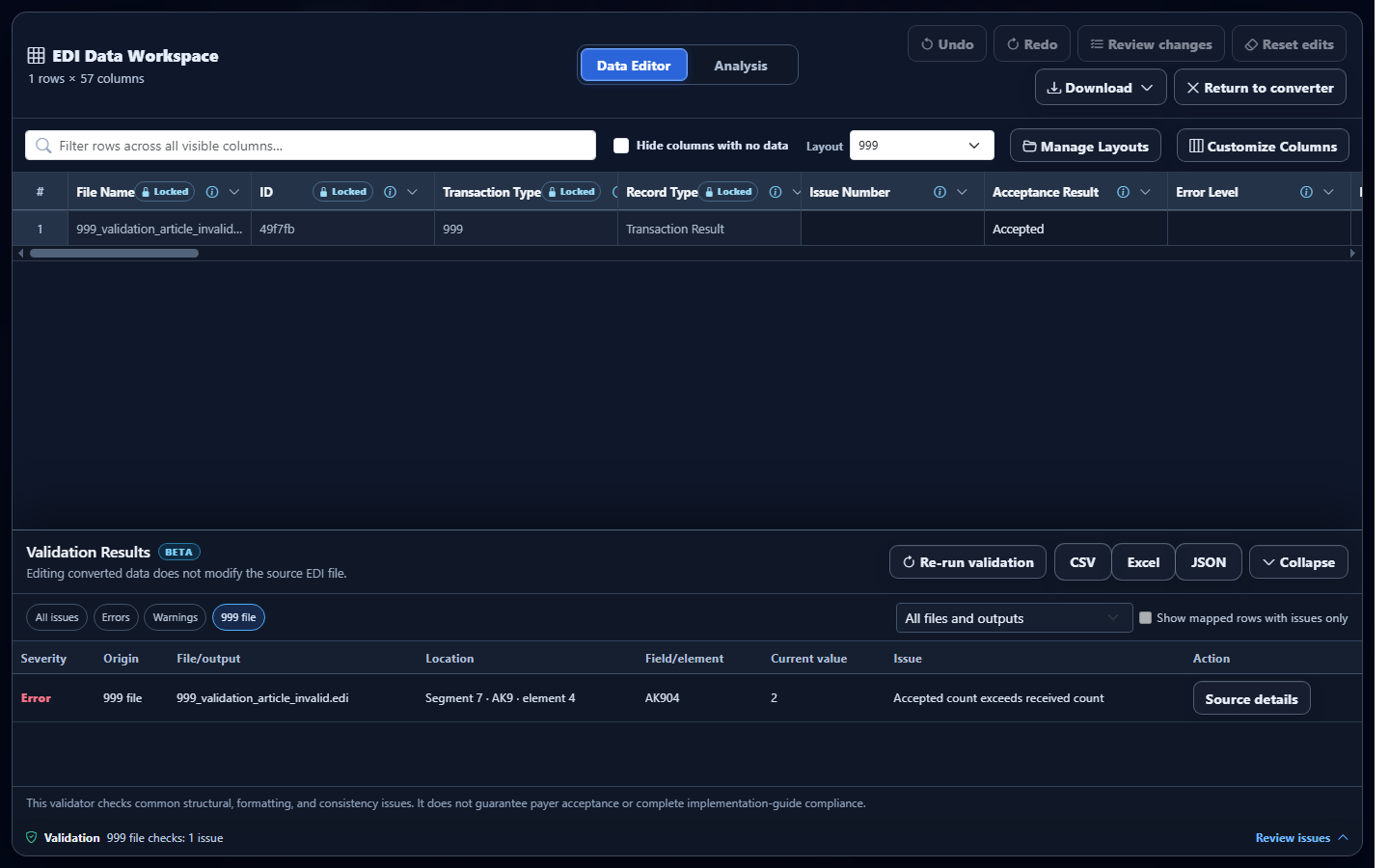
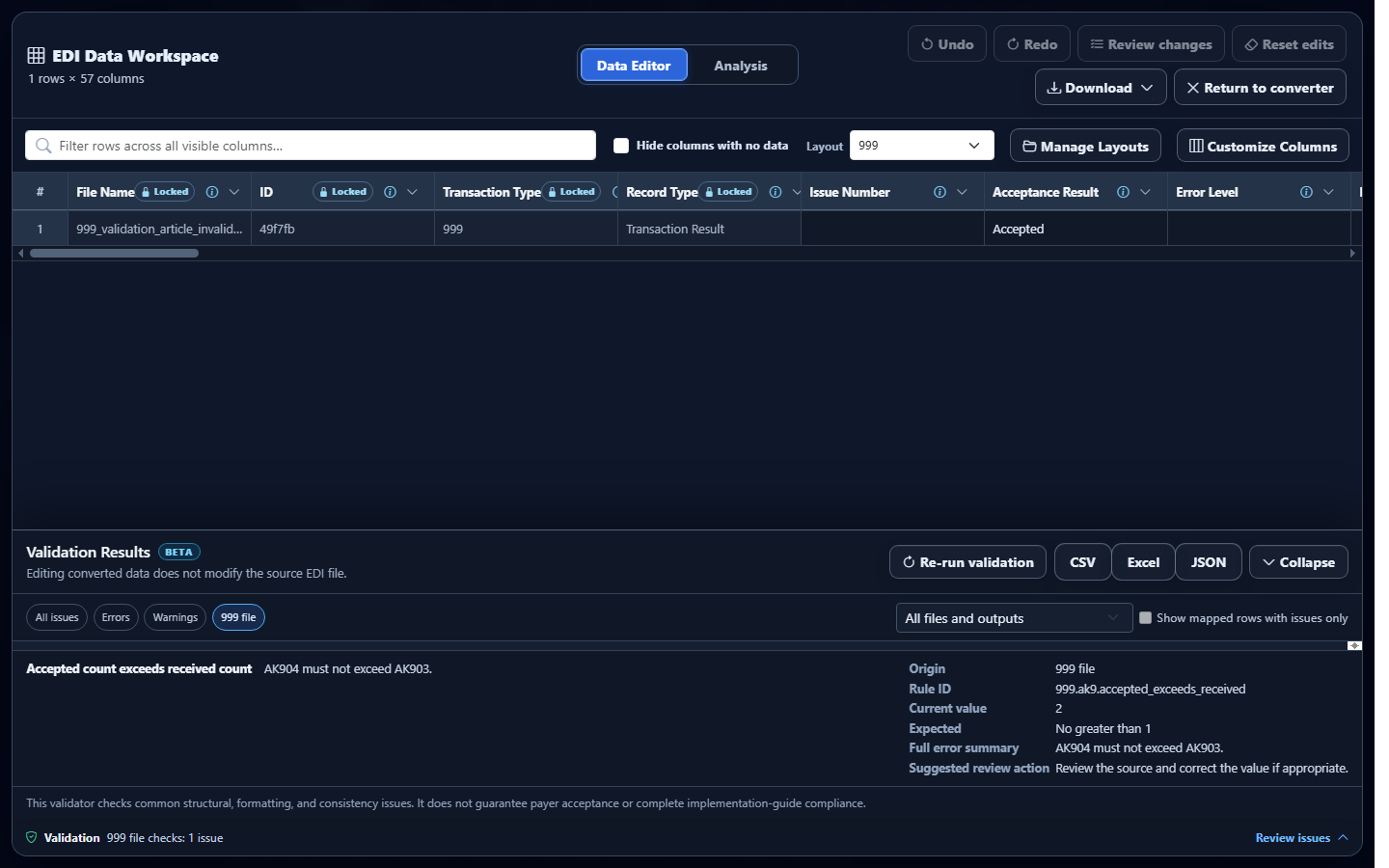
Observed validator result: the actual validator reports Accepted count exceeds received count, applies rule 999.ak9.accepted_exceeds_received, and locates AK9 element 4 with current value 2 and expected value no greater than 1.
Corrected source
ST*999*0001*005010X231A1~
AK1*HC*100001*005010X222A1~
AK2*837*000001*005010X222A1~
IK5*A~
AK9*A*1*1*1~
SE*6*0001~
Changing AK904 to 1 makes the controlled counts coherent. That correction addresses the 999 source defect only; it does not alter or resubmit the acknowledged 837.
Validate the 999 in EDIFileConverter.com
- Open the EDI converter and validator. Add an authorized acknowledgment through Browse files or Drag & drop EDI files. Processing occurs in the browser tab without application-server upload.
- Keep Smart mapping (per file) selected. The application identifies 005010X231A1 and maps group, transaction-result, and error-detail rows while preserving their hierarchy.
- Select Convert & Preview. Confirm Converted results identifies 999. Spot-check original group identifiers, transaction control numbers, IK5 and AK9 results, and any IK3, IK4, or CTX details.
- Select Open full editor. Expand Validation in Data Editor to open Validation Results.
- Separate source and reported issues. Use severity and domain filters, then check whether an item describes the 999 file itself or an implementation problem reported about the original transaction.
- Open Source details. Review the rule ID, segment location, current value, expected condition, and suggested corrective action.
- Correct the appropriate system. Repair a malformed 999 where it was generated. Investigate reported IK3 or IK4 content against the original submitted transaction. Editing converted rows does not rewrite either source file.
- Replace and rerun. Add the corrected acknowledgment and choose Re-run validation. Eligible plans can export a validation report as CSV, Excel, or JSON.
Common EDI 999 validation issues and cautious fixes
Missing AK1 or AK9 group result
What you see: a missing group-response or group-result error. Why it matters: the acknowledgment cannot completely identify and summarize the original group. Review: the ST-to-SE transaction and generator logic. Correction: regenerate the complete acknowledgment and recalculate SE01.
AK2 without a closing IK5
What you see: a transaction result is missing. Why it matters: AK2 identifies the original transaction, but no disposition closes it. Review: the AK2 occurrence and the following segments. Correction: derive IK5 from the receiver’s actual implementation result; do not copy another transaction’s code.
Orphan IK3, IK4, or IK5
What you see: a parent or hierarchy error. Why it matters: the reported problem cannot be assigned safely to its transaction, segment, or element. Review: preceding AK2 and IK3 boundaries. Correction: repair loop serialization while keeping related CTX details with their error.
Unknown acknowledgment or error code
What you see: a code warning tied to IK3, IK4, IK5, or AK9. Why it matters: the disposition is ambiguous under enabled code checks. Review: the exact element and applicable partner documentation. Correction: confirm the intended supported code before regenerating; do not guess from its description.
Non-numeric or contradictory AK9 counts
What you see: an invalid numeric value or accepted count greater than received. Why it matters: the group summary conflicts with itself. Review: AK902 through AK904 against acknowledged AK2 occurrences and receiver records. Correction: calculate counts from the authoritative acknowledgment result.
Frequently asked questions
What does an EDI 999 validator check?
It checks enabled envelope, group-result, transaction-result, hierarchy, code, numeric, and consistency rules.
Does an accepted 999 mean a claim will be paid?
No. A 999 reports syntax and implementation acknowledgment, not adjudication, payment, enrollment, or eligibility.
Which implementations are recognized?
The current workflow recognizes exact 005010X231 and 005010X231A1 under the documented ST03/GS08 fallback rule.
Can a rejected group omit AK2 details?
Yes. A group-level AK9 result may not identify a particular transaction. Do not infer one when AK2 detail is absent.
Does editing converted data rewrite the source?
No. Data Editor changes affect converted output and downloads, not the uploaded EDI.