Converted claim-acknowledgment editing guide
How to Edit an EDI 277CA File
Change mapped claim-status data for analysis or downstream export while preserving the difference between an editable converted row and the sender’s original acknowledgment.
To edit an EDI 277CA file, convert the 005010X214 acknowledgment with Smart mapping, open the full Data Editor, locate the claim-, provider-, transaction-, or service-level status row, and change an unlocked converted field. Use Undo, Redo, Review changes, or Reset edits to verify the result, then download the revised tabular representation as Excel, CSV, JSON, or XML. The editor does not rewrite the uploaded X12 source, change a status reported by the payer or clearinghouse, repair the original 837, or resubmit a claim.
What editing a 277CA does—and does not do
The ASC X12 277CA Health Care Claim Acknowledgment uses implementation 005010X214. A payer, clearinghouse, or other information source sends it to report pre-processing status for previously submitted 837 claim data. Status can occur at transaction, provider, claim, and service-line levels. A single claim may therefore produce several converted rows, especially when multiple STC status segments are present.
EDIFileConverter.com maps that nested document into labeled rows and columns. The Data Editor changes this converted representation. That is useful for adding a downstream review marker, normalizing a value for an internal dataset, correcting a presentation-layer typo, or preparing an analysis-friendly export. It is not source-EDI authoring. A changed cell neither changes the payer’s reported status nor modifies the original 837 claim.
A 999 acknowledgment is related but different: it primarily reports implementation syntax and structure. A 277CA adds claim-oriented status. An accepted 277CA still does not prove adjudication or payment; an 835 remittance and later claim-status workflows address later lifecycle events.
Choose the correct status occurrence before editing
| Converted context | Fields to verify | Editing risk |
|---|---|---|
| Transaction | 277CA transaction control, BHT reference, transaction-level STC, and action code. | A transaction-level status should not be mistaken for one claim’s result. |
| Provider | Billing provider identifier, provider trace, acknowledgment level, and provider STC. | Several claims can inherit the same provider context. |
| Claim | Claim submitter identifier, payer claim control number, status number, STC composite, and amounts. | Repeated STC rows may describe one claim, not separate claims. |
| Service line | Service-line control number, procedure context, service date, and line-level STC. | A line rejection must remain tied to its parent claim and service occurrence. |
Start by filtering or searching for a stable business identifier rather than editing the first visually similar row. Preserve leading zeros in identifiers and keep the original file available for audit. Locked columns such as file identity and internal row identifiers protect workspace context; editable columns represent converted output.
Important: If the source 277CA itself is malformed, correct it in the system that generated the acknowledgment. If the 277CA reports an 837 rejection, investigate the original submission and trading-partner instructions. Do not “fix” a rejection by relabeling a converted result.
Original and edited converted values
The synthetic 277CA used for the screenshots contains fictional organizations, identifiers, claims, and dates. The source includes a claim-level status occurrence like this:
TRN*2*CLAIM000001~
STC*A2:20:PR*20260725*WQ*150~
REF*1K*PAYER000001~
Here, TRN02 carries the claim trace, STC01 carries the composite status, STC02 is the status date, STC03 is an action code, and the REF occurrence supplies a payer claim control value according to its qualifier and loop context. The mapper interprets that occurrence as an accepted claim-status row.
| Field | Original converted value | Edited export value |
|---|---|---|
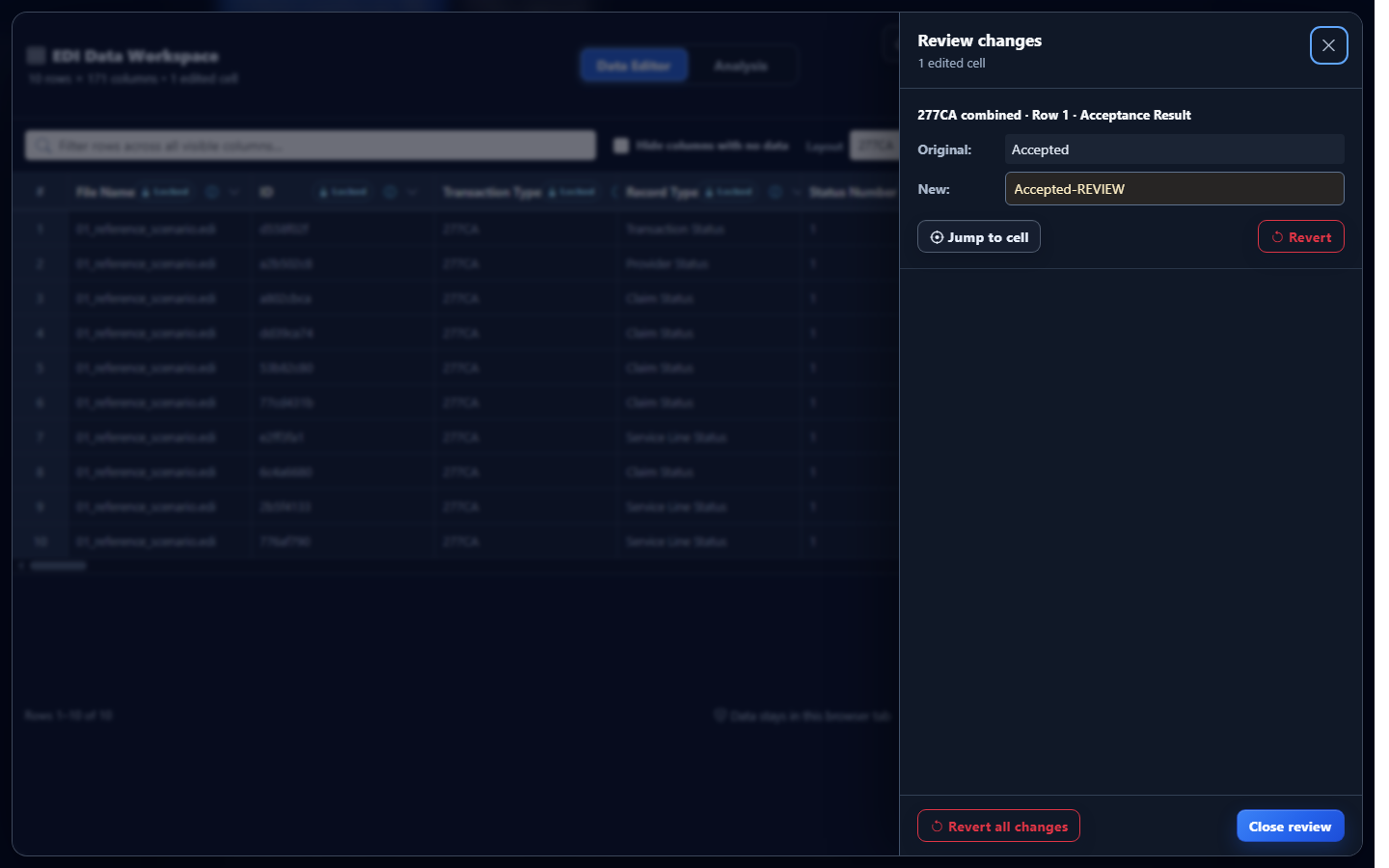
| Acceptance Result | Accepted | Accepted-REVIEW |
The suffix is an intentionally obvious analyst marker used only to demonstrate the editor. It is not an X12 acknowledgment code and should not be represented as payer-supplied truth. The original source still contains A2:20:PR; only the converted download carries the edited label.
Edit converted 277CA data in EDIFileConverter.com
- Open the EDI converter and Data Editor. Add an authorized 277CA using Browse files or Drag & drop EDI files. Processing occurs in the browser tab without application-server upload.
- Keep Smart mapping (per file) selected. Confirm the detected implementation is 005010X214. A different 277 implementation, such as 005010X212, should not be treated as 277CA.
- Select Convert & Preview. In Converted results, verify transaction type, Record Type, Acknowledgment Level, claim identifiers, and Acceptance Result before changing anything.
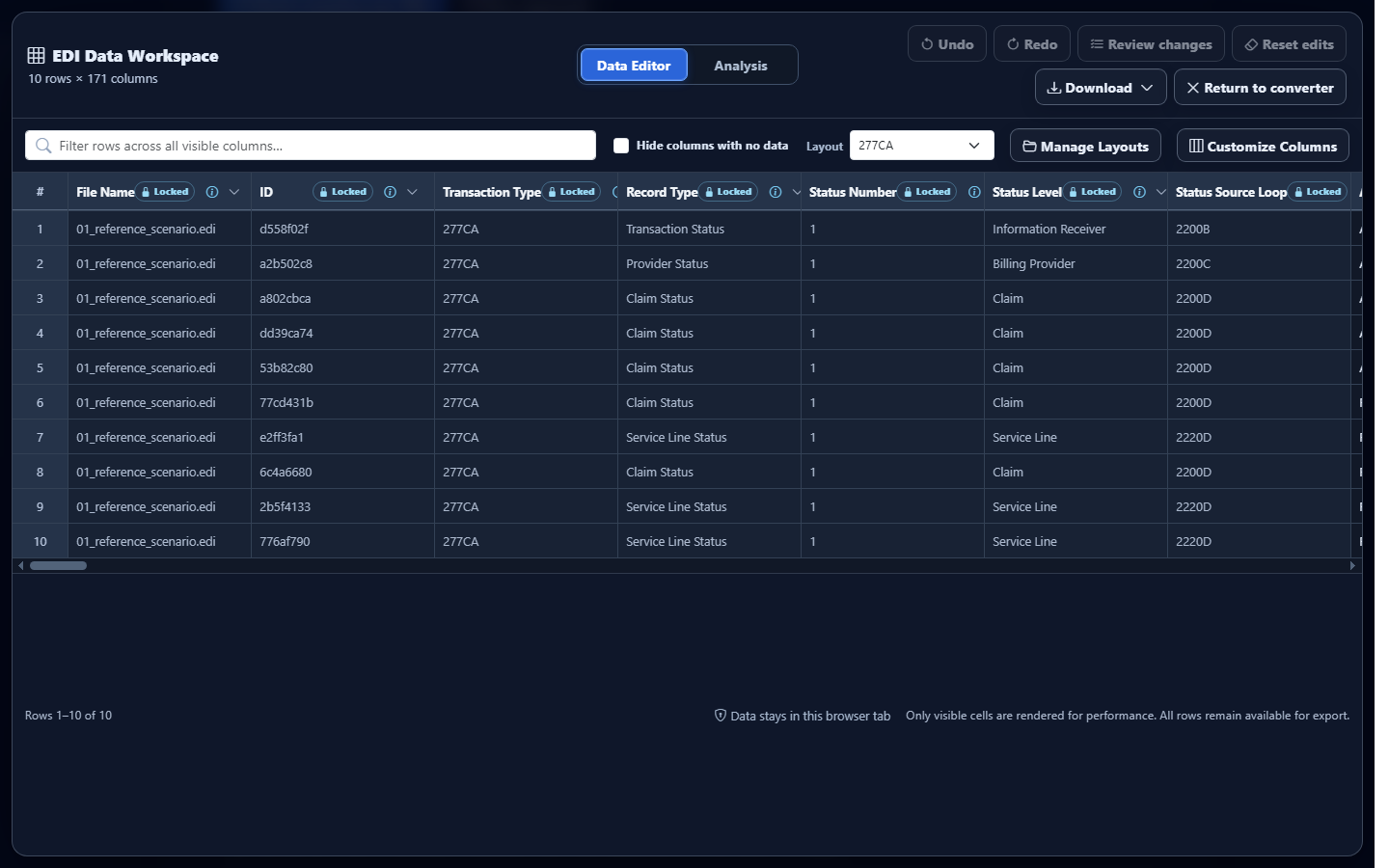
- Select Open full editor. The EDI Data Workspace opens on the Data Editor tab. The interface shows the row and column count and keeps protected context columns locked.
- Find the intended occurrence. Use Filter rows across all visible columns, a column menu, or the Layout selector. Hide columns with no data can reduce sparse 277CA output, but confirm that necessary identifiers remain visible.
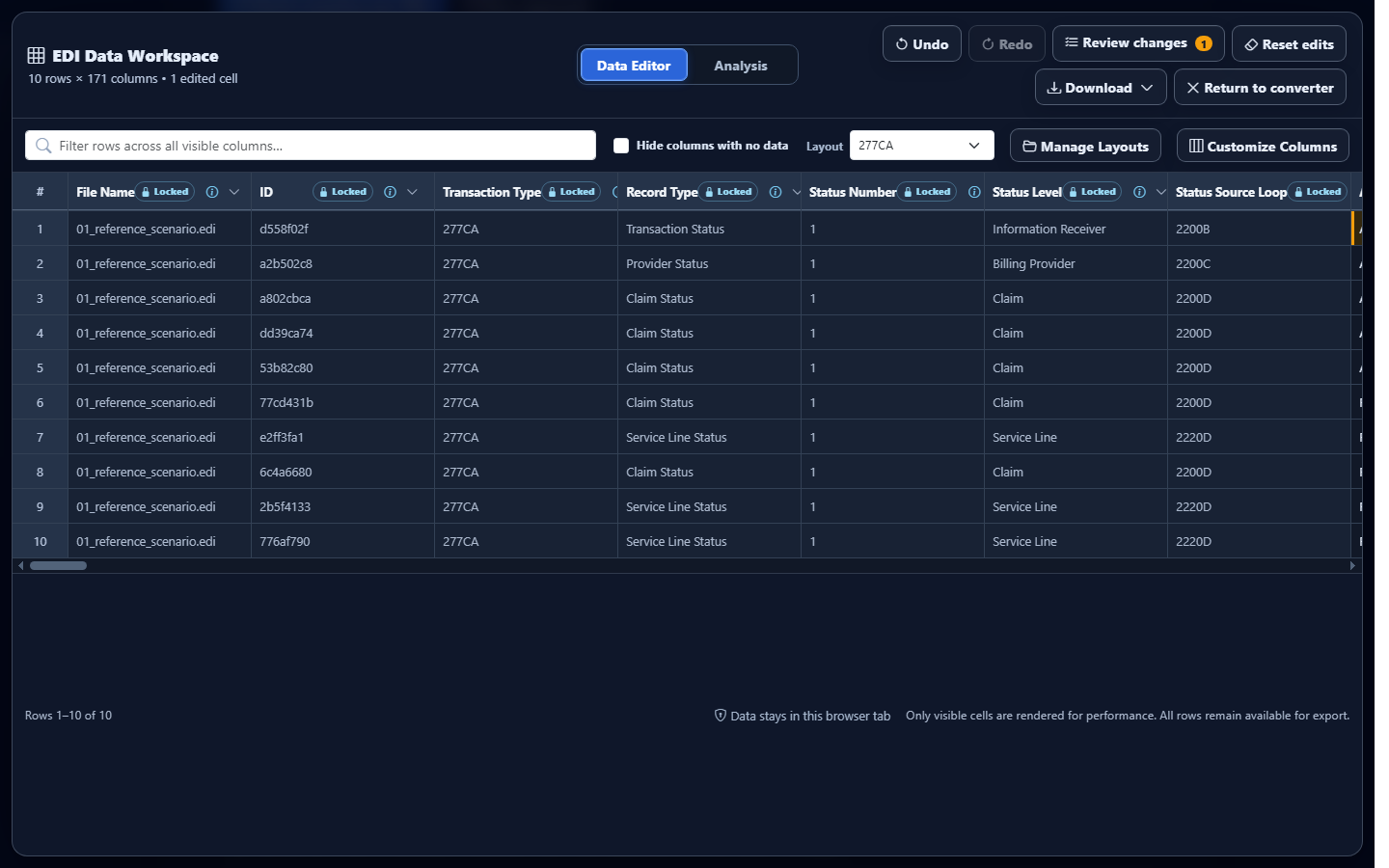
- Edit an unlocked cell. Select the value, enter the reviewed replacement, and press Enter or move focus away to commit it. The edited-cell treatment and workspace count identify the change.
Review, undo, revert, and export the edit
Select Review changes before downloading. The review panel lists the field, row context, original value, and replacement so you can distinguish a deliberate transformation from an accidental keystroke. Use Undo and Redo for recent changes. Use the review panel’s revert action for a specific change, Revert all changes for the displayed edit set, or Reset edits when you intend to discard converted-data changes.
Open Download in the Data Editor and select Excel, CSV, JSON, or XML. The export includes committed converted-data edits. Choose Excel for a reviewed workbook, CSV for a flat system import, JSON when a downstream application benefits from objects and explicit field names, or XML when an integration benefits from structured elements. The output remains occurrence-based: retain Record Type, Acknowledgment Level, status numbers, and identifiers when consumers must reconstruct hierarchy.
Common 277CA editing mistakes
Editing the wrong repeated STC row
What you see: multiple similar rows for one claim. Why it matters: each row can represent a different status occurrence or hierarchy level. Review: Record Type, Acknowledgment Level, Status Number, claim trace, and service-line control. Correction: revert the wrong cell and edit only the identified occurrence.
Replacing a payer-reported rejection with “Accepted”
What you see: a more convenient export label but unchanged source evidence. Why it matters: the edit misrepresents what the sender reported. Review: original STC composite and source context. Correction: revert the label and track internal disposition in a separate governed field or system.
Dropping identifiers from a customized layout
What you see: a concise export that cannot be joined back to claims. Why it matters: status meaning depends on owner and occurrence. Review: claim submitter identifier, payer control, transaction control, provider, and service-line fields. Correction: restore the necessary columns before download.
Assuming validation repairs the edited result
What you see: an edited-data warning or no source issue. Why it matters: source validation and converted-output review are different. Review: the issue origin and current edited cell. Correction: fix source defects upstream; use the editor only for the intended derived dataset.
Frequently asked questions
Does the Data Editor rewrite the original 277CA?
No. It edits the converted representation used for review and download. The uploaded X12 source remains unchanged.
Can editing Acceptance Result change a payer decision?
No. It is a downstream data transformation, not a change to sender-reported status.
Which 277 implementation is supported?
Smart mapping recognizes 005010X214, the Health Care Claim Acknowledgment commonly called 277CA.
Can edited data be downloaded?
Yes. The Data Editor offers Excel, CSV, JSON, and XML downloads containing committed converted-data edits.
Can I undo an edit?
Yes. Use Undo, Redo, Review changes, the available revert controls, or Reset edits according to the scope you intend.