Benefit-enrollment editing guide
How to Edit an EDI 834 File
Change mapped enrollment data for downstream analysis or export while preserving member, coverage, maintenance-action, date, and identifier context.
To edit an EDI 834 file, convert the 005010X220A1 enrollment file with Smart mapping, open the full Data Editor, locate the correct subscriber or dependent enrollment row, and change an unlocked converted field. Verify the change with Undo, Redo, Review changes, or Reset edits, then export the revised representation as Excel, CSV, JSON, or XML. This workflow does not rewrite the uploaded X12 source, apply enrollment, alter a payer’s records, or create coverage.
What editing an 834 does—and does not do
An EDI 834 Benefit Enrollment and Maintenance transaction communicates member and coverage additions, changes, terminations, and reinstatements between trading partners. The 005010X220A1 transaction can identify the information source, information receiver, subscriber, and—when applicable—a dependent. INS identifies member maintenance and HD identifies coverage maintenance, while TRN, REF, DTP, NM1, DMG, and related segments contribute trace, identifier, date, demographic, and party context.
EDIFileConverter.com maps that hierarchy into labeled enrollment rows. The Data Editor changes the converted representation used for review and download. This is useful for annotating an internal dataset, normalizing a display value, correcting a downstream import value, or preparing a reviewed extract. It is not an EDI authoring or transmission tool. The original file remains intact, and a changed row cannot establish whether a member is enrolled or what coverage is active.
Editing a converted 834 does not apply enrollment, contact a payer, or create coverage. Any operational correction intended for submission should be made in the authoritative source system and regenerated under the applicable trading-partner rules.
Select the correct enrollment and hierarchy level
| Context | Fields to verify | Why it matters |
|---|---|---|
| Information source | Sponsor or employer name, identifier, and source-level hierarchy. | The source identifies the organization supplying enrollment maintenance. |
| Information receiver | Payer, plan administrator, or TPA name, identifier, address, and receiver hierarchy. | Receiver identity can affect routing and trading-partner requirements. |
| Subscriber | Member identifier, name, date of birth, relationship, trace, and enrollment number. | Several enrollment rows can share one subscriber context. |
| Dependent | Dependent identity, relationship, parent subscriber, and member level. | Do not overwrite subscriber data when a coverage occurrence belongs to a dependent. |
| Coverage maintenance | HD maintenance action, insurance line, plan description, DTP enrollment date, and occurrence number. | One patient can have several distinct coverage occurrences. |
Search for stable identifiers such as the member identifier, enrollment trace, or sponsor reference. Then verify Enrollment Level, member relationship, maintenance-action fields, coverage dates, and source hierarchy before editing. Protected workspace columns remain locked; unlocked columns are part of the converted output.
Important: Preserve leading zeros in member, trace, and reference identifiers. If a source value must change for transmission, correct the generating system and rebuild the X12 controls and counts rather than treating the edited spreadsheet-like result as a replacement EDI file.
Original and edited converted enrollment values
The screenshot fixture is synthetic and contains fictional names, identifiers, addresses, and dates. Its transaction header includes this reference:
ST*834*0001*005010X220A1~
HL*1**20*1~
NM1*PR*2*SYNTHETIC HEALTH PLAN*****PI*PAYER001~
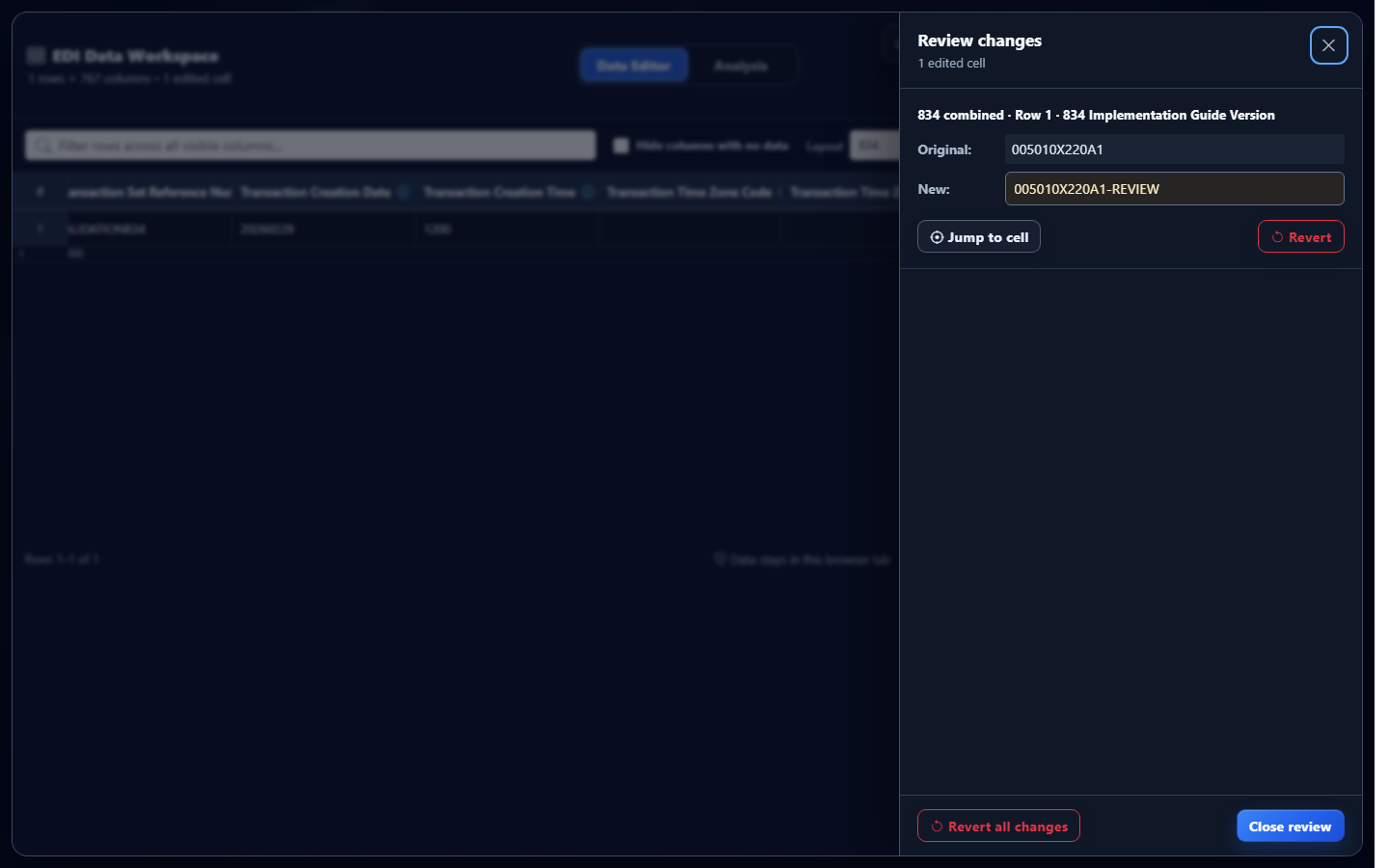
ST03 contains the transaction’s reference identification. The mapped row labels it for readable review. In the controlled editing demonstration, that converted value changes as follows:
| Field context | Original converted value | Edited export value |
|---|---|---|
| 834 implementation reference | 005010X220A1 | 005010X220A1-REVIEW |
The suffix is an intentionally obvious analyst marker, not a transmitted X12 value. It demonstrates the editor while preventing confusion with source truth. The uploaded ST segment remains ST*834*0001*005010X220A1~.
Edit converted EDI 834 data in the application
- Open the EDI converter and Data Editor. Add an authorized enrollment using Browse files or Drag & drop EDI files. Processing occurs in the browser tab without application-server upload.
- Keep Smart mapping (per file) selected. Confirm the application identifies transaction 834 and implementation 005010X220A1.
- Select Convert & Preview. Verify the transaction reference, enrollment level, member and sponsor identifiers, maintenance action, insurance line, and coverage dates in Converted results.
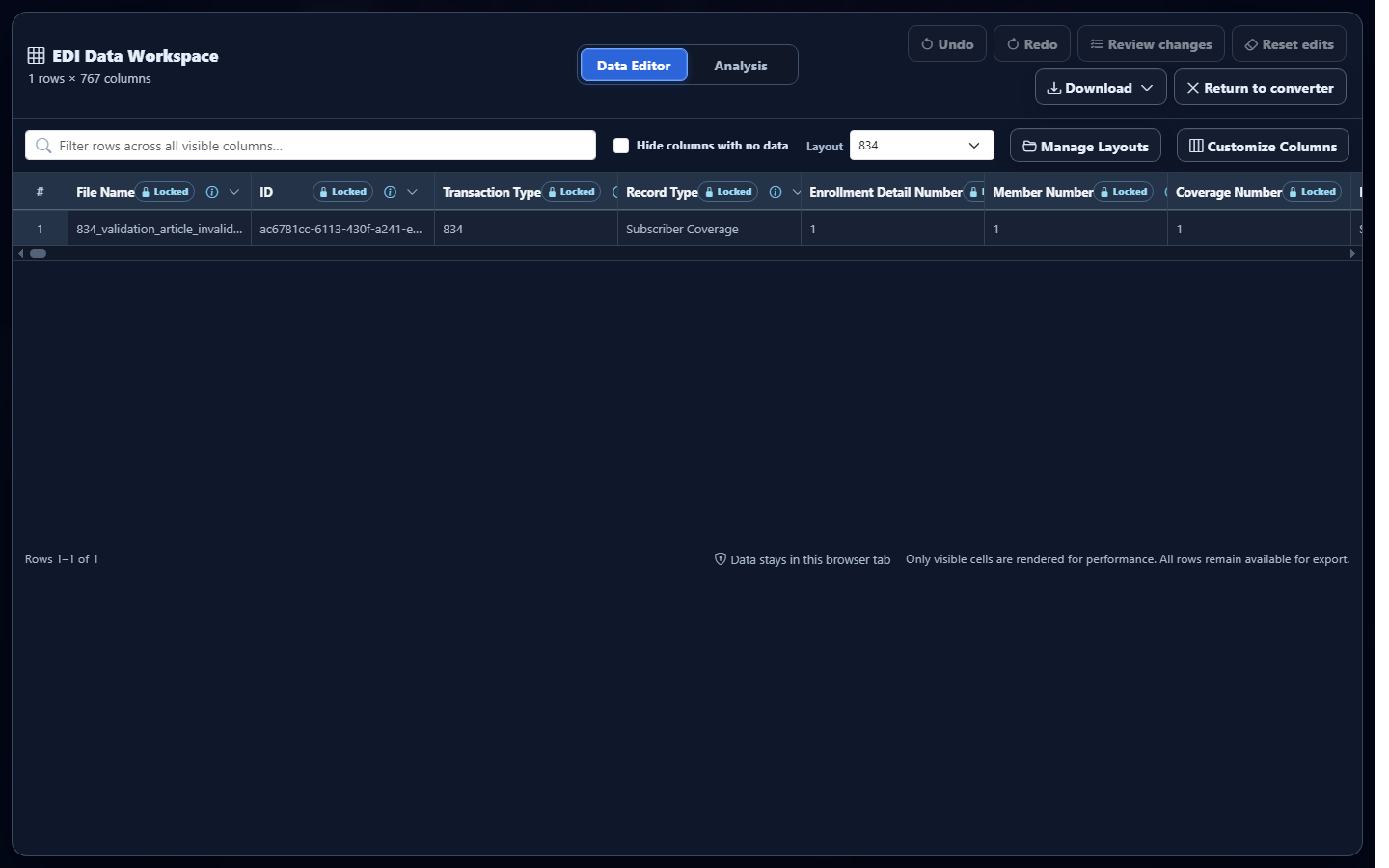
- Select Open full editor. The EDI Data Workspace opens on Data Editor with row and column counts, layout controls, and protected context columns.
- Find the intended row. Use Filter rows across all visible columns, column menus, or Layout. Hide columns with no data can simplify sparse output, but keep the identifiers needed to establish ownership.
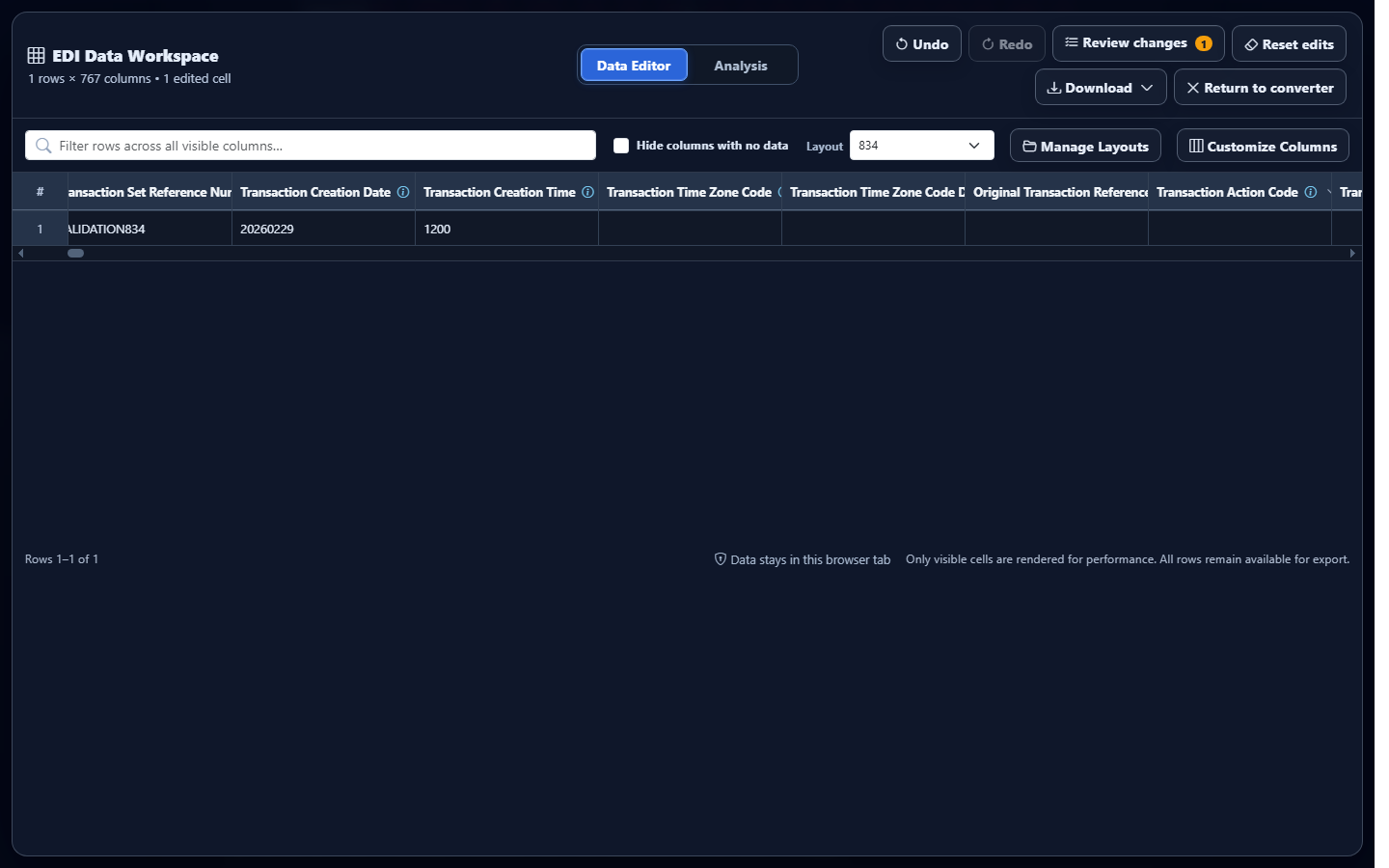
- Edit an unlocked cell. Enter the reviewed value and press Enter or move focus away. The workspace marks the edited cell and updates the edited-cell count.
Review, revert, and export the change
Select Review changes before downloading. The panel identifies the mapped output, row, field, original value, and new value. Use Undo and Redo for recent edits. Use the per-change Revert control, Revert all changes, or Reset edits according to the scope you intend to discard.
Open Download and select Excel, CSV, JSON, or XML. Excel suits a reviewed workbook, CSV supports flat imports, JSON supplies explicit field names for application workflows, and XML supplies structured elements for integration workflows. Each includes committed converted-data edits. Retain enrollment number, hierarchy level, member relationship, trace, sponsor, receiver, HD occurrence, maintenance action, insurance line, and coverage dates when a downstream consumer must distinguish repeated coverage records.
Common EDI 834 editing mistakes
Editing the wrong patient occurrence
What you see: similar subscriber and dependent rows. Why it matters: an HD coverage occurrence belongs to a specific INS member. Review: Enrollment Level, Patient Type, member identifier, and relationship. Correction: revert the wrong edit and locate the intended row through stable identifiers.
Removing leading zeros from identifiers
What you see: spreadsheet-style numeric coercion. Why it matters: identifiers are text and leading zeros may be significant. Review: original mapped value and export settings. Correction: preserve text formatting and compare the reviewed download.
Changing coverage values without their occurrence context
What you see: a revised HD-derived value detached from its maintenance action or coverage dates. Why it matters: one member can have multiple coverage occurrences. Review: enrollment number, HD occurrence, insurance line, maintenance action, and DTP qualifier. Correction: keep associated fields together in the export.
Assuming an edit updates eligibility
What you see: a cleaned dataset but no response from a payer. Why it matters: enrollment application comes from the receiver, not from editing converted data. Correction: use the authorized submission and response workflow outside this converted-data editor.
Frequently asked questions
Does the Data Editor rewrite the original EDI 834?
No. It edits the converted representation used for review and download. The uploaded source remains unchanged.
Does editing an 834 apply enrollment?
No. Editing converted data does not apply enrollment or change payer records.
Which implementation is recognized?
The current smart mapper recognizes 005010X220A1.
Can edited data be downloaded?
Yes. The Data Editor offers Excel, CSV, JSON, and XML containing committed converted-data edits.
Can I undo a converted-data edit?
Yes. Use Undo, Redo, Review changes, Reset edits, or the available revert controls.