Eligibility-inquiry analysis guide
How to Analyze an EDI 270 File
Review inquiry counts, patient hierarchy, service patterns, dates, identifiers, and request criteria without treating the request as an eligibility answer.
To analyze an EDI 270 file, convert the 005010X279A1 eligibility inquiry with Smart Mapping, open the full workspace, and select Analysis. Review physical files, ST transactions, sources, receivers, patients, EQ inquiries, EQ01 service occurrences, request criteria, and bounded member evidence; then drill into Data Editor rows for the full mapped context. Analysis summarizes what the inquiry asks. It does not prove eligibility or benefits and does not change the source inquiry.
Active mapping boundary: Smart Mapping requires exact ST03=005010X279A1, or blank ST03 with exact GS08=005010X279A1; near-matches are Raw-only. The unified 227-field schema has no separate Key layout and emits one row per EQ. Smart de-identification covers rows, validation, summary, and downloads; Raw segments preserve original identified values and are not de-identified.
What EDI 270 analysis shows
An EDI 270 Eligibility, Coverage or Benefit Inquiry asks an information source for eligibility or benefit information. The 005010X279A1 hierarchy identifies the information source, information receiver, subscriber, and—when applicable—a dependent. EQ occurrences identify requested service types, while TRN, REF, DTP, NM1, and DMG supply trace, identifier, date, party, and demographic context.
Analysis summarizes the inquiry content already present in the file: inquiry and patient counts, subscriber-versus-dependent distribution, service-type patterns, request dates, identifier coverage, and hierarchy quality. It does not contact a payer, determine eligibility, calculate benefits, or create a 271 response.
Repeated EQ occurrences can create multiple mapped rows for one patient. Interpret row counts with Inquiry Number, Inquiry Level, Patient Type, trace number, member identifier, and service-type context.
Choose the correct inquiry occurrence before analysis
| Converted context | Fields to verify | Analysis risk |
|---|---|---|
| Transaction | 270 transaction control, BHT reference, information source, and receiver. | Rows from separate ST occurrences must not be merged by a reused business control. |
| Patient | Patient Type, subscriber ID, patient ID, relationship, and resolved HL identifiers. | A dependent inquiry must remain attached to its HL02-resolved subscriber. |
| Inquiry | Inquiry Number, EQ service types, procedure composite, coverage, insurance, references, and dates. | Each EQ is one inquiry row; one row can contain several EQ01 service occurrences. |
| Repeated member evidence | First semantic date/reference/PRV fields plus Other Dates, Other References, and Other Provider Data. | Analysis exposes bounded detail; use the mapped 227-field rows when reconstructing every retained occurrence. |
Start by filtering or searching for a stable business identifier rather than selecting the first visually similar row. Preserve leading zeros in identifiers and keep the original file available for audit. File identity and the converter-generated stable row ID protect the connection between aggregate results and mapped context.
Important: Ownership follows resolved HL02 parents and malformed hierarchy fails closed. If the source 270 is malformed, correct it in its producing system. Do not “fix” a request by relabeling converted output.
Synthetic inquiry example and analysis result
The synthetic 270 used for the screenshots contains fictional organizations, patients, identifiers, and dates. It requests several service categories for a synthetic subscriber:
ST*270*000000001*005010X279A1~
BHT*0022*13*REF000001*20260726*1030~
TRN*1*000000000001*1999999999~
NM1*IL*1*SAMPLE*ALICE****MI*000000000123~
DTP*291*D8*20260726~
EQ*30^47^98~
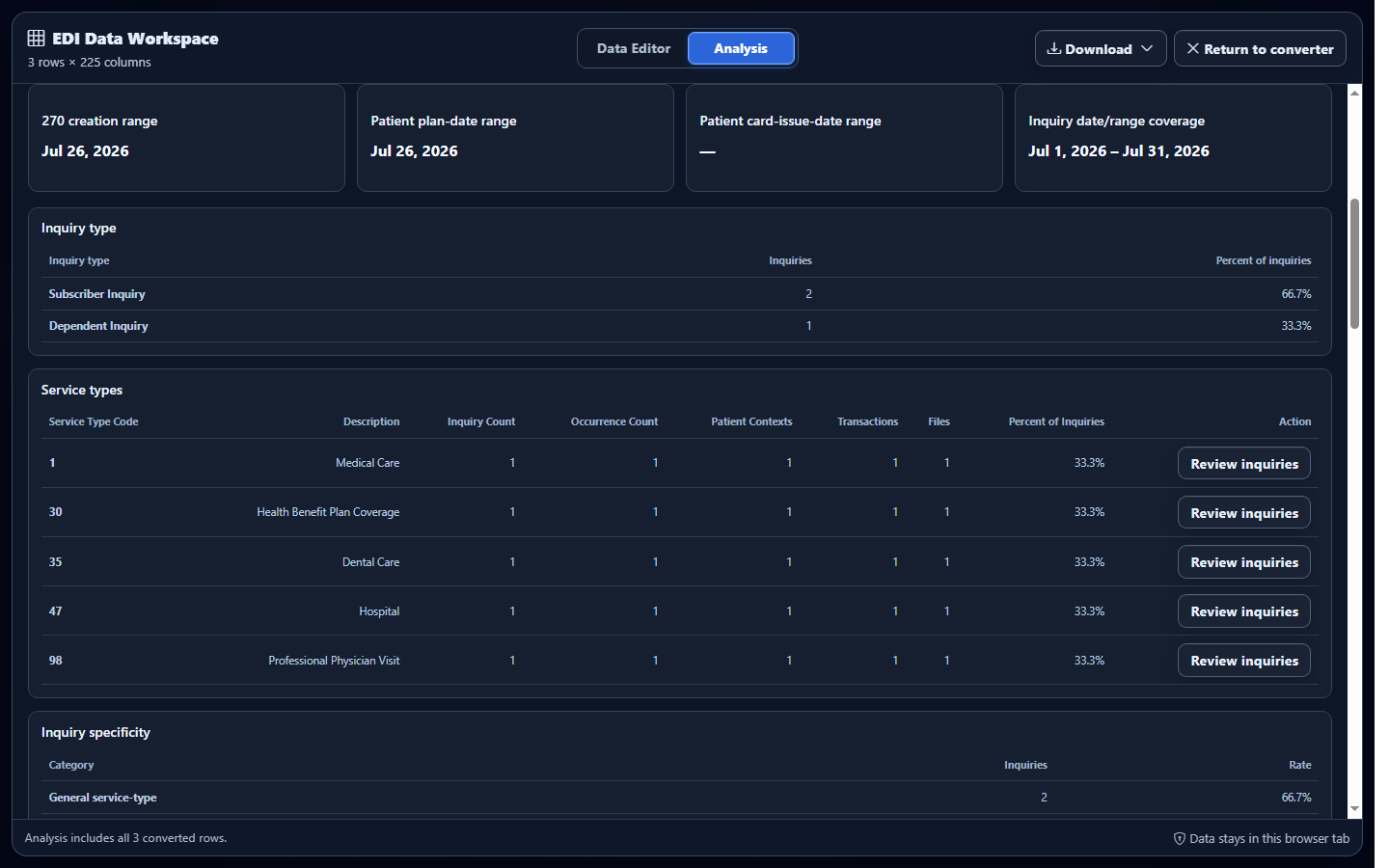
Full Analysis counts the patient at subscriber scope and summarizes the requested service types. It reports what the inquiry asks; it does not assert that those services are covered.
Analyze converted 270 data in EDIFileConverter.com
- Open the EDI converter and Data Editor. Add an authorized 270 using Browse files or Drag & drop EDI files. Processing occurs in the browser tab without application-server upload.
- Keep Smart mapping (per file) selected. Confirm exact 005010X279A1 routing. Unsupported or near-match versions remain Raw-only.
- Select Convert & Preview. In Converted results, verify transaction type, Record Type, Patient Type, hierarchical IDs, inquiry number, and EQ request fields.
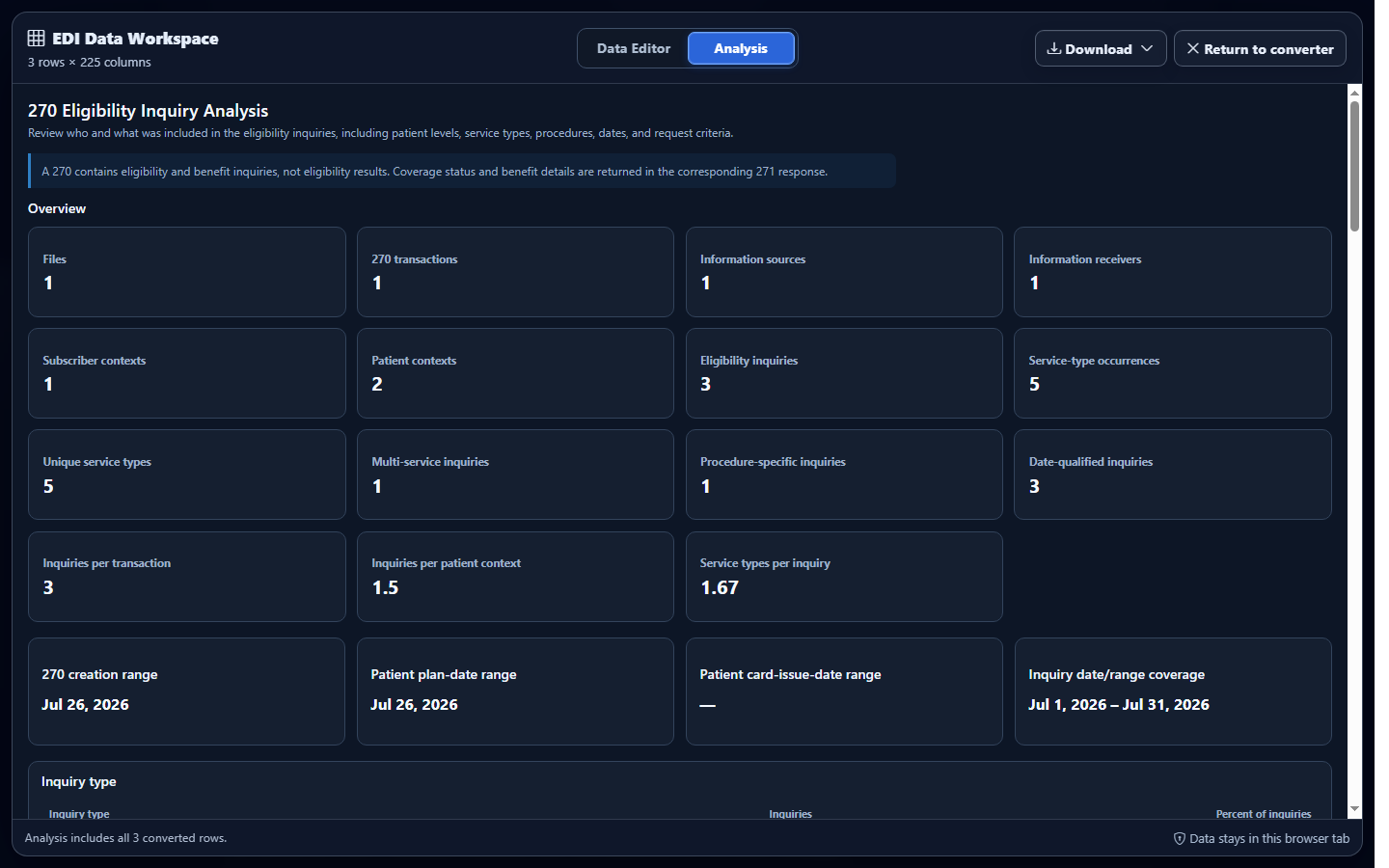
- Open the full workspace and select Analysis. Compare physical files, transactions, patients, inquiries, and service occurrences using consistent denominators.
- Find the intended occurrence. Use Filter rows across all visible columns, a column menu, or the Layout selector. Hide columns with no data can reduce sparse 270 output, but confirm that necessary identifiers remain visible.
- Drill into an anomaly. Filter by source, receiver, patient type, date, or requested service, then inspect the corresponding mapped row and hierarchy context.
Review distributions without double-counting inquiries
Compare physical files, ST transactions, patients, EQ inquiries, and EQ01 service occurrences as separate measures. Break results down by information source, information receiver, subscriber-versus-dependent scope, request date, and service code only after selecting the denominator.
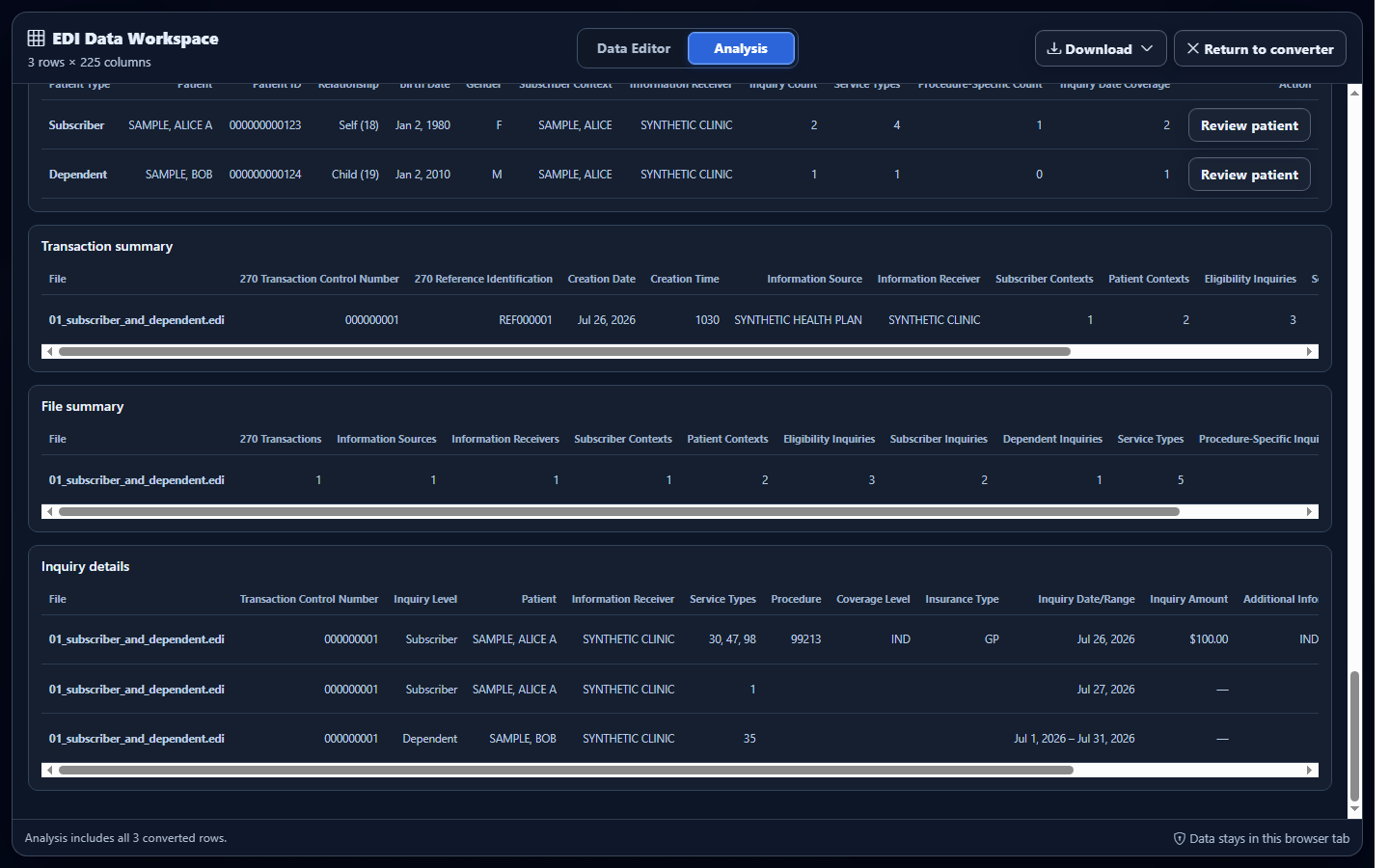
For a downstream analysis extract, retain Record Type, Patient Type, Inquiry Number, hierarchical IDs, qualifiers, identifiers, dates, and service occurrence fields. Record the cohort and grouping rules so later reviewers can reproduce the counts.
Common 270 analysis mistakes
Counting EQ01 repetitions as separate patients
What you see: service-occurrence totals exceed inquiry totals. Why it matters: one EQ row can retain several EQ01 codes. Review: patient, inquiry, and service-occurrence metrics separately. Correction: group patients by resolved member occurrence and inquiries by EQ occurrence.
Reading only the first member date, reference, or PRV
What you see: a convenience value appears complete. Why it matters: later member DTP, REF, and PRV evidence is serialized in Other fields. Review: the corresponding Other Dates, Other References, and Other Provider Data columns in the editor/export.
Dropping hierarchy identifiers during aggregation
What you see: a concise export that cannot be joined back to inquiries. Why it matters: inquiry meaning depends on owner and EQ occurrence. Review: transaction control, patient type, hierarchical IDs, inquiry number, and qualifiers. Correction: restore the necessary columns before download.
Frequently asked questions
What does 270 analysis summarize?
It summarizes inquiry, patient, service, date, identifier, and hierarchy evidence already present in the file.
Does Analysis determine eligibility?
No. It summarizes the request and does not create or replace the payer’s 271 response.
Which 270 implementation is supported?
Smart Mapping recognizes exact 005010X279A1 in ST03, or exact 005010X279A1 in GS08 only when ST03 is blank.
How should repeated EQ values be counted?
Count patients and inquiries separately from EQ01 service occurrences so repeated service codes do not inflate member totals.
Does a 270 prove eligibility or payment?
No. It is an inquiry. Review the corresponding 271 for the returned eligibility information; neither transaction guarantees future claim payment.