277CA conversion guide
How to Convert EDI 277CA to CSV, Excel, JSON, or XML
Turn a claim acknowledgment into readable status rows without losing the hierarchy that connects an STC result to its transaction, billing provider, claim, or service line.
To convert an EDI 277CA to CSV, Excel, JSON, or XML, open the EDI converter, add the 005010X214 file, leave Smart mapping (per file) selected, and choose Convert & Preview. Review the mapped status rows in Converted results, then open Download and select Excel, CSV, JSON, or XML. The export turns nested X12 content into labeled fields such as Claim Submitter Identifier, Acceptance Result, status category and code descriptions, Payer Claim Control Number, and service-line details.
What a 277CA conversion does—and does not do
The ASC X12 277CA Health Care Claim Acknowledgment uses the 005010X214 implementation of the 277 transaction. A payer, clearinghouse, or other information source can send it without a claim-status inquiry to report whether submitted 837 claim data was accepted into, or rejected from, pre-processing. It may report results at transaction, provider, claim, and service-line levels.
That is different from a 999, which primarily acknowledges implementation-level syntax and structure, and from a solicited 276/277 claim-status exchange. It is also different from an 835 remittance: an accepted 277CA does not say that a claim was adjudicated or paid.
Conversion flattens the hierarchy into rows while repeating the necessary parent context. If a claim has two STC occurrences and two service-line results, those are separate status rows rather than one overloaded cell. This makes the data practical for filtering, reconciliation, spreadsheet review, or loading into an analytics pipeline.
From an STC segment to a readable row
This short, fictional extract is based on the repository’s parser-tested 005010X214 fixture. Names and identifiers are synthetic; the leading zeroes are intentional.
ST*277*0001*005010X214~
BHT*0085*08*ACK-20260728-01*20260728*1030*TH~
HL*3*2*19*1~
NM1*85*2*DESERT VALLEY CLINIC*****XX*0123456789~
HL*4*3*PT*0~
NM1*QC*1*EXAMPLE*RILEY****MI*000000001~
TRN*2*CLAIM-0001~
STC*A2:20:PR*20260728*WQ*75.50~
REF*1K*PAYER-0001~
DTP*472*D8*20260720~
TRN02 supplies the claim submitter’s trace identifier, STC01 carries a composite status, STC02 is the status effective date, and REF02 is interpreted according to REF01. Here, qualifier 1K identifies the payer claim control number. The claim service date comes from DTP03 only because DTP01 is 472 and DTP02 says the value is a single date.
Provider NPI
0123456789Claim trace
CLAIM-0001Status
A2:20:PRBilling Provider NPI:
0123456789Claim Submitter Identifier:
CLAIM-0001Acceptance Result:
AcceptedPayer Claim Control Number:
PAYER-0001Representative converted fields
| Output field | Example | Why it matters |
|---|---|---|
| Record Type | Claim Status | Distinguishes transaction, provider, claim, and service-line results. |
| Claim Submitter Identifier | CLAIM-0001 | Helps join the acknowledgment back to the submitted claim. |
| Acceptance Result | Accepted | Provides a normalized reading derived from the reported action. |
| Primary Status Category Code | A2 | Preserves the reported acknowledgment category. |
| Primary Claim Status Code | 20 | Preserves the more specific reported status. |
| Payer Claim Control Number | PAYER-0001 | Captures the payer-assigned claim reference when supplied. |
| Claim Service Date | 20260720 | Preserves the eight-digit D8 value without spreadsheet reformatting. |
Convert the 277CA in the application
- Open the converter. Go to the Client-Side EDI converter. Processing occurs in the browser tab; the application does not upload the selected EDI file to an application server.
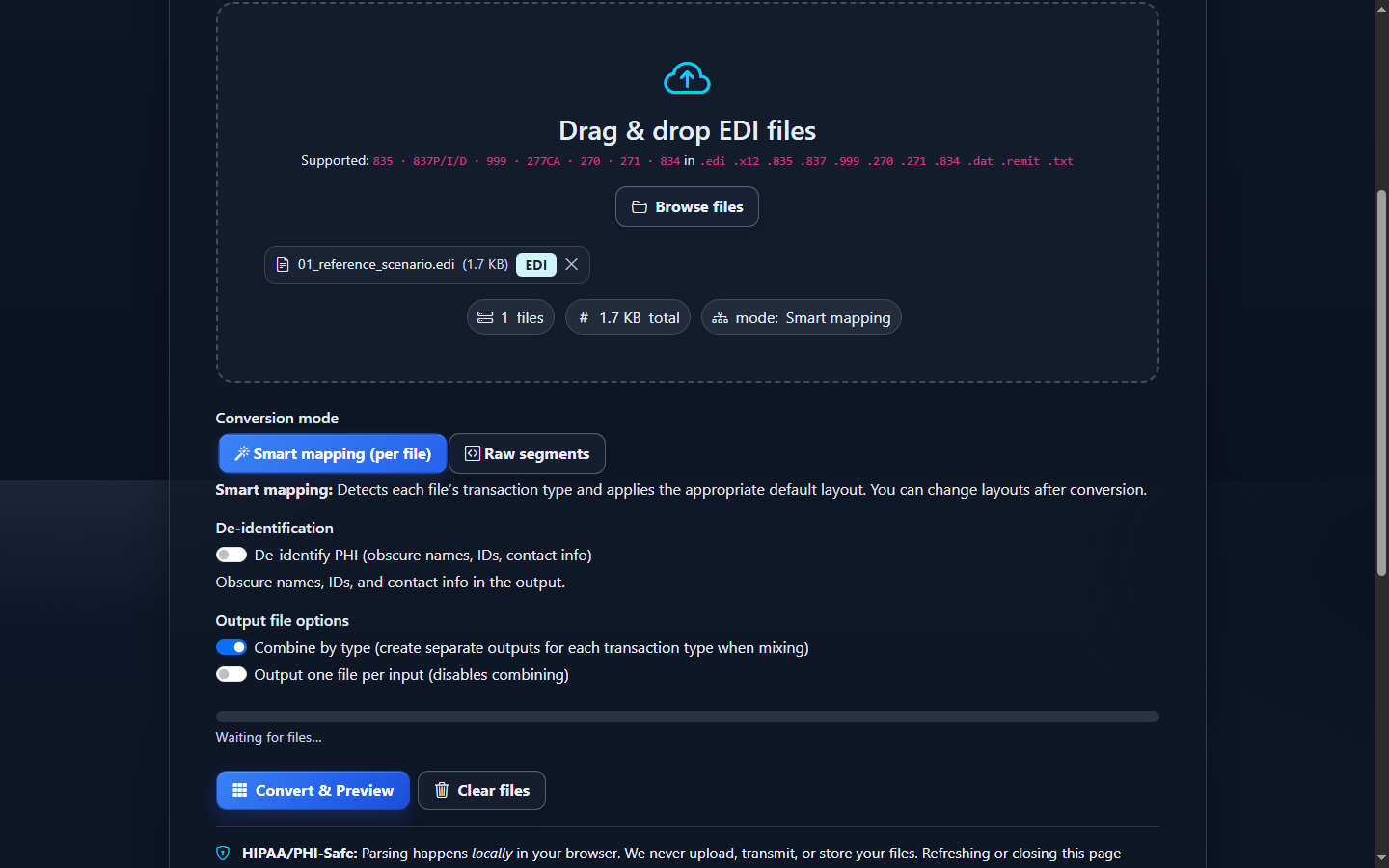
- Add the file. Drag the 277CA into Drag & drop EDI files, or choose Browse files. The current interface accepts common extensions including
.edi,.x12,.dat, and.txt. - Keep Smart mapping selected. Smart mapping (per file) requires exact
ST03=005010X214, or blank ST03 with exactGS08=005010X214. Near matches and unsupported 277 versions remain Raw-only. Raw segments is useful for original delimiter-level inspection, is not de-identified, and does not produce the 174 claim-aware fields. - Optionally de-identify the output. Turn on De-identify PHI if protected Smart values should flow through mapped rows, Summary, validation presentation, CSV, JSON, XLSX, and XML. Preserve a controlled linkage key separately if reconciliation requires one.
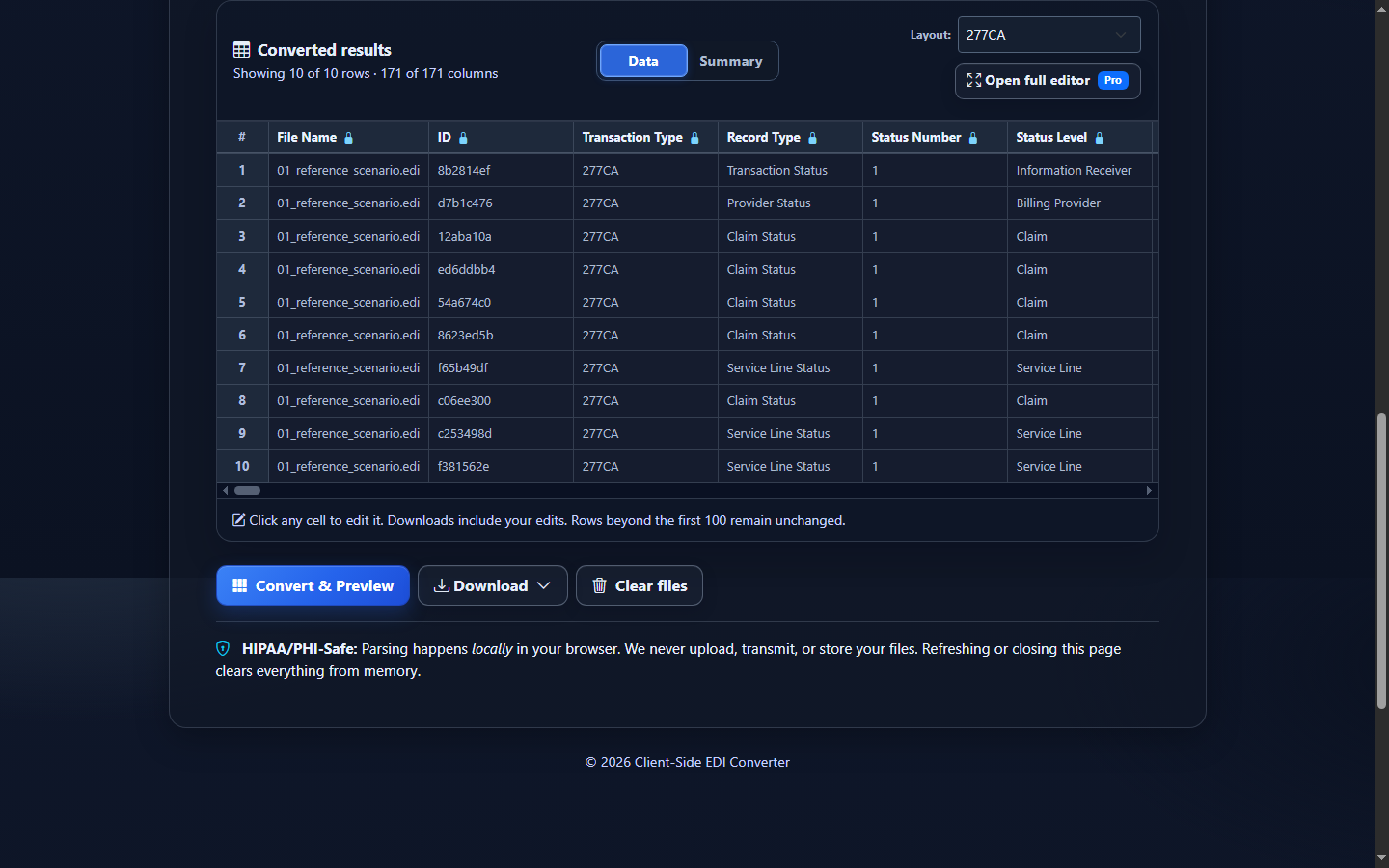
- Select Convert & Preview. Confirm that Converted results opens on the Data view and that the output tab is identified as 277CA. Check a few claim identifiers, status descriptions, and provider values before downloading.
- Review the mapped preview. Each row describes one status occurrence. Use Summary for compact counts, or Open full editor when your account entitlements allow the larger workspace. A wide 277CA schema will scroll horizontally.
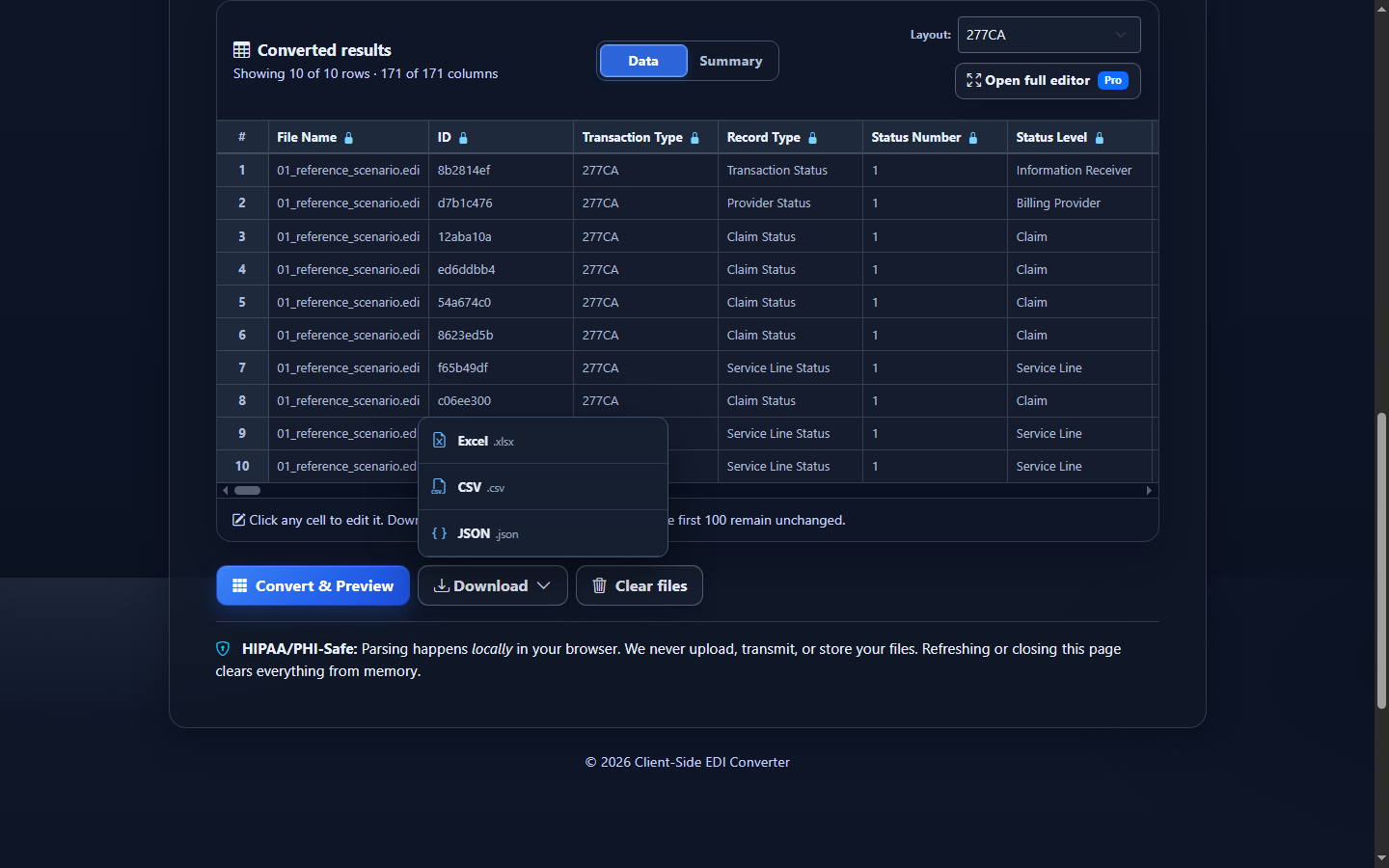
- Choose the export. Open Download, then choose Excel (.xlsx), CSV (.csv), JSON (.json), or XML (.xml). Downloads include converted-data edits. They do not modify the source EDI or resolve a reported rejection.
Choose CSV, Excel, JSON, or XML based on the next step
| Format | Best fit | Watch for |
|---|---|---|
| CSV | SQL imports, scripts, data warehouses, and one-table workflows. | CSV has no native data types or multiple worksheets. Import identifiers as text so leading zeroes survive downstream processing. |
| Excel | Operations review, filters, handoff, and ad hoc reconciliation. | Spreadsheet software may auto-convert dates, long identifiers, or zero-prefixed IDs. Inspect import/display formatting. |
| JSON | Application integration and code that benefits from field-name/value objects. | The export is mapped tabular JSON, not a lossless reconstruction of the original X12 segment tree. |
| XML | Structured row XML for integrations. It serializes the same reviewed Smart Mapping or Raw rows; it is not a native X12 hierarchy, an implementation-guide XML schema, or a lossless X12 round trip. | |
Read the hierarchy before counting claims
A 277CA conversion is deliberately occurrence-based. A transaction-level STC, provider-level STC, claim-level STC, and service-line STC can all refer to related material without representing four distinct claims. Filter Record Type to Claim Status before calculating claim-level acceptance counts, and decide how repeated STC occurrences should be handled.
For reconciliation, start with Original 837 Transaction Identifier, Billing Provider NPI, Claim Submitter Identifier, and Payer Claim Control Number. Then inspect Acceptance Result, the primary and additional category/status/entity codes, Status Summary, and Status Message. At service-line level, add the line number and current/original procedure fields.
The converter uses one unified 174-field Smart Mapping schema and no separate Key schema. It is the current supported projection, not exhaustive X214 coverage or a lossless hierarchical export. Most rows will have many blank cells because a claim status does not carry every service-line field. That sparsity is expected, not evidence of failed parsing.
Common 277CA conversion mistakes
Counting every row as a claim
What you see: exported row totals exceed the number of submitted claims. Why: STC can repeat at multiple hierarchy levels. Review: Record Type, Loop Identifier, Status Number, Claim Submitter Identifier, and Service Line Number. Correction: define a claim-level key and filter to the status level required by the report.
Dropping additional STC components
What you see: a broad status category with no useful specificity. Why: the primary composite can include category, status, and entity codes, and extra composites may add context. Review: the primary and Additional Status 1/2 fields together. Correction: retain all mapped code and description columns instead of exporting only Acceptance Result.
Losing leading zeroes in Excel
What you see: 000000001 becomes 1, or NPI-like values lose a leading zero. Why: spreadsheet type inference treats identifiers as numbers. Review: member, trace, control, and provider identifier columns. Correction: format destination columns as text before pasting/importing, or use an import flow that fixes their type.
Confusing file validity with reported claim rejection
What you see: a structurally readable 277CA includes rejected claim status. Why: the acknowledgment can be valid while reporting a problem with the original 837. Review: Validation Results separately from the status rows and source-context action. Correction: use the reported status and the applicable trading-partner companion guide to investigate the original submission.
Assuming acceptance means adjudication
What you see: Accepted in the export. Why it matters: 277CA acceptance is a pre-processing acknowledgment, not proof of coverage, adjudication, or payment. Correction: use downstream claim-status and remittance workflows for later lifecycle decisions.
Frequently asked questions
What does one converted 277CA row represent?
A row represents one mapped status occurrence at the transaction, provider, claim, or service-line level. Repeated STC segments can create multiple rows for one claim, so use Record Type and hierarchy identifiers when aggregating.
Can Excel open a raw 277CA file directly?
It can show the raw text, but it does not interpret X12 loops, composites, or repeated status segments. Convert the file first to create labeled rows and columns.
Does an accepted 277CA mean the claim will be paid?
No. It reports pre-processing acceptance or rejection status. It is not an adjudication, coverage, or payment decision.
Does conversion change the source EDI?
No. Conversion creates a separate tabular representation. Editing a preview value affects the download, not the original EDI source.
Which implementation does the converter recognize?
The current mapper recognizes 005010X214. If a file is another 277 implementation—such as a 005010X212 claim-status response—do not label it as a 277CA merely because ST01 is 277.
Can I de-identify a 277CA export?
Yes. The converter’s De-identify PHI option obscures names, identifiers, and contact information in converted output. Verify that altered values still meet the purpose of your downstream workflow.