Raw boundary: Raw mode preserves identified original segment rows, bypasses the 58-field Smart projection and 999 Smart Summary/validation, and is not de-identified. TA1, broader optional X231 structures, payer/partner companion rules, and lossless hierarchical export remain outside the current result schema.
Current converter contract
Smart routing requires ST01=999. A nonblank ST03 must be exactly 005010X231 or 005010X231A1; only a blank ST03 may fall back to an exact supported GS08. Near matches and unsupported references are Raw-only.
Smart Mapping exposes one unified 58-field schema with no separate Key schema. It is a bounded, non-exhaustive X231/X231A1 projection with hybrid row grain: one row per IK4, an IK3-without-IK4 row, an AK2-without-IK3 row, or a group-summary row when no AK2 exists. Converter-generated ID represents private physical occurrence identity and is not source-supplied.
IK401-3 is the repeating data-element position. CTX output preserves exact source text, case, physical order, and duplicates. Summary counts physical AK2, IK3, IK4, and every populated IK5/AK9 error-code position independently; AK9 counts remain source-reported and are not reconciled to AK2 detail.
De-identification protects Smart rows, Summary, validation presentation, and CSV/JSON/XLSX/XML downloads. Raw mode preserves identified original segment rows and is not de-identified.
Implementation acknowledgment conversion guide
How to Convert EDI 999 to CSV, Excel, JSON, or XML
Turn nested acknowledgment codes and implementation errors into reviewable rows without separating an IK3 or IK4 finding from the transaction it describes.
To convert an EDI 999 to CSV, Excel, JSON, or XML, open the EDI converter, add the 005010X231A1 acknowledgment, leave Smart mapping (per file) selected, and choose Convert & Preview. Review the transaction-result and error-detail rows in Converted results, then open Download and select Excel, CSV, JSON, or XML. The mapped output carries AK1, AK2, IK3, IK4, CTX, IK5, and AK9 context into labeled columns.
What a converted EDI 999 represents
An EDI 999 Implementation Acknowledgment tells a submitter whether a receiving system accepted, accepted with errors, partially accepted, or rejected an X12 functional group or transaction set at the syntax and implementation-guide level. Clearinghouses, payers, providers, and other trading partners commonly exchange it after transactions such as an 837 claim, 270 eligibility inquiry, 834 enrollment, or 835 remittance file.
The 999 is not the original business transaction. AK1 identifies the acknowledged functional group; AK2 identifies an acknowledged transaction set; IK3 points to a segment error; IK4 narrows a finding to an element or component; optional CTX segments add business-unit or situational context; IK5 states the transaction acknowledgment; and AK9 summarizes the group.
The current smart mapper recognizes 005010X231A1 and its X231 base reference. It emits a transaction-result row when an AK2/IK5 result has no detailed error and an error-detail row for each reportable IK3/IK4 finding. If AK9 reports only a group result and no AK2 appears, a group-level row preserves that outcome.
From IK3 and IK4 to an error-detail row
This shortened synthetic example acknowledges a fictional 837 transaction. Identifiers and the deliberately bad NPI value are test data; leading zeroes are intentional.
ST*999*0003*005010X231A1~
AK1*HC*300001*005010X222A1~
AK2*837*000201*005010X222A1~
IK3*NM1*18*2010BA*8~
CTX*CLM01:CLAIM000201~
IK4*9:1:003*67*7*BADNPI~
IK5*R*5~
AK9*R*1*1*0~
SE*9*0003~
AK2*837*000201 ties the result to transaction control number 000201. IK3 locates a problem at the NM1 segment in position 18 and loop 2010BA; its code 8 says the segment has data-element errors. IK4 points to element position 9, data-element reference 67, error code 7 (invalid code value), and the reported bad value BADNPI. CTX supplies additional claim context. IK5*R*5 rejects this transaction because one or more segments are in error, while AK9*R*1*1*0 says one transaction was included and received, none accepted.
| Output field | Mapped value | Source |
|---|---|---|
| Record Type | Error Detail | IK3/IK4 finding |
| Acceptance Result | Rejected | IK5*R |
| Original Transaction Set ID | 837 | AK201 |
| Original Transaction Control Number | 000201 | AK202 |
| Segment ID / Position / Loop ID | NM1 / 18 / 2010BA | IK301–IK303 |
| Element Position / Error Code | 9 / 7 | IK401 / IK403 |
| Bad Data Value | BADNPI | IK404 |
| Business Unit Reference | CLM01:CLAIM000201 | CTX01 |
Convert the 999 in the application
- Open the converter. Visit the Client-Side EDI converter. Selected files are processed in the browser tab without application-server upload.
- Add the acknowledgment. Drag the file into Drag & drop EDI files or choose Browse files.
- Keep Smart mapping selected. Smart mapping (per file) detects ST01 999 and applies the acknowledgment-results layout. Raw segments is useful for delimiter inspection but does not assemble error context into result rows.
- Select Convert & Preview. Confirm the detected type, then review the original group and transaction controls, acceptance result, error level, segment and element locations, codes, descriptions, bad values, and CTX context.
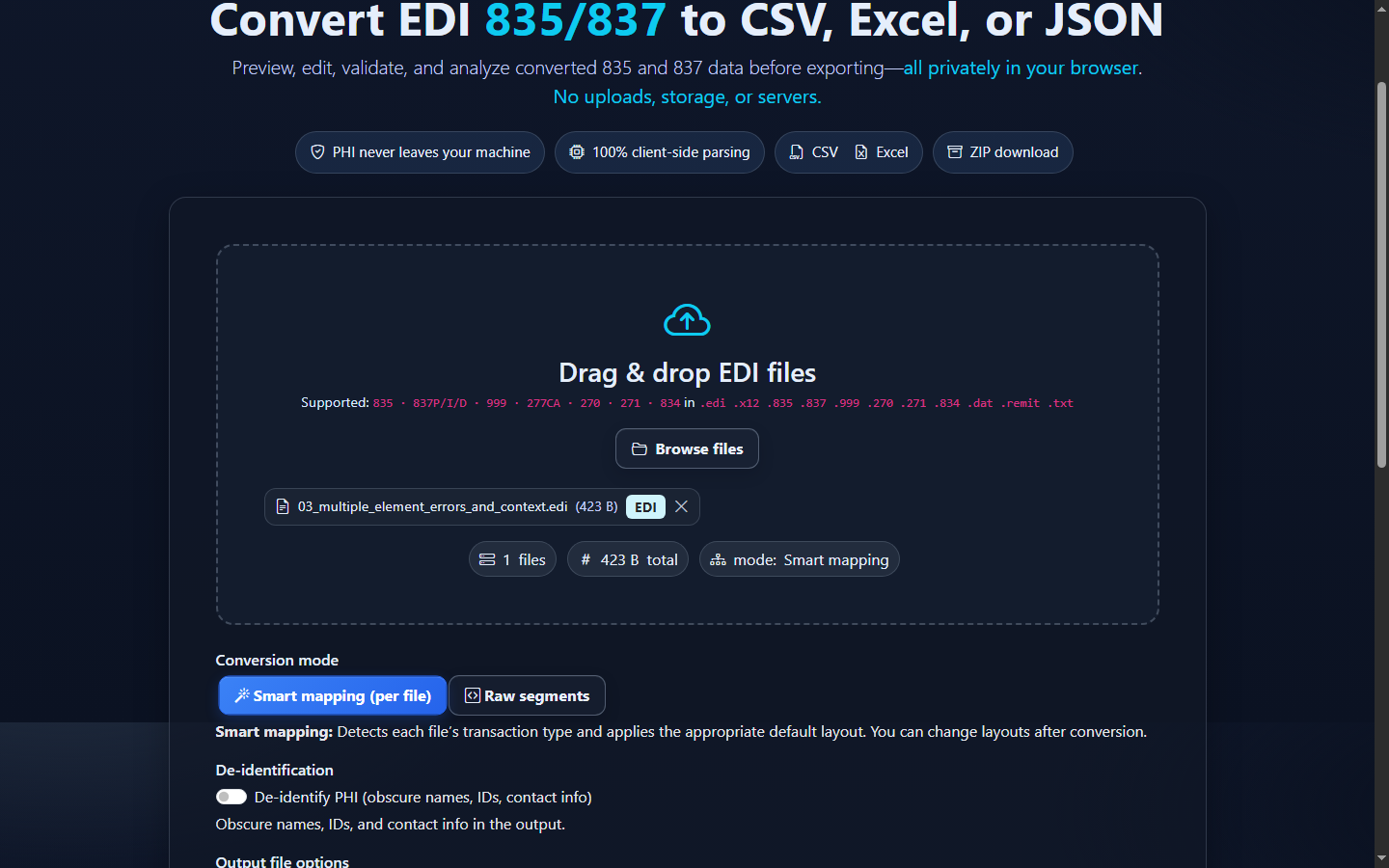
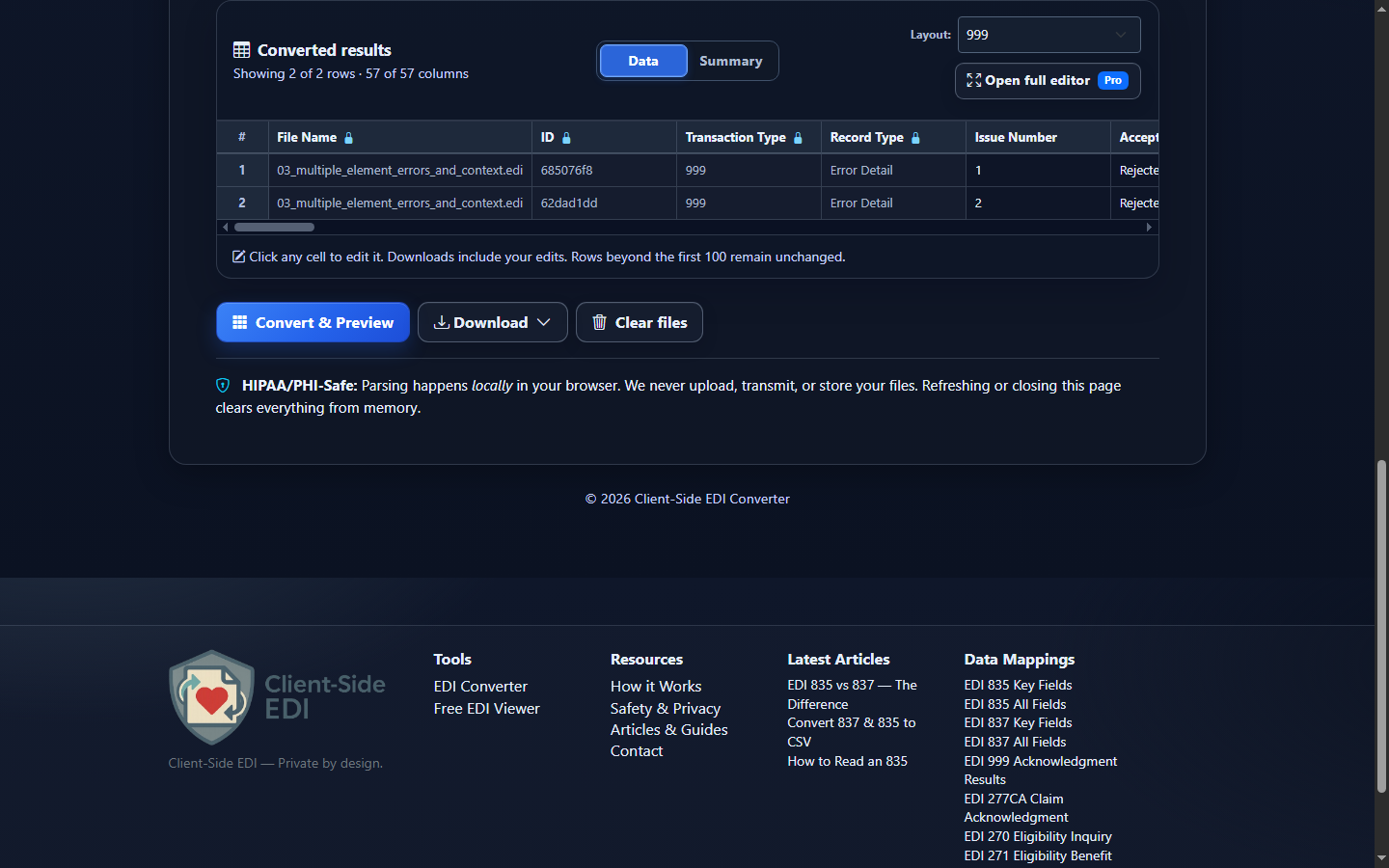
- Review the mapped result. Converted results separates transaction results from error details. Use the Summary or Full Analysis view for acknowledgment counts and drilldowns, but use converted rows when you need an exportable issue list.
- Download reviewed data. Open Download and choose Excel (.xlsx), CSV (.csv), JSON (.json), or XML (.xml). Data Editor changes flow into the download but do not rewrite the source 999 or repair the acknowledged file.
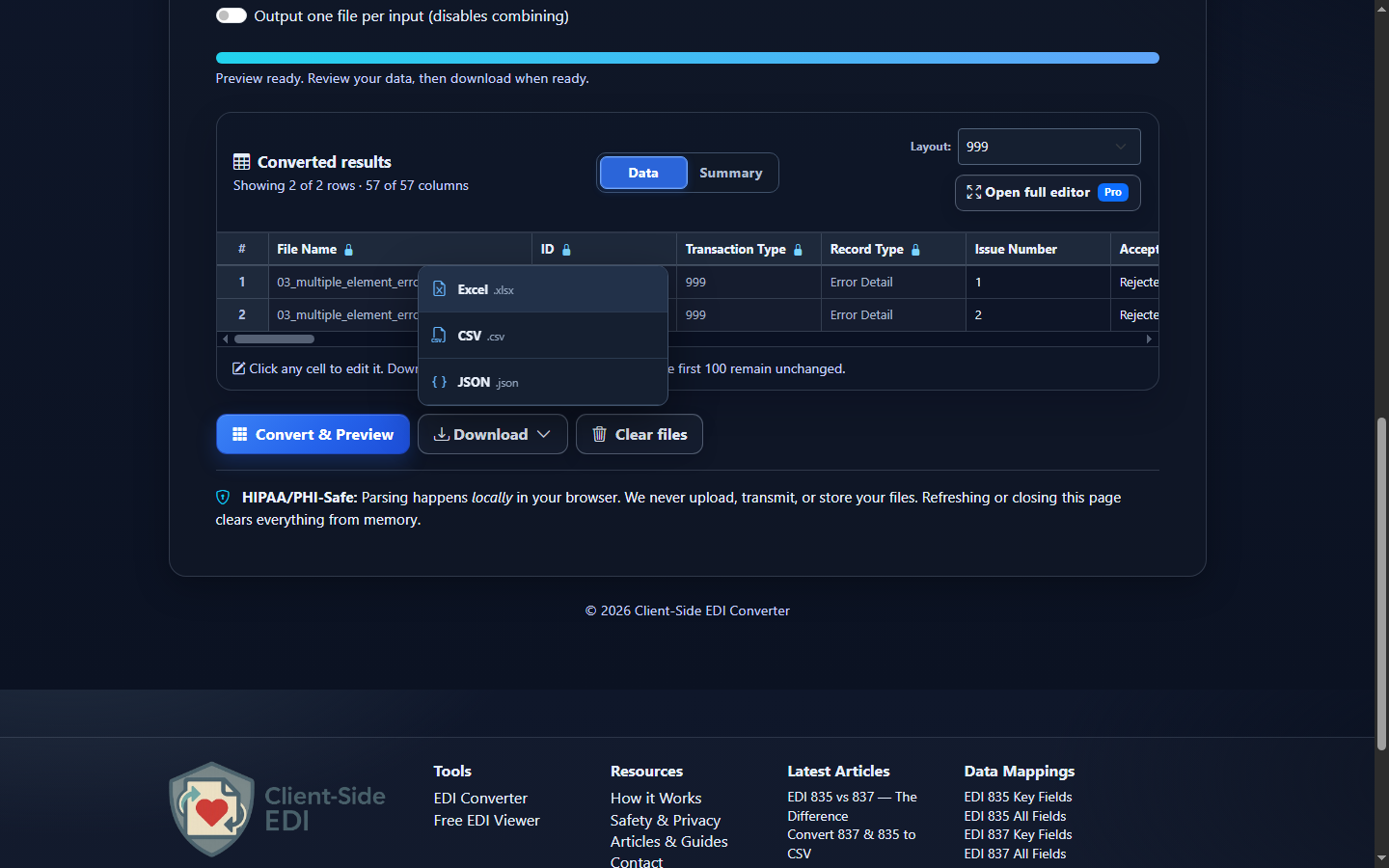
Choose CSV, Excel, JSON, or XML
| Format | Best fit | Watch for |
|---|---|---|
| CSV | Issue queues, reconciliation, database loads, and command-line analysis. | Import control numbers and bad values as text. |
| Excel | Operations review, filters, assignment, and annotated follow-up. | Spreadsheet inference can remove leading zeroes. |
| JSON | Automation, APIs, and programmatic routing by acceptance or error level. | Mapped row JSON is not a lossless reconstruction of the X12 hierarchy. |
| XML | Structured row XML for integrations. It serializes the same reviewed Smart Mapping or Raw rows; it is not a native X12 hierarchy, an implementation-guide XML schema, or a lossless X12 round trip. | |
Interpret acknowledgment rows without losing scope
Use the original functional identifier and group control number together with the original transaction set ID and transaction control number. An interchange can contain multiple groups, and a group can contain multiple acknowledged transactions. The 999’s own ST02 control number identifies the acknowledgment—not the original transaction.
Read the hierarchy from broad to narrow: AK9 group result, IK5 transaction result, IK3 segment location, IK4 element or component location, then CTX context. A rejected group without AK2 detail does not identify a specific rejected transaction. Conversely, several error-detail rows can belong to one rejected transaction and must not be counted as several transactions.
The public EDI 999 acknowledgment-results data map documents the available output fields and their sources. Preserve error codes alongside their displayed descriptions because a trading partner’s companion guide may add operational instructions that are outside the base acknowledgment.
Common 999 conversion and review mistakes
Treating every output row as a separate transaction
What you see: one rejected AK2 appears several times. Why it matters: IK3 and IK4 findings create distinct error-detail rows. Review: original transaction control number and issue number. Correction: count distinct acknowledged transaction keys, then count error rows separately.
Confusing AK9 with IK5
What you see: a partially accepted group is labeled as the result for every transaction. Review: Group Acknowledgment Code versus Transaction Acknowledgment Code. Correction: retain both scopes; label AK9 counts as source-reported and keep them independent from detailed AK2 occurrences.
Losing the IK3/IK4 relationship
What you see: “invalid code value” has no segment or loop. Review: Segment ID, Segment Position, Loop ID, Element Position, Component Position, and Bad Data Value. Correction: keep these columns together and consult the applicable implementation guide and companion guide.
Dropping leading zeroes from control numbers
What you see: 000201 becomes 201 in Excel. Correction: import control-number columns as text and compare their string values to the submitted transaction.
Assuming a 999 identifies every business error
What you see: an accepted 999 is treated as complete downstream approval. Correction: use the 999 for syntax and implementation acknowledgment, then review the appropriate business acknowledgment or adjudication response separately.
Editing the export as if it repaired the source
What you see: a changed description or bad value in Data Editor is expected to resubmit automatically. Correction: edits change converted output only; correct the originating transaction in its source system and follow the trading partner’s resubmission process.
Frequently asked questions
What does one converted EDI 999 row represent?
A row represents an acknowledged transaction result, a detailed implementation error, or a group-level result when no AK2 detail exists.
Does an accepted 999 mean a claim will be paid?
No. It reports syntax and implementation-guide acknowledgment, not adjudication or payment.
Can EDI 999 files be exported to JSON, CSV, Excel, or XML?
Yes. The mapped acknowledgment-result rows can be downloaded as JSON, CSV, Excel, or XML.
Why can one acknowledged transaction produce several rows?
Each IK3 segment finding and associated IK4 element finding may need its own exportable error-detail row.
Can a 999 acknowledge something other than an 837?
Yes. A 999 can acknowledge supported X12 transaction sets such as 270, 834, or 835; inspect AK1 and AK2 rather than assuming the original type.
Does editing converted output change the source 999?
No. Data Editor changes affect the export, not the original EDI file or the transaction being acknowledged.